Chapter 8
48
Using the Timers List
USING THE TIMERS LIST
Use the Timers List to:
• View the general list of timers.
• Create a Manual timer.
• Edit a timer.
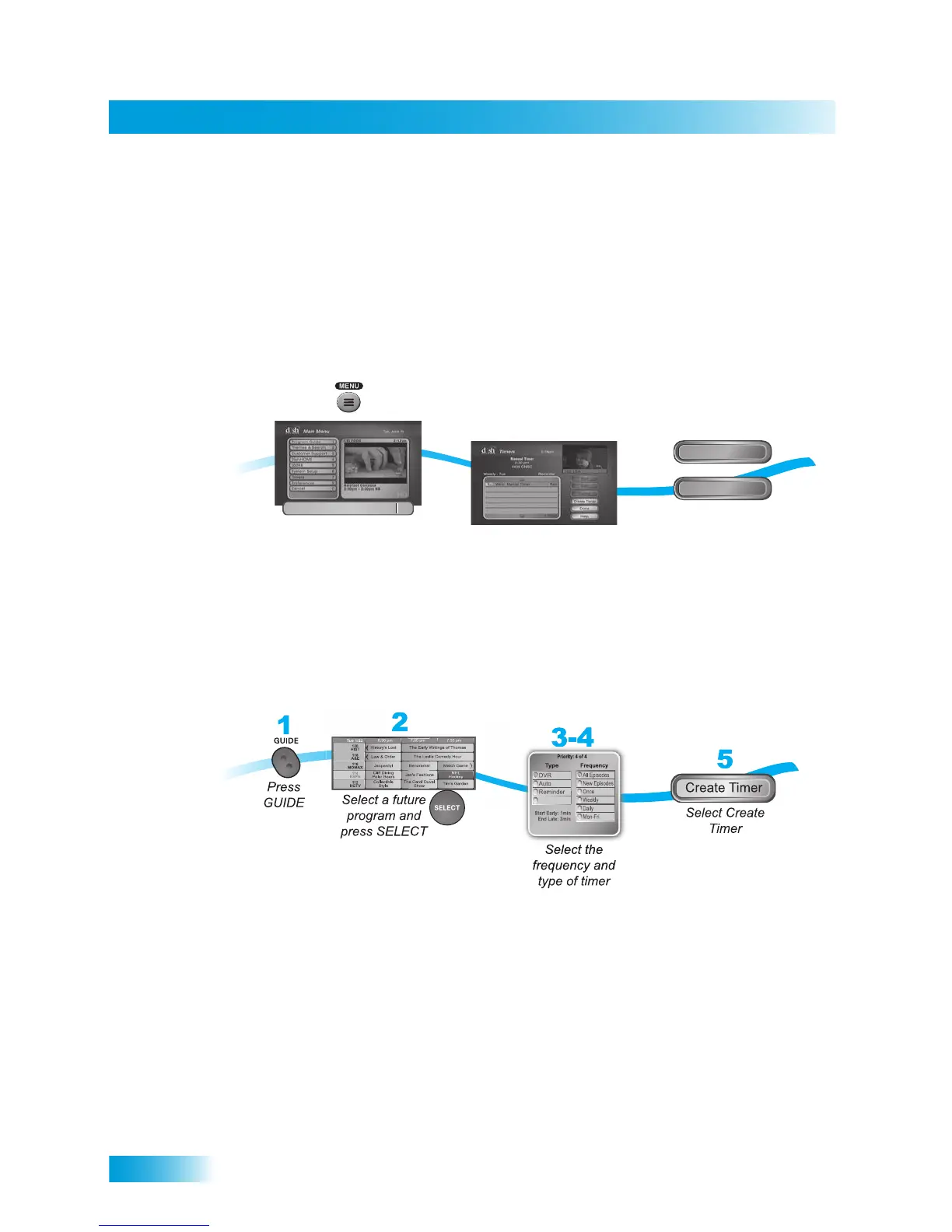
SETTING UP AN AUTOMATIC TIMER
You can create an automatic timer for a future event. The following instructions explain the
simplest way to set up an automatic timer.
1 Find the future program you want to record using the Program Guide or Browse Banner.
The program can be a satellite or over-the-air program.
Note: You may not be able to create automatic timers on all over-the-air channels.
2 Select the future event. The Create Timer screen displays.
3 Select the Timer Frequency.
4 Select a Timer Type.
5 Select Create Timer to finish making the new timer.
Press MENU,
and select Timers
2
Edit
Delete
Select
Delete or Edit
1
Timers
7
or
EXT
Maximum Events For This Timer: All













 To Next Page