Page 9
Remote Control
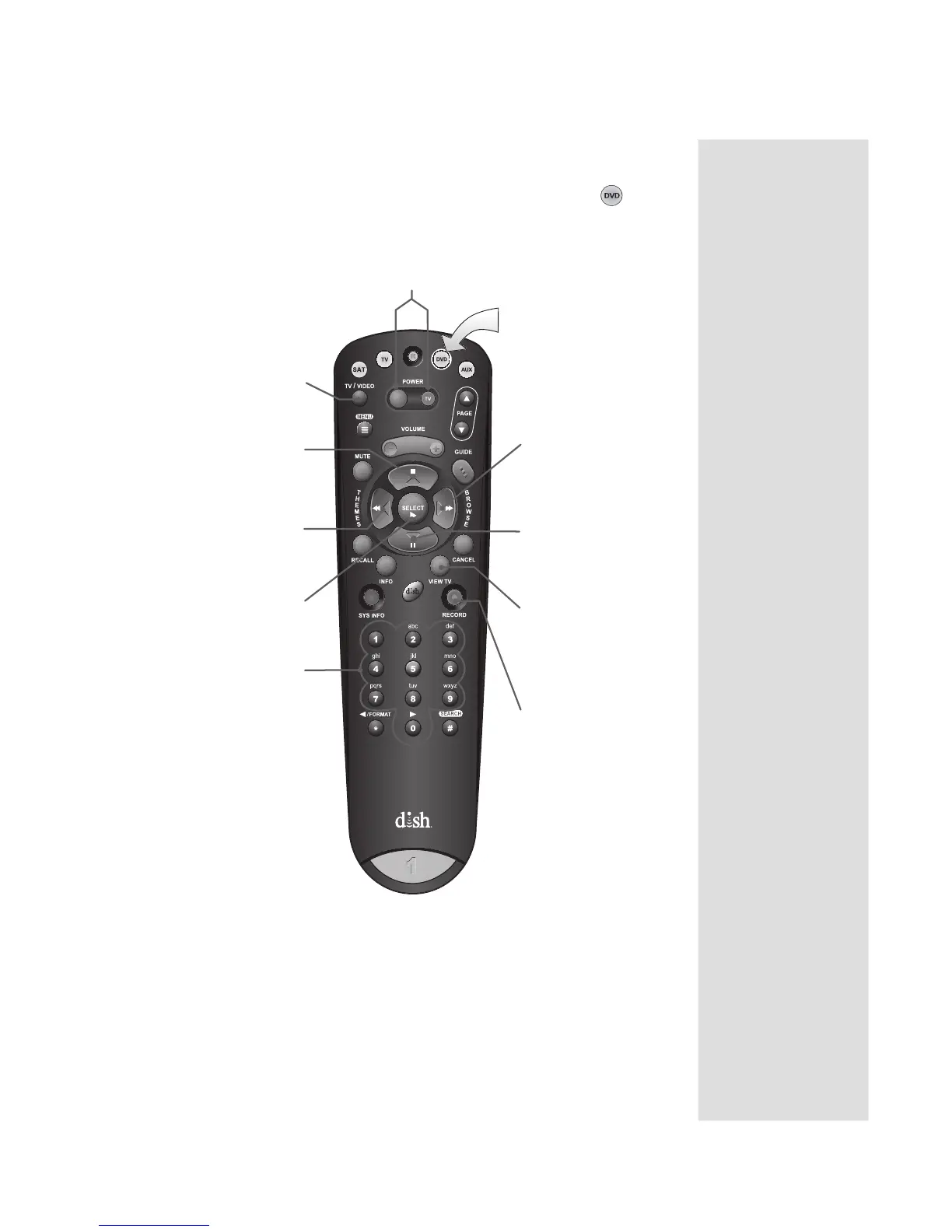
USING THE REMOTE CONTROL IN DVD MODE
Press this button
for DVD Mode
Power & TV Power
Left button turns the DVD/VCR/BD on/off
Right button turns the TV on/off
TV/Video
Switches DVD between
its TV & DVD mode
Stop
Stop playing or
recording a videotape,
stop playing a DVD
Themes/Back
Rewind a videotape or
reverses a DVD
Play
Play a videotape or DVD
Number Buttons
Use to get specific
chapters on the DVD;
the function of remote
number buttons
depends on the device
Browse/Fast Forward
Fast forward through a
videotape or DVD
Pause
Pause a videotape or DVD
Pressing again restarts th
videotape or DVD
Record
Records a program
onto a videotape
To use the features as described in this section, make
sure you are in DVD mode by pressing the DVD Mode button.
You can use this mode to operate your VCR or BD player instead of a DVD player.
Be sure to program the remote to control your
DVD, VCR, or BD player as described on page 11.
View TV
For VCR/DVD
combinations only
Switch between VCR
and DVD functions











 To Next Page