Subnetwork Installation Guidelines
Network Guide 87
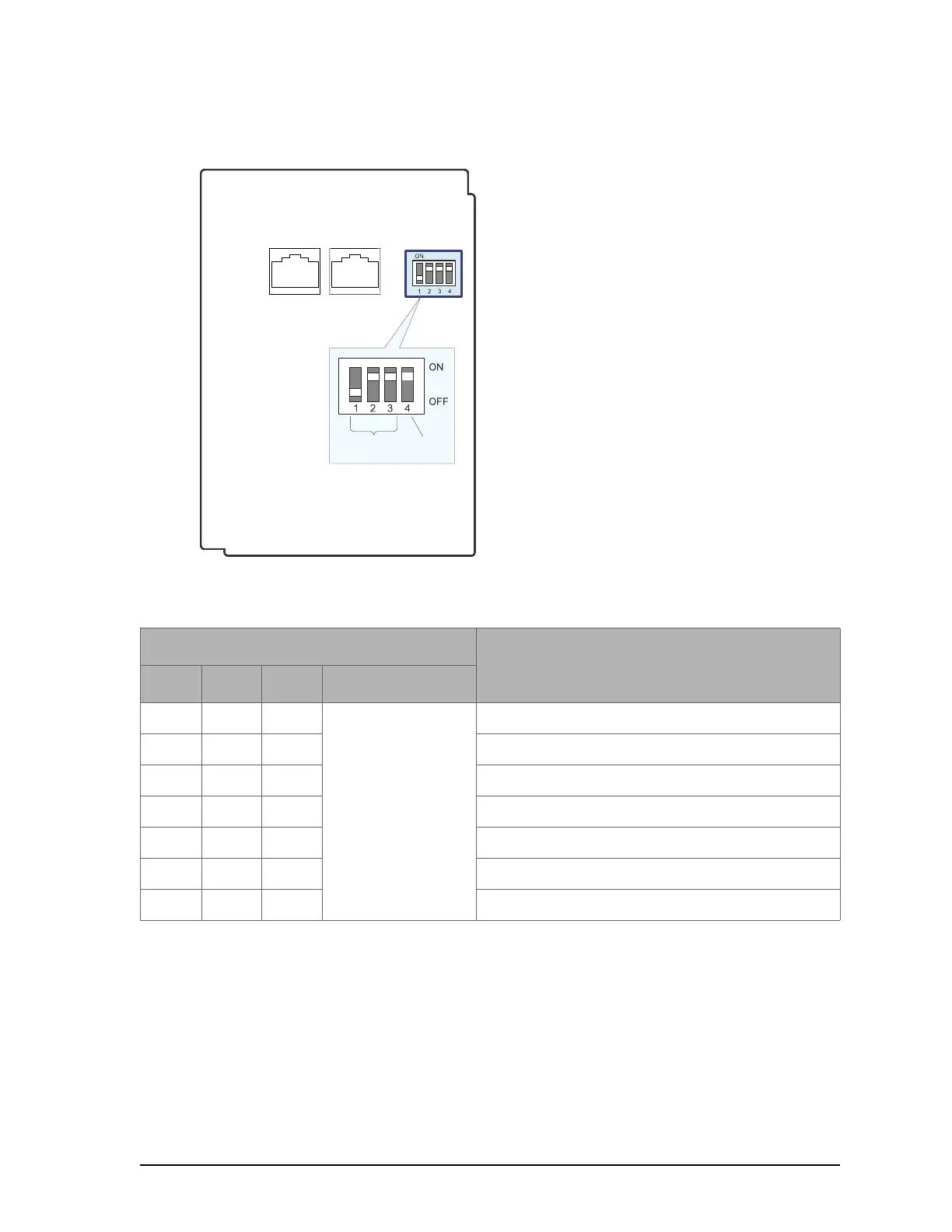
Figure 55: Setting the Allure EC-Smart-Air or EC-Smart-Comfort communicating sensor’s Subnet ID
Address
Figure 55 shows an example of how to set the Allure EC-Smart-Air or EC-Smart-Comfort com-
municating sensor's Subnet ID address DIP switch to 6 and how to set the EOL termination to
ON.
Allure EC-Smart-Comfort / EC-Smart-Air
Front Cover, Interior View
S e t th e S u bnet
ID A dd re s s
EOL
Termination
RJ-45 Subnetwork P ass-
Through Connectors
Table 20: Allure EC-Smart-Air or EC-Smart-Comfort communicating sensor's Subnet ID Address DIP Switch
Settings
Switch Position
Allure EC-Smart-Air or EC-Smart-Comfort
communicating sensor's Subnet ID Address
1 2 3 4
OFF OFF OFF OFF: EOL disabled
ON: EOL enabled
1
ON OFF OFF 1
OFF ON OFF 2
ON ON OFF 3
OFF OFF ON 4
ON OFF ON 5
OFF ON ON 6


 To Next Page
 Loading...