1592022760 Quick reference guide iCHILL 200CX EVO rel. 1.0 14/40
2. Push SET key and the top display shows “0” blinking
3. Push UP or DOWN to select Pr1 password
4. Push SET and, if the value is correct, the top display shows the first family of parameters “ALL”
5. Push UP or DOWN to select the parameter family
6. Push SET to enter; the bottom display shows the first available parameter while the top display
shows its value.
7. Push UP or DOWN to modify its value
8. Push SET to confirm the new value
9. If necessary modify others parameter
10. Push SET + UP keys together to exit parameters programming
10.2 ENTER THE PROGRAMMING LEVEL PR2
Enter the Pr2 “service level”:
1. Push SET + DOWN keys together for 3 seconds. The top display shows “PAS” and the bottom
display shows “Pr1”
2. Push UP key for 2 seconds and the top display will show Pr2
3. Push SET key and the top display shows “0” blinking
4. Push UP or DOWN to select Pr2 password
5. Push SET and, if the value is correct, the top display shows the first family of parameters “ALL”
6. Push UP or DOWN to select the parameter family
7. Push SET to enter, the bottom display shows the first available parameter label while the top
display shows its value
8. Push UP or DOWN to modify its value
9. Push SET to confirm the new value
10. If necessary modify others parameter
11. Push SET + UP keys together to exit parameters programming
10.3 ENTER THE PROGRAMMING LEVEL PR3
Enter Pr3 “OEM level ”:
1. Push SET + DOWN keys together for 3 seconds. The top display shows PAS and the bottom
display shows Pr1
2. Push UP key for 2 seconds and the top display shows Pr2
3. Push UP key again for 2 seconds and the top display will show Pr3
4. Push SET key and the top display shows “0” blinking
5. Push UP or DOWN to select Pr3 password
6. Push SET and, if the value is correct, the top display shows the first family of parameters “ALL”
7. Push UP or DOWN to select the parameter family
8. Push SET to enter; the bottom display shows the first available parameter label while the top
display shows its value
9. Push UP or DOWN to modify its value
10. Push SET to confirm the new value
11. If necessary modify others parameter
12. Push SET + UP keys together to exit parameters programming
11 MENU ( MENU KEY)
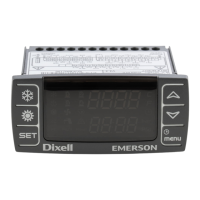
Enter the menu:
• press the menu button;


 To Next Page
 Loading...