4 Advanced Features
4.1 Multifunctional Module
• The Osmo Mobile 7P combo includes Multifunctional Module and
accompanying accessories. For Osmo Mobile 7, the module and accessories are
sold separately.
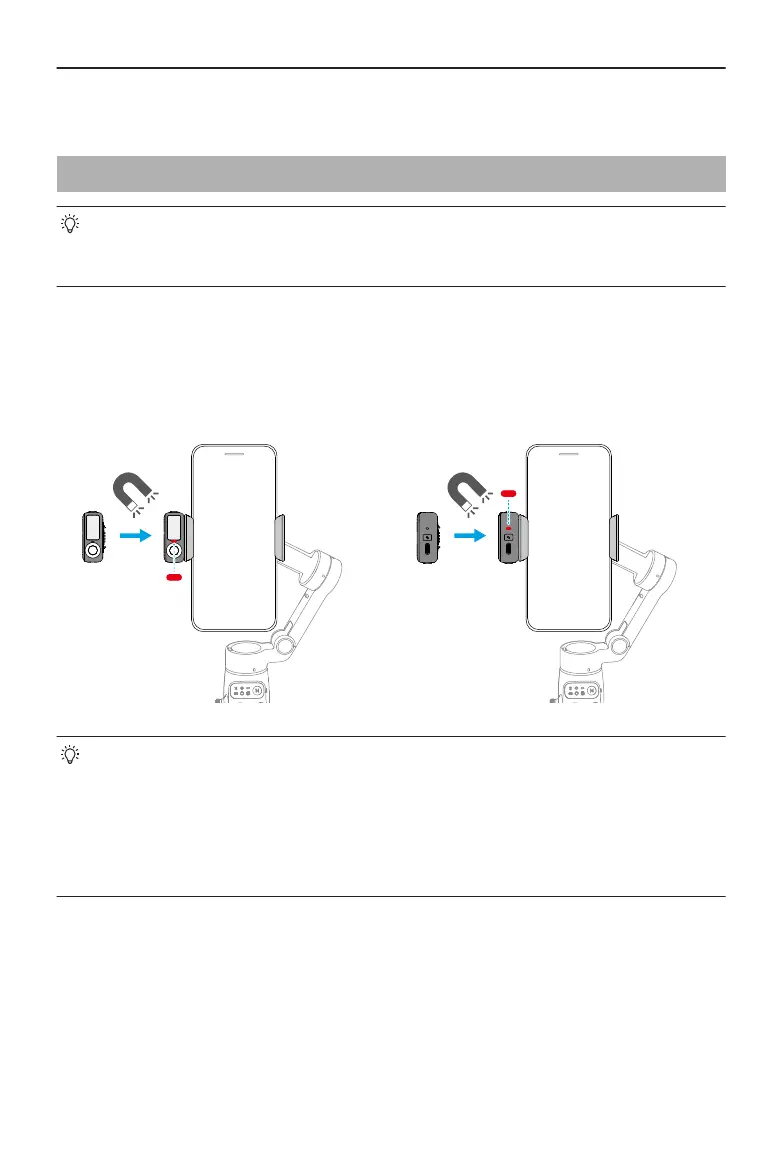
Installing and Removing
Example ①
Capture photos or videos of yourself
Example ②
Capture photos or videos of others
• If the indicator shown in the preceding gure does not turn on after
Multifunctional Module is installed, check whether the marks on the gimbal and
the phone clamp are aligned.
• If Multifunctional Module is idle for more than ve minutes, it automatically
enters sleep mode and the indicator turns o. To exit sleep mode, press the
trigger on the gimbal.
Osmo Mobile 7 / 7P User Manual
20 © 2025 DJI All Rights Reserved.


 To Next Page