• Method 1: Use the joystick.
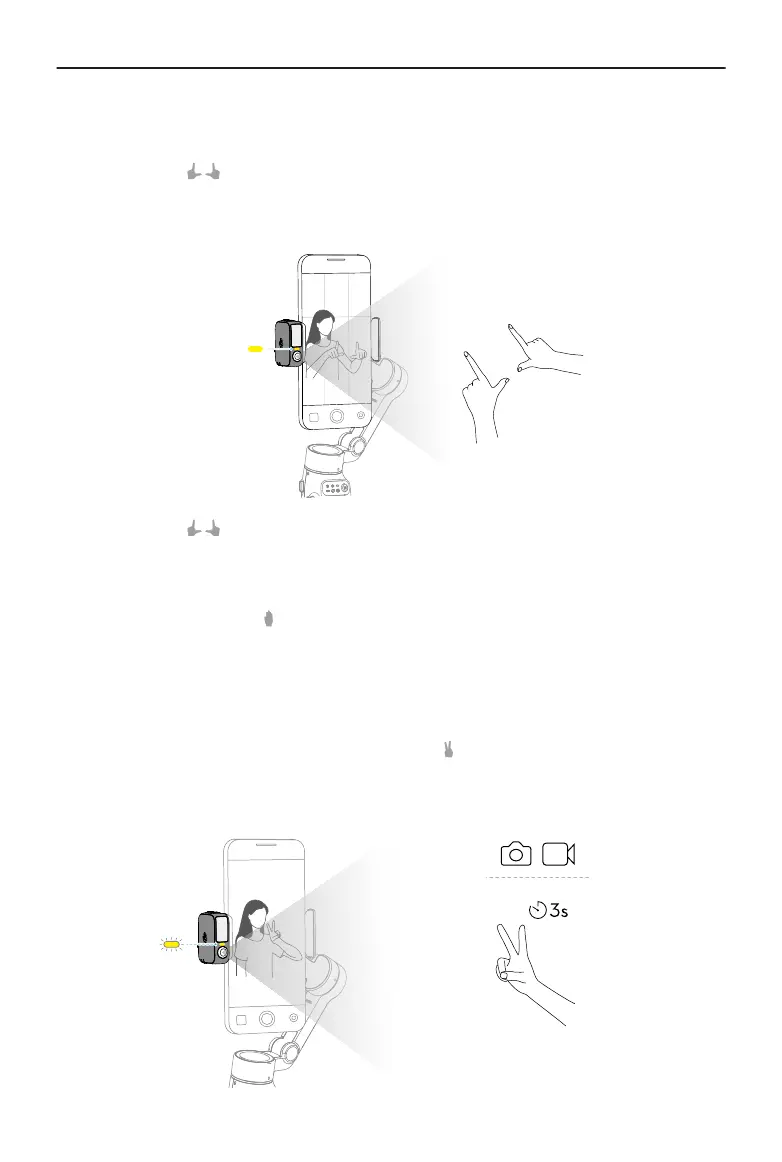
• Method 2: Use hand gestures.
Show the gesture to the camera. The indicator turns solid yellow and tracking
is automatically paused. The subject can move to the desired position in the
frame.
Show the gesture again to conrm the composition. The indicator turns solid
green and tracking automatically resumes.
To restore the default composition for each method, press the trigger twice.
4. Stop tracking: Show the
gesture or press the trigger again. The indicator turns solid
red.
Shooting
Whether tracking is enabled or not, you can use the gesture to start a countdown
for taking a photo or starting/stopping recording. The indicator pulses yellow during the
countdown.
Osmo Mobile 7 / 7P User Manual
© 2025 DJI All Rights Reserved. 23


 To Next Page