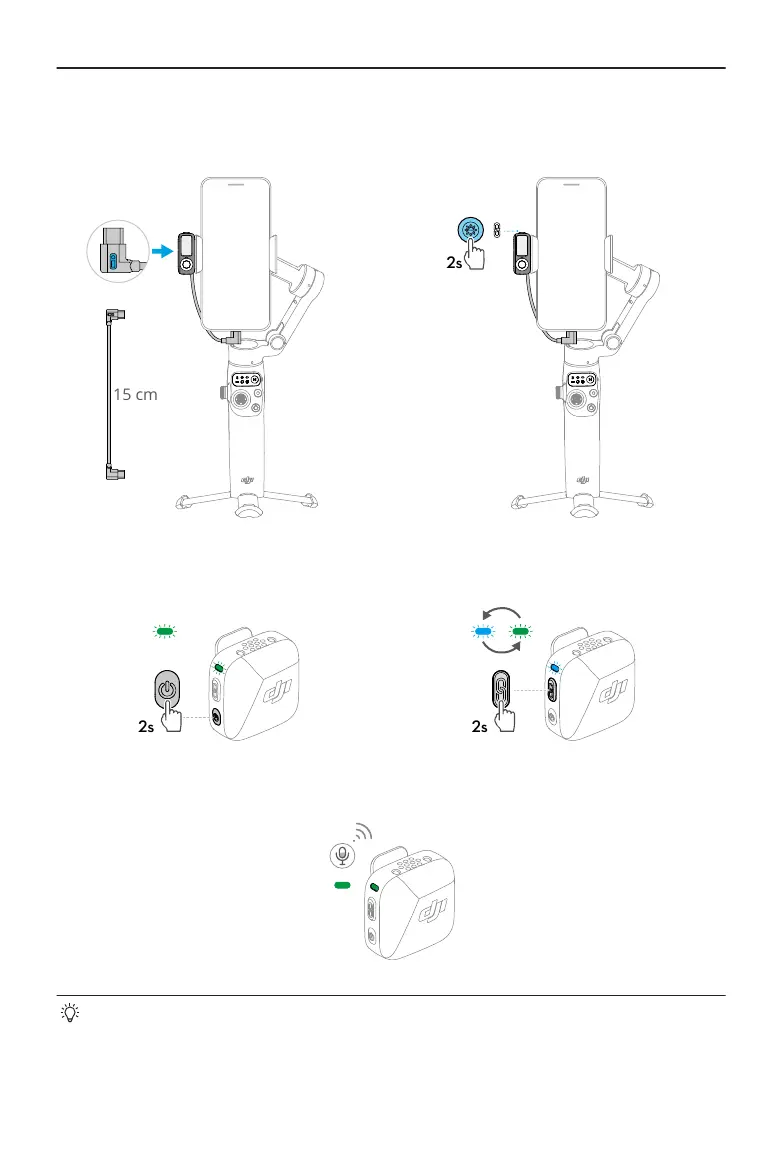
1. Connect Multifunctional Module to the
phone.
2. Enable Bluetooth pairing for Multifunc-
tional Module.
3. Power on the transmitter. 4. Enable Bluetooth pairing for the trans-
mitter.
5. Once paired, both indicators of Multifunctional Module and the transmitter turn solid
green. You can start recording.
• To prevent the cable connecting Multifunctional Module and the phone from
obstructing the gimbal, bend the cable as needed.
• For iPhone 14 and earlier models, a USB-C to Lightning cable (sold separately) is
required to connect to Multifunctional Module.
Osmo Mobile 7 / 7P User Manual
26 © 2025 DJI All Rights Reserved.


 To Next Page