ROBOMASTER Development Board Type C
User Manual
8
© 2020 DJI All Rights Reserved.
The relationship between the STM32 boot method and BOOT conguration is shown below.
Boot Mode Selection Pins
Boot Mode Aliasing
BOOT1 BOOT0
X 0 User Flash memory User Flash memory is selected as the boot space
0 1 System memory System memory is selected as the boot space
1 1 Embedded SRAM Embedded SRAM is selected as the boot space
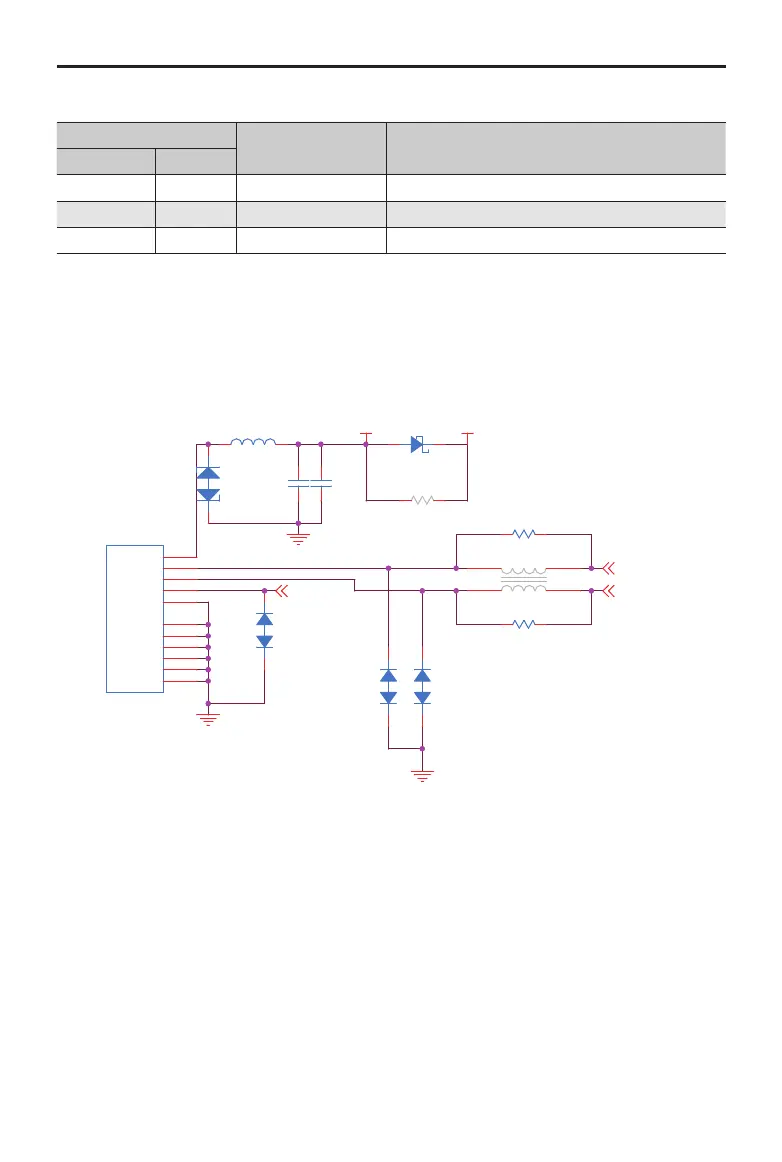
Micro USB Port
A full-speed USB port is integrated in the Board Type C and can be used for USB communication with
other devices while also meeting USB 2.0 protocol specications. In primary mode, it supports full-
speed (FS, 12 Mbps) and low-speed (LS, 1.5 Mbps) transceivers. In secondary mode, only full-speed
(FS, 12 Mbps) transceivers are supported.
VCC5V_USB VCC_5V
USB_DM [4]
USB_DP [4]
USB_OTG [4]
C861uF
0402
D6
DSS34
3A
A C
L6
0603 1.4A
L12
NC
1 2
34
D9
PESD5V0F1BL
C A
R65
0.0R0402
D8
PESD5V0F1BL
C A
D7
PESD12VV1BL
A
C
J7
1.0A
VBUS
1
DM
2
DP
3
ID
4
GND
5
SHELL1
6
SHELL2
7
SHELL3
8
SHELL4
9
SHELL5
10
SHELL6
11
R211 0.0R
0603NC
D35
PESD5V0F1BL
C
A
R58
0.0R0402
C85100nF
0402
The USB port can be used to supply power for a Board Type C (only STM32 and some onboard
external devices can be driven by the USB port*) and download rmware in DFU mode with BOOT
conguration. Follow the steps below to download Board Type C rmware in DFU mode.
1. Set the level status of BOOT0 as high and BOOT1 as low using jumpers.
2. Connect the Board Type C to a computer using the USB cable.
3. Press the RST button to reset the Board Type C and enter DFU mode.
4. Convert the BIN le to a DFU le using the DFU File Manager.
5. Download the DFU le to the Board Type C using DfuSe Demo.
* USBpowersupplyisforpowernetworkVCC_5Vonly.OnboarddeviceslikethePWMexternalportpoweredby
powernetworkVCC_5V_Marenotsupported.


 To Next Page