Dai Nippon Printing Co., Ltd.
[DP-DS620/DP-DS620 (A) Printer Driver] User’s Manual (For Windows 7, 8)
C
C
h
h
a
a
p
p
t
t
e
e
r
r
2
2
P
P
r
r
o
o
p
p
e
e
r
r
t
t
i
i
e
e
s
s
You can configure various printer settings from the Properties of the DP-DS620 driver. Make sure you understand the
contents well before changing settings. To use the properties, log in as an administrator. Depending on the application
you are using, you must perform this operation from the print settings of the application.
2
2
.
.
1
1
O
O
p
p
e
e
n
n
t
t
h
h
e
e
p
p
r
r
i
i
n
n
t
t
e
e
r
r
p
p
r
r
o
o
p
p
e
e
r
r
t
t
i
i
e
e
s
s
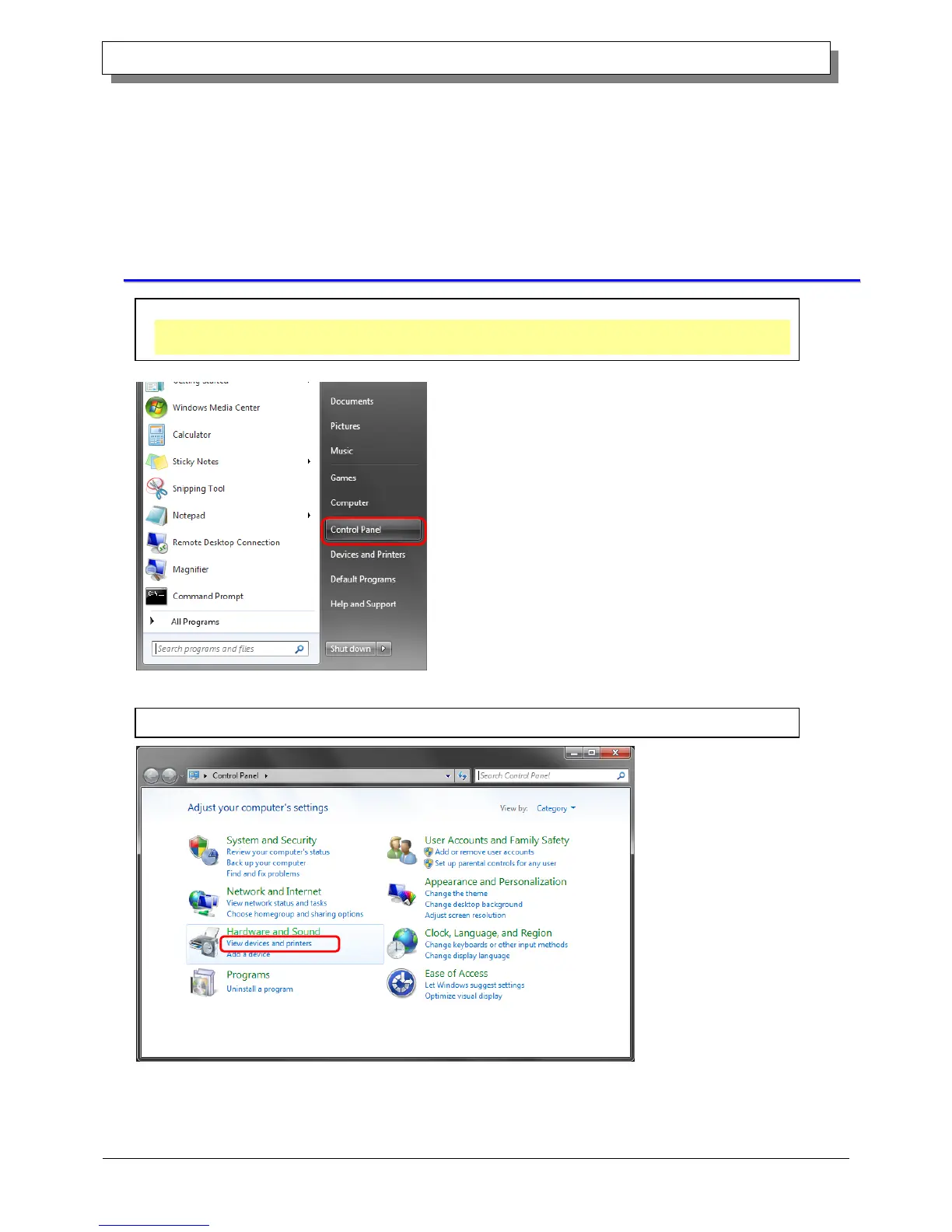
2. From the Control Panel, click "View devices and printers" to open the Devices and Printers screen.
1. Click "Start", and then click "Control Panel" to open the Control Panel.
In Windows 8, right click the Start screen, click "All Apps", and then click "Control Panel" to open the Control
Panel.



 To Next Page