Operation Section
55
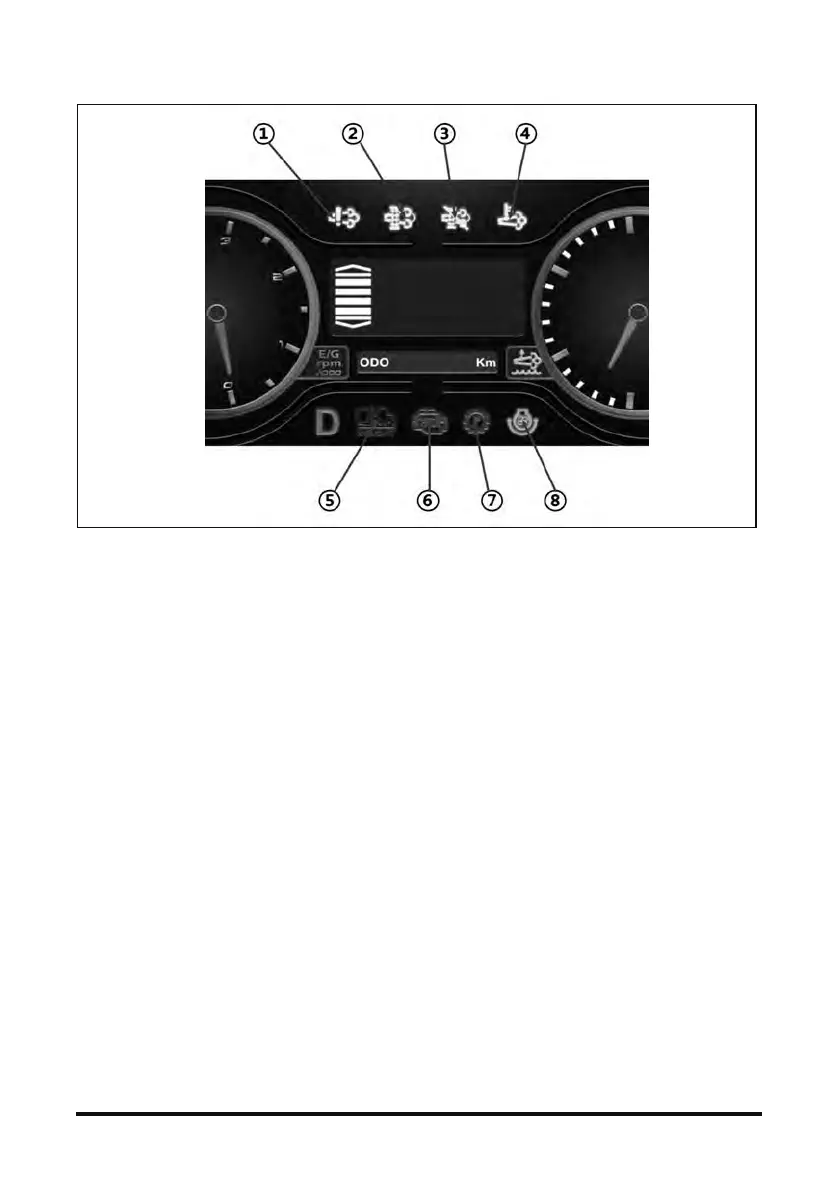
1. DEF/Ad-Blue FAULT WARNING
- If the lamp is turned on, after-treatment
system should be checked.
- Refer page. 85 (Section “Detecting control
failure)
2. SCR Cleaning-DeSOx Request / On
- In order that the SCR system may maintain its
exhaust cleaning efficiency at a proper level, it
should be periodically initialized - “SCR
cleaning.”
Once the indicator lamp lights up, you should
conduct the SCR cleaning process. During
this process you can't use the vehicle.
- Pop-up window and the lamp will be turned on
10 hours before if “Service SCR
Cleaning-DeSOx” needed.
- “Service SCR Cleaning-DeSOx” will take
about 30 minutes; the lamp will blink during
the process.
- Press the “SCR Cleaning-DeSOx” switch
continuously for 3 sec, SCR cleaning will be
started. For detailed instructions refer to p.72.
3. SCR Cleaning-DeSOx Inhibition
- When the symbol is turned on and “Active
SCR Cleaning-DeSOx” is inhibited by
pressing the inhibition switch. In places where
there is a risk of fire or explosion, to prevent
fire or explosion caused by flammable
substances or particles inhibition switch
should be used.
4. High Exhaust System Temperature (HEST)
- While SCR Cleaning-DeSOx for
after-treatment, the temperature of exhaust
gas will increase over 600℃. If this lamp on,
operator should warn passengers around the
truck not to approach or touch exhaust system
especially rear side. And if the place of your
truck has flammable material (Gas, Particle
etc.) please replace truck to other safety zone.
5. Weight Scale Mode
- Press “MODE” once, Display will change to
weight scale mode, for detailed instructions,
refer to page 61.
6. Engine Check Lamp (RED)
- Malfunction or necessary for diagnostic of
engine, this lamp will light on.
- To check error, press “MODE” 3 seconds,
display will converse to main menu then you
can use check function. For detailed
instructions refer to p.85.
7. Transmission Check Lamp (RED)
- Malfunction or necessary for diagnostic of
transmission, this lamp will light on.
- To check error, press “MODE” 3 seconds,
display will converse to main menu then you
can use check function. For detailed
instructions refer to p.69.
8. Fan Reverse (For D100 Model)



 To Next Page