Operation Section
56
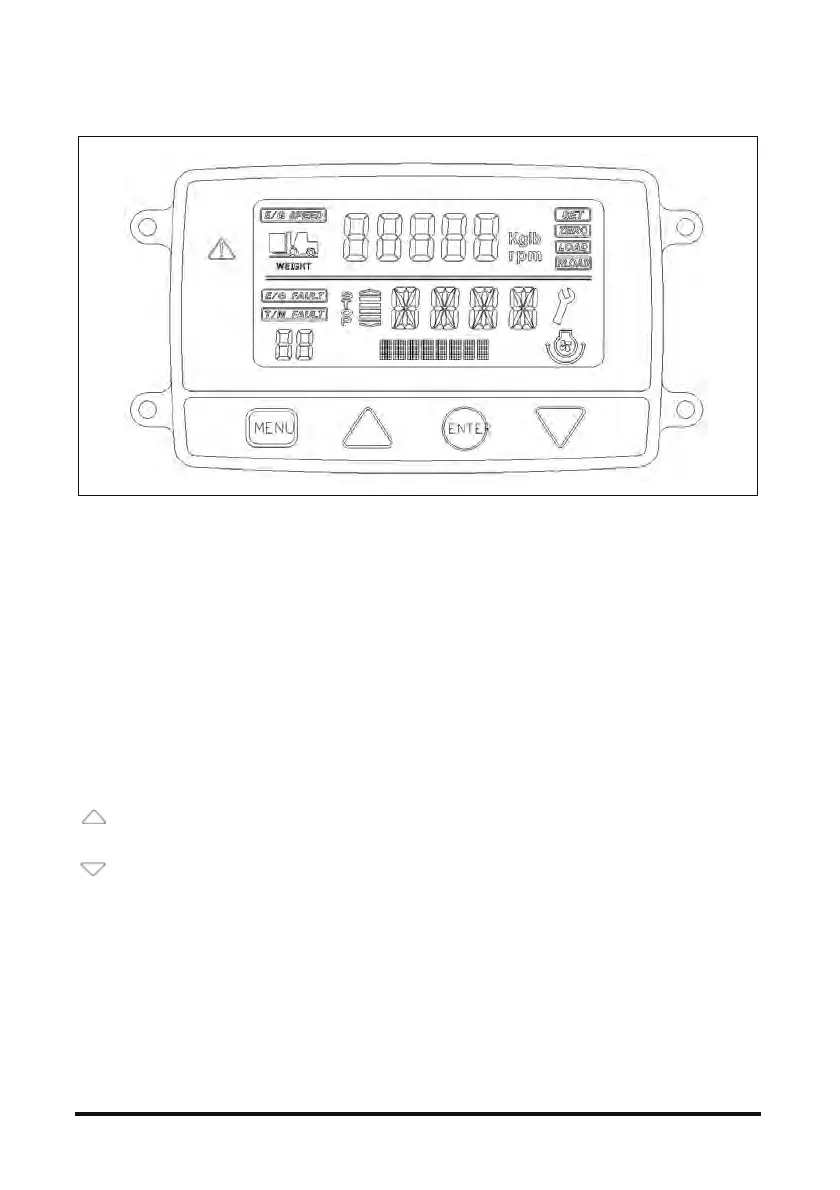
LCD Instrument Panel (Option) - (Diesel 55kW Only)
1. Mode (Function) Configuration
- Engine RPM mode
- Transmission information display mode
- Weight scale (load) display mode
- Transmission error (TCU FAULT) display mode
- Engine error (ECU FAULT) display mode
2. Operation Method
The initial screen at start-up shows engine RPM
and transmission information. The upper column
shows engine RPM and weigh scale, and the
lower column shows transmission information,
transmission error and engine error.
1) How to change modes
Pressing the ‘UP’ button switches engine
RPM and weight scale.
Pressing the ‘DOWN’ button switches;
transmission information engine error
transmission error
2) Weight scale operation
(1) Initial setting
Weight scale requires initial setting for operation.
Perform setting under no-load, load (of known
weight), and max. load conditions.
- How to change weight scale
Press MENU button for 2 seconds to light up the
SET and ZERO at the top right screen. Then,
press MENU button for 3 times to blink the
current weight scale. Change the scale (unit)
with UP and DOWN buttons, and press ENTER
for 1 second to save the setting.
- No-load (zero) setting
Press MENU button for 2 seconds to light up the
SET and ZERO at the top right screen. When
‘----‘ blinks in the figure display field, enter ‘0’
using UP and DOWN buttons. After entering the
weight, press ENTER for 1 second to save the
setting (ZERO blinks for 3 seconds).
- Setting in loaded condition
Press ‘MENU’ button for 2 seconds to light up
the SET and ZERO at the top right screen. Then,
press MENU button again to light up the SET
and LOAD. When ‘----‘ blinks in the figure display
field, enter the weight of the load using UP and
DOWN buttons. After entering the weight, press
ENTER for 1 second to save the setting (SET
and LOAD blink for 3 seconds).
- Setting in max. load condition
Press ‘MENU’ button for 2 seconds to light up
the SET and ZERO at the top right screen. Then,
press MENU button twice to light up the SET
and RLOAD. When ‘----‘ blinks in the figure
display field, enter the weight of the load using
UP and DOWN buttons. After entering the



 To Next Page