30
Icon
Details
Generator and mains voltage instrumenta-
tion (DSE6020 MKII only)
Generator instrumentation
Mains instrumentation (DSE6020 MKII only)
Engine instrumentation
VIEWING THE INSTRUMENT PAGES
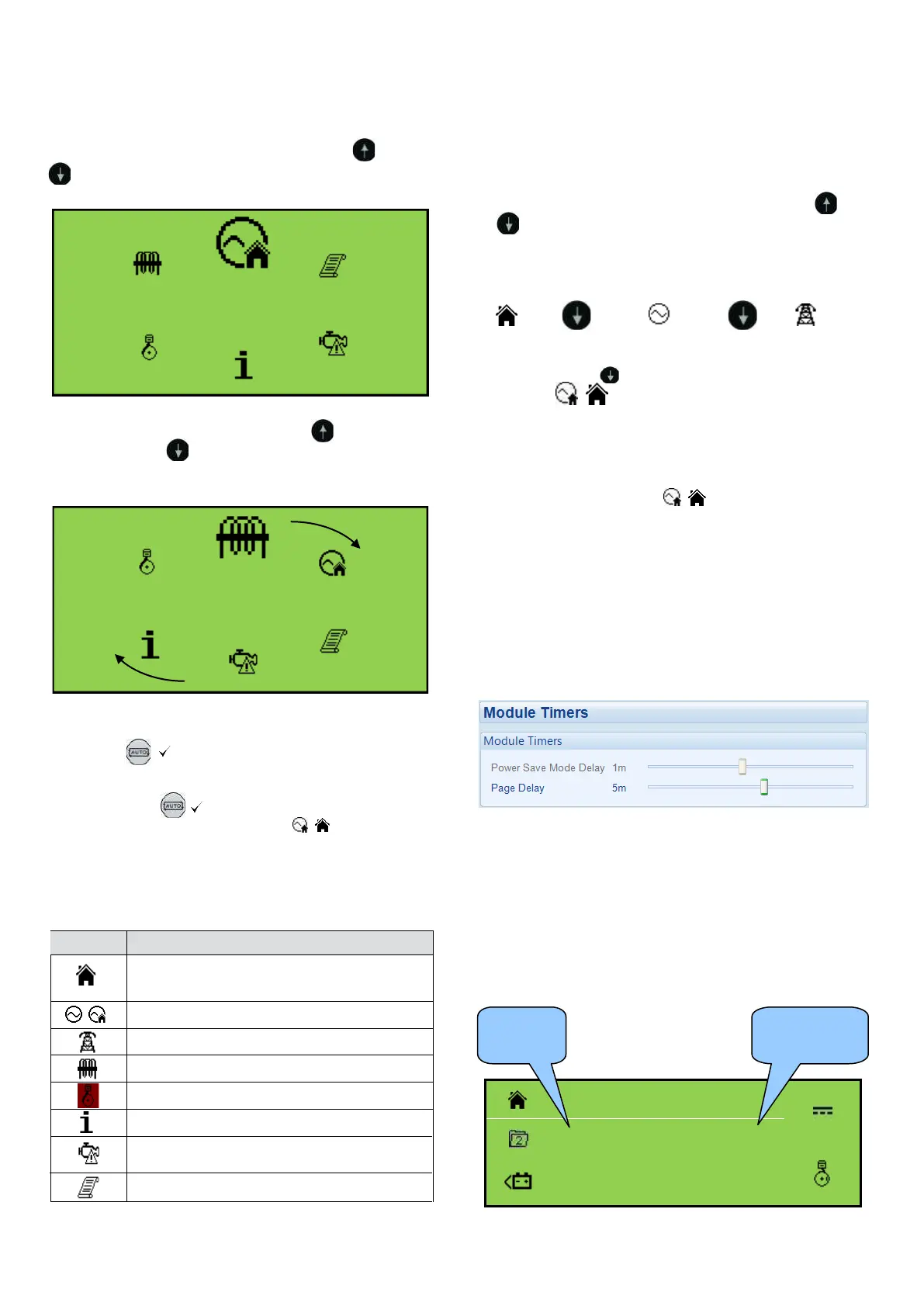
To enter the navigation menu, press both the (up) and
(down) buttons simultaneously.
Navigation Menu
Current and load instrumentation
Module information
Engine DTCs (Diagnostic Trouble Codes) if
active
Event Log
1. Navigation Menu Icons
To select the required icon, press the (up) button to
cycle right or the (down) button to cycle left until the
desired instrumentation section is reached.
Once the desired icon is at the top, press the
Auto Mode ( ) button to enter that instrunmentation
section.
If the Auto Mode ( ) button is not pressed, the display
automatically returns to the Home ( / ) page after the
configured setting of the LCD Scroll Timer.
General Navigation
Note: For further details of module configuration,
refer to DSE Publication: 057-223 DSE60xx
MKII Configuration Software Manual.
It is possible to scroll through the display to view different
pages of information by repeatedly operating the (up)
or (down) naviagation buttons.
Example:
Home
Press
Generator
Press
Mains
/
And so on until the last page is reached. A Further press
of the navigation (down) button returns the display to
the Home ( ) page.
Once selected, the page remains on the LCD display until
the user selects a different page or, after an extended
period of inactivity (Page Delay Timer), the module
reverts back to the Home ( / ) page.
Note: If you want to view one of the instrument
pages towards the end of the list, it may be
quicker to scroll up through the pages rather
than down.
The Page Delay Timer is configurable using the DSE
Configuration Suite Software or by using the Front Panel
Editor.
Home
This is the page that is displayed when no other page has
been selected and is automatically displayed after a
period of inactivity (Page Delay Timer) of the module facia
buttons. It also contains the voltage reading of the gener-
ator and mains that is measured from the module’s
voltage inputs.
V
L1N
V
V
L2N
V
230 V
L3N
230 V
Voltage
Voltage


 To Next Page