37
Depending upon module configuration one or more levels
of engine maintenance alarm may occur based upon a
configurable schedule.
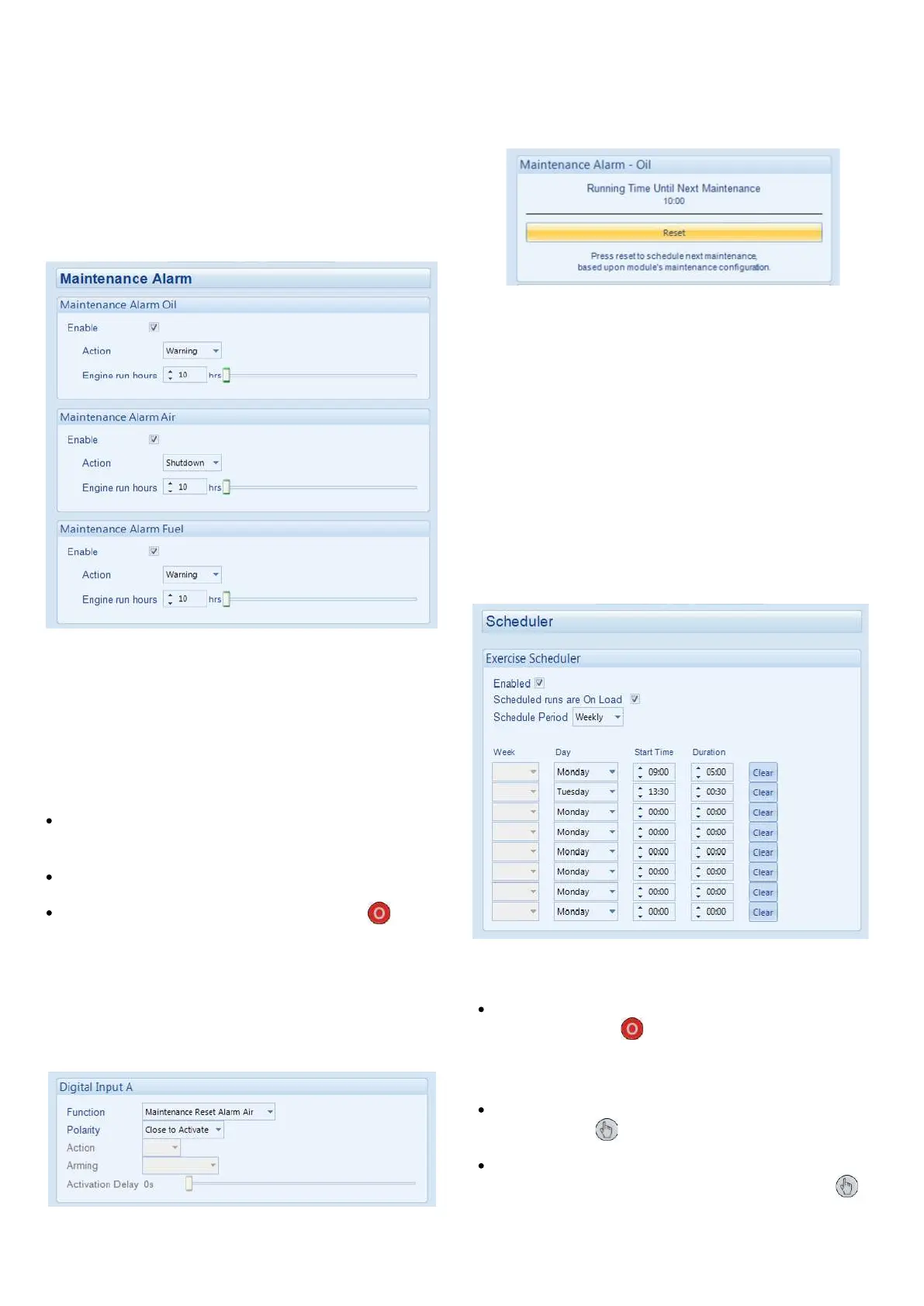
Example 1: Screen capture from DSE Configuration
Suite Software showing the configuration of the Mainte-
nance Alarm for Oil, Air and Fuel.
Stop Mode
When activated, the maintenance alarm can be either a
Warning (set continues to run) or Shutdown (running the
set is not possible).
Resetting the Maintenance Alarm is normally actioned by
the site service engineer after performing the required
maintenance. The method of reset is either by:
MAINTENANCE ALARM
Activating an input that has been configured to Mainte-
nance Reset Alarm x, where x is the type of mainte-
nance alarm (Air, Fuel or Oil).
Pressing the maintenance reset button in the DSE
Configuration Suite, Maintenance section.
Pressing and holding the Stop/Reset Mode button
for 10 seconds on the desired Maintenance Alarm
status page. This can be protected by a PIN number.
Example 2: Screen capture from DSE Configuration Suite
Software showing the configuration of a digital input for
Maintenance Reset Alarm Air.
Example 3: Screen capture from DSE Configuration Suite
Software showing the Maintenance Alarm Reset ‘button’
in the DSE Configuration Suite SCADA | MAINTENANCE
section.
SCHEDULER
The controller contains an inbuilt exercise run scheduler,
capable of automatically starting and stopping the set. Up
to 8 scheduled start/stop sequences can be configured to
repeat on a 7-day or 28-day cycle. Scheduled runs may
be on load or off load depending upon module configura-
tion.
Example: Screen capture from DSE Configuration Suite
Software showing the configuration of the Exercise
Scheduler. In this example the set starts at 09:00 on
Monday and run for 5 hours, then start at 13:30 on Tues-
day and run for 30 minutes.
Scheduled runs do not occur when the module is in
Stop/Reset Mode
Manual Mode
Scheduled runs do not occur when the module is in
Manual Mode waiting for a start request.
Activation of a Scheduled Run ‘On Load’ when the
module is operating OFF LOAD in Manual Mode
forces the set to run ON LOAD.


 To Next Page