72
4
Synchronizing Information and Setting Up E-mail Security
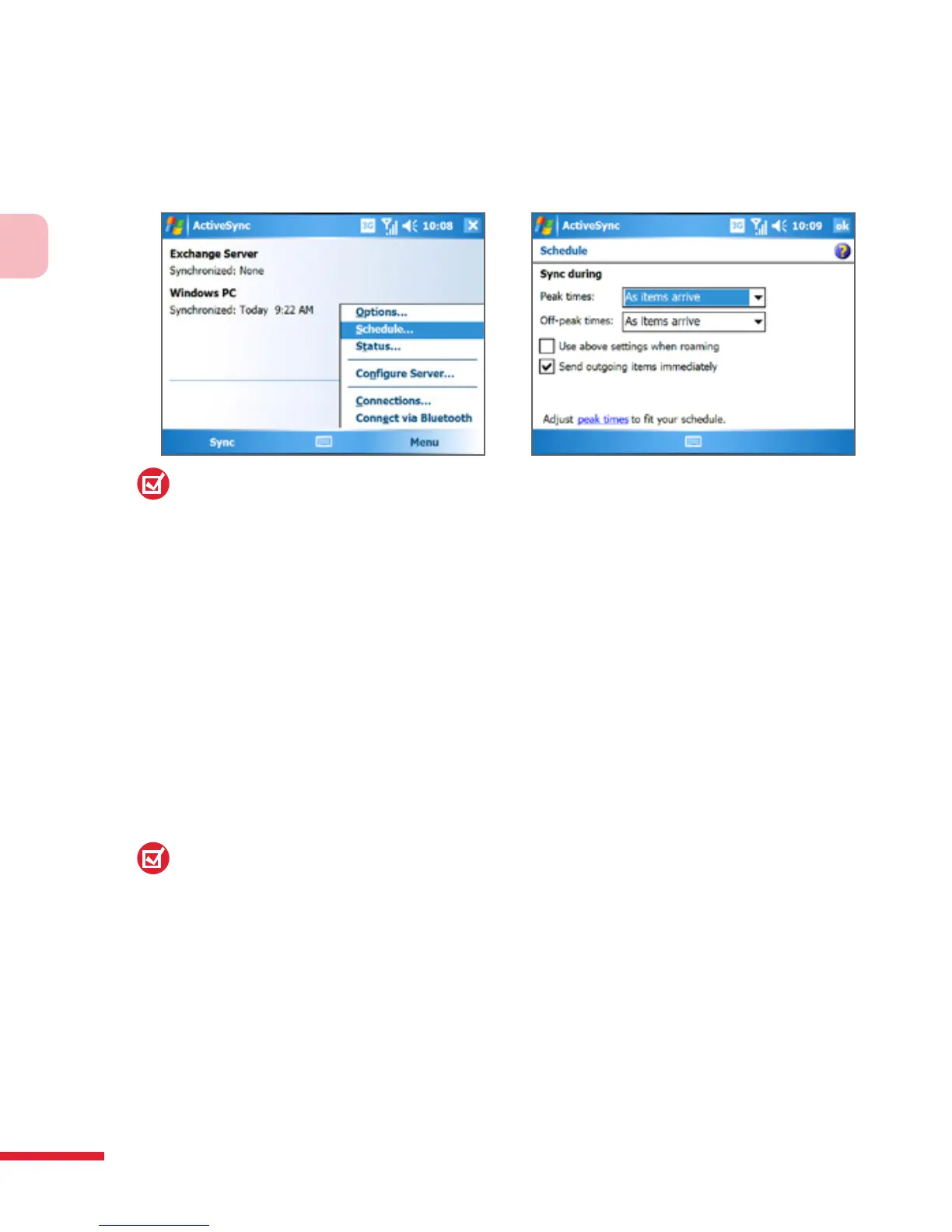
Using ActiveSync to enable Direct Push
1. In ActiveSync on your device, tap Menu > Schedule.
2. Select As items arrive in the Peak times and Off-peak times boxes.
Note:
When both the GPRS and Wi-Fi connections are turned on at the same time, the
Direct Push feature will always opt for GPRS, for which you could be charged per
your network operator’s service plan.
To schedule synchronization at regular time intervals
You can set how often to synchronize during Peak times (which usually
refer to your working hours) when e-mail volume is high, as well as Off-
peak times when e-mail volume is low.
1. In ActiveSync on your device, tap Menu > Schedule.
2. Select a shorter time interval in the Peak times box for you to be able
to receive e-mails more frequently.
3. Select a longer interval in the Off-peak times box.
Tip:
To set the days and hours that make up your peak and off-peak times, tap Adjust
peak times to fit your schedule.



 To Next Page