25
1
Getting Started
1.4 The Today Screen
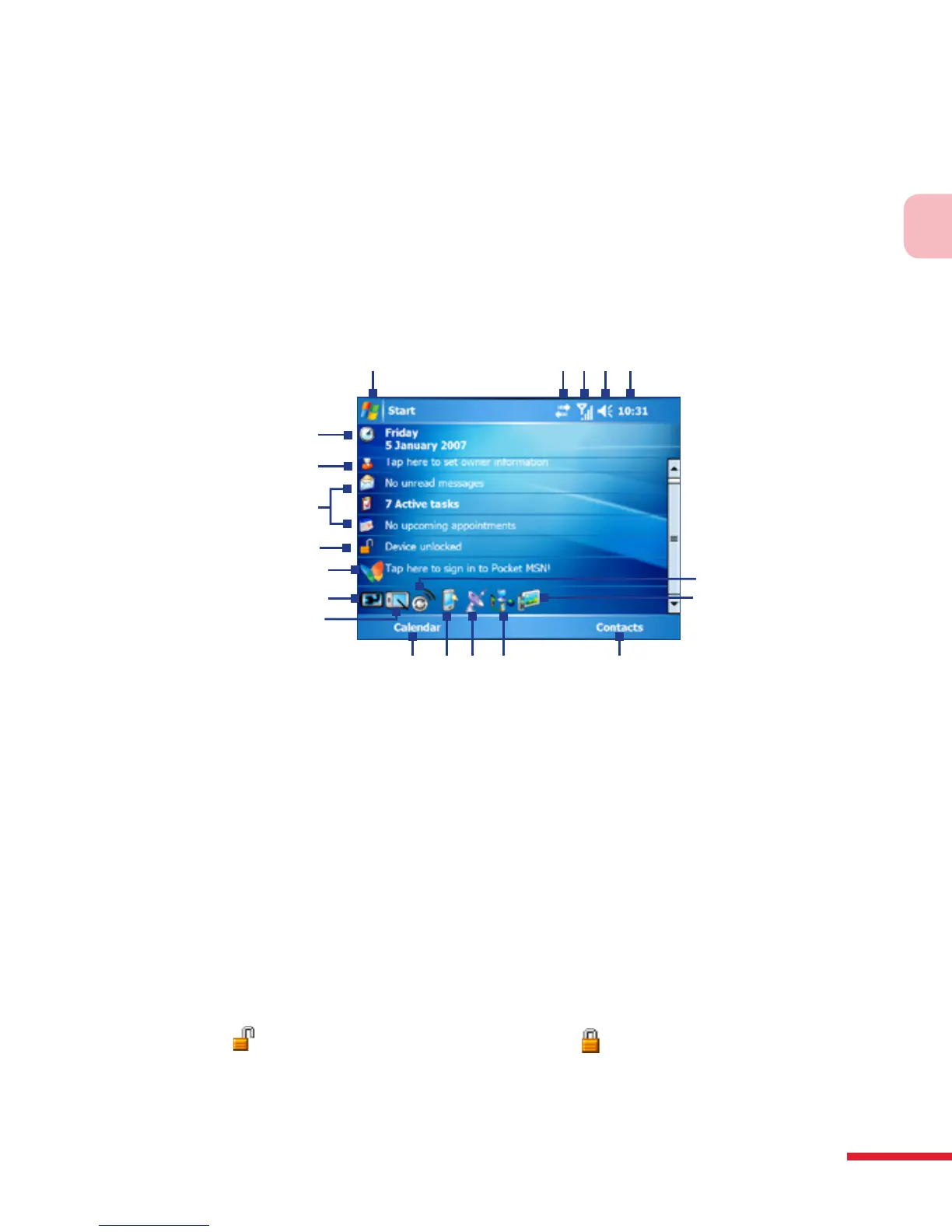
The Today screen displays important information, such as upcoming
appointments and status indicators. You can tap a section on the screen to
open the associated program.
• To access the Today screen, tap Start > Today.
• To customize the Today screen display, including the background
image, tap Start > Settings > Personal tab > Today.
1
6
19
7
8
9
2 3 4 5
18
13
10
11
17
12
14 15 16
1 Tap to open the Start menu.
2 Tap to view connectivity status.
3 Indicates the radio signal strength. Tap to configure the phone settings.
4 Tap to adjust device/ringer volume.
5 Displays the current time. Tap to check the current date and upcoming
appointments. Tap and hold to change the clock mode to Analog or Digital.
6 Displays the current date and time. Tap to set up date, time, alarm, and more.
7 Tap to set owner information.
8 Your day at a glance with reminders. Tap to open the related program: messages,
tasks, and appointments.
9
Tap
to lock the device. The icon changes to
.
Tap Unlock on the Today screen to ulock again.
10 Tap to sign in to Pocket MSN



 To Next Page