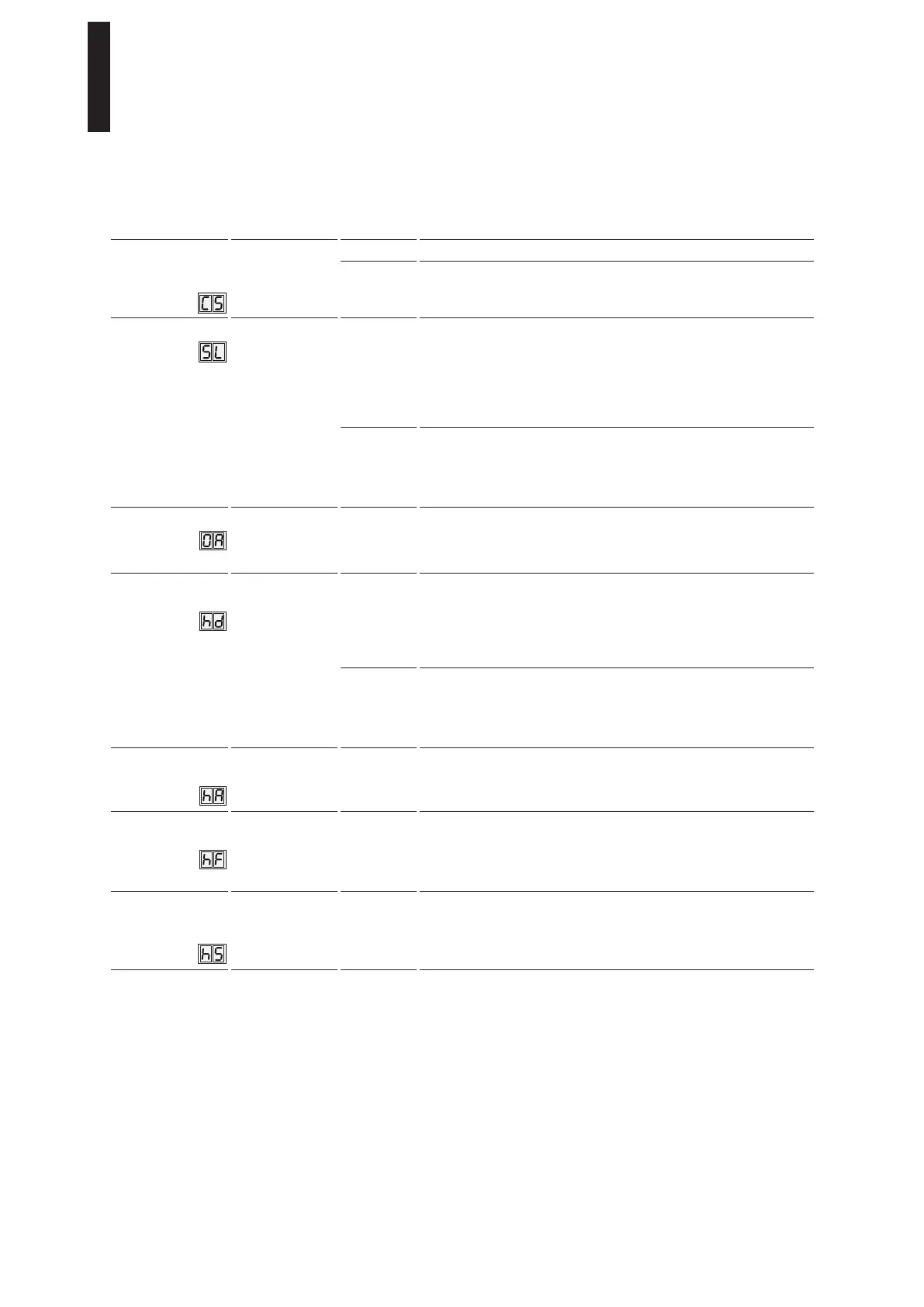
Parameters / Display Value range Unit
factory
setting =
bold
Explanation
Reset service
interval display
(yellow LED)
0 – 1
0
No function.
1 The service cycle counter and time counter are reset to 200,000
cycles and 12 months. Any settings deviating from this must be made
with the DORMA hand-held terminal (also see service LED function).
Factory setting level
1 – 2
1
By pressing the Fact Setup button on the user interface for
> 8 seconds, the drive can be reset to the factory setting. Before
restoring to factory settings, the SL parameter can be used to
determine what data will be deleted during this process.
Standard factory setting: All parameters are reset to the factory
setting. The installed Upgrade Cards do, however, remain valid and do
not have to be reinstalled.
2 Extended factory setting:
All parameters are reset to the factory setting. The installed Upgrade
Cards are deleted from the control unit’s memory. The control unit
and Upgrade Card can be used independently of one another again
(delivery status).
Opening angle
0 – 110 Degrees The opening angle set during the learning cycle is displayed here. It
can be changed only via a learning cycle.
Due to installation and parameter tolerances, the display may vary
from the actual door position.
Door closer /
automatic mode
0 – 1 0 Automatic mode should be used if the door is preferably opened
automatically and the motion detectors are used. If blockages
are encountered during closing operations, the drive reverses
automatically. The driving phase is optimized for safe closing.
The wind load control and the Push & Go Function can only be used
in automatic mode.
1
Door closer mode should be used if the door is mainly opened
manually and seldom automatically. If blockages are encountered
during closing operations, the door remains in its current position.
The driving phase is optimized for manual opening.
The Power Assist Function should be used only in door closer mode.
Power Assist
start angle
1 – 5 Degrees
3
Setting for the angle from which the Power Assist Function should
take effect. The smaller the value, the more sensitively the Power
Assist Function responds.
Power Assist
support force
0 – 10
0
Setting for the intensity of Power Assist support. The greater the
value, the easier it is to open the door manually.
With the setting of 0 the function is deactivated. The Power Assist
Function is available only in door closer mode (hd=1). If the support
level is set too high, the door can open by itself!
Support for manual
mode in the
“closed” position
0 – 10
0
Setting for the intensity of Power Assist support in the “closed”
position. The greater the value, the easier it is to open the door
manually from the closed position. The Power Assist Function is
available only in door closer mode (hd=1).
ED 100, ED 250
—
34 DORMA





 To Next Page