English
Tip: You can run the start-up wizard later if you want. From standby
mode, press Menu
Settings General Start-up wizard.
Phone indicators
Lights on the phone will:
• Flash when you have a new message or a missed call. After reading
the new message or missed call, the flashing will stop.
• Flash when the battery is running low and during charging.
Navigate the phone
When the phone is ready to use, and you have not keyed in any charac-
ters, the phone is in standby.
• Press
to return to standby mode.
• Press left selection button
to access the phone Menu or right
selection button
Name to access your saved contacts in the
phonebook.
Tip: You can always press
to return to standby.
Scroll
• Use the arrow buttons
Step-by-step instructions
The arrow (
) indicates next action in step-by-step instructions. To con-
firm an action, press OK. To select an item, scroll or highlight the item us-
ing
/ and then press OK.
Example:
• Press Menu
Phonebook -New contact- Add.
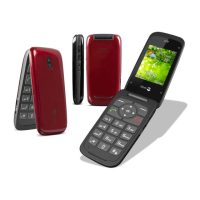
To perform the example on your Doro 6030 you should do the following:
1. Press Menu, scroll to Phonebook and press OK.
2. Select -New contact- and press Add.



 To Next Page