EasyManua.ls Logo

Doro 6030 - Status; Display Status Symbols; Display Main Symbols

Doro 6030
62 pages
Print Icon
To Next Page IconTo Next Page
To Previous Page IconTo Previous Page
Loading...
English
Status
Scroll through the
Status list to get further information about the
icons shown on top of your display. Icons shown on the display varies de-
pending on your phone status.
Press Menu
Status.
1. Use
/ to scroll the list.
2. Press Back to return to standby mode.
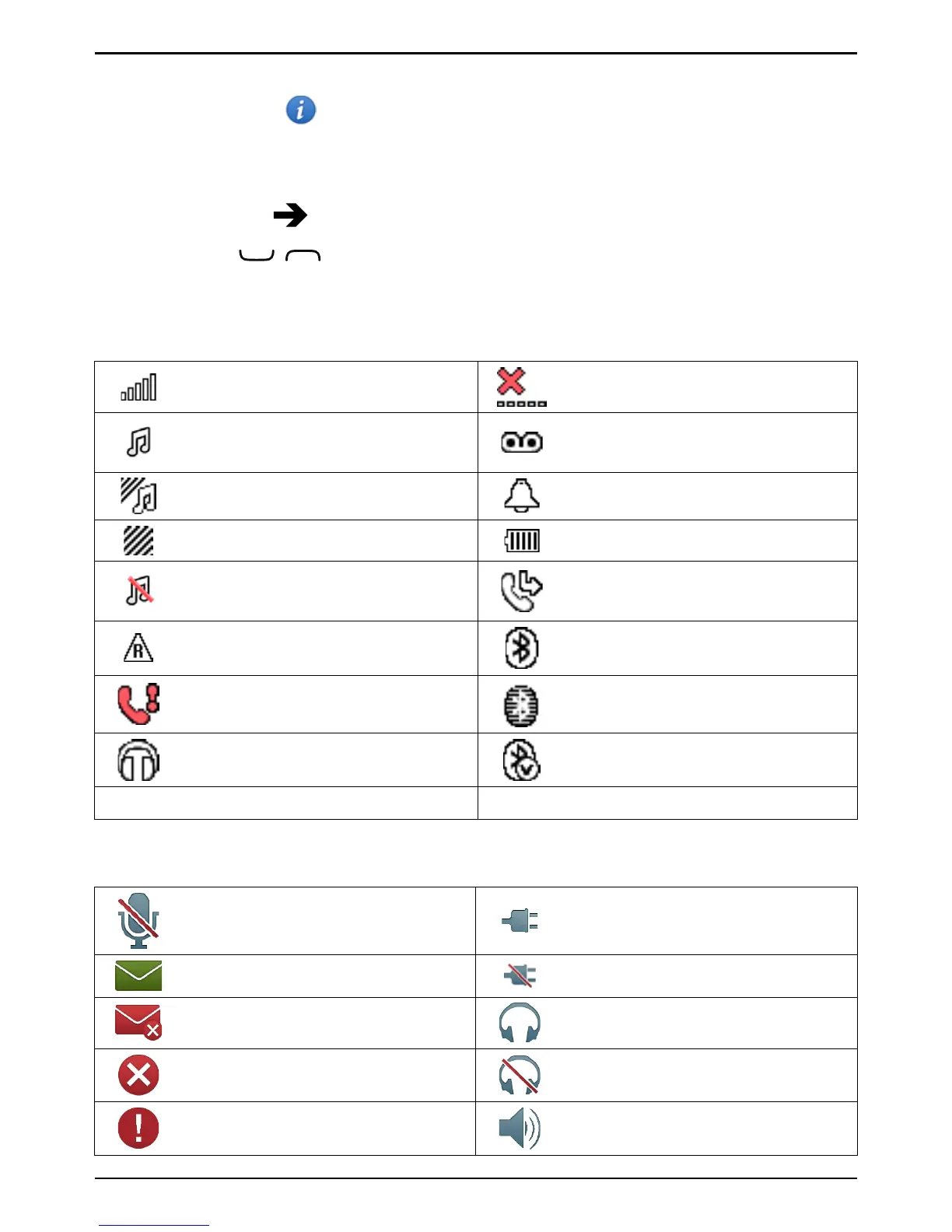
Display status symbols
Signal strength
No network coverage
Ring only
Voice mail message
received
Ring + vibration
Alarm active
Vibration only Battery level
Silent Call divert activated
Roaming (in other network)
Bluetooth on, visible to
others
Missed call
Bluetooth on, invisible to
others
Headset connected Bluetooth connected
5
Unread text message/SMS
Display main symbols
Mute
Charger connected
Message sending success
Charger removed
Message sending failed
Headset in
Error Headset out
Warning
Speaker on
43

Table of Contents

Other manuals for Doro 6030

Related product manuals