DC Breaker
20
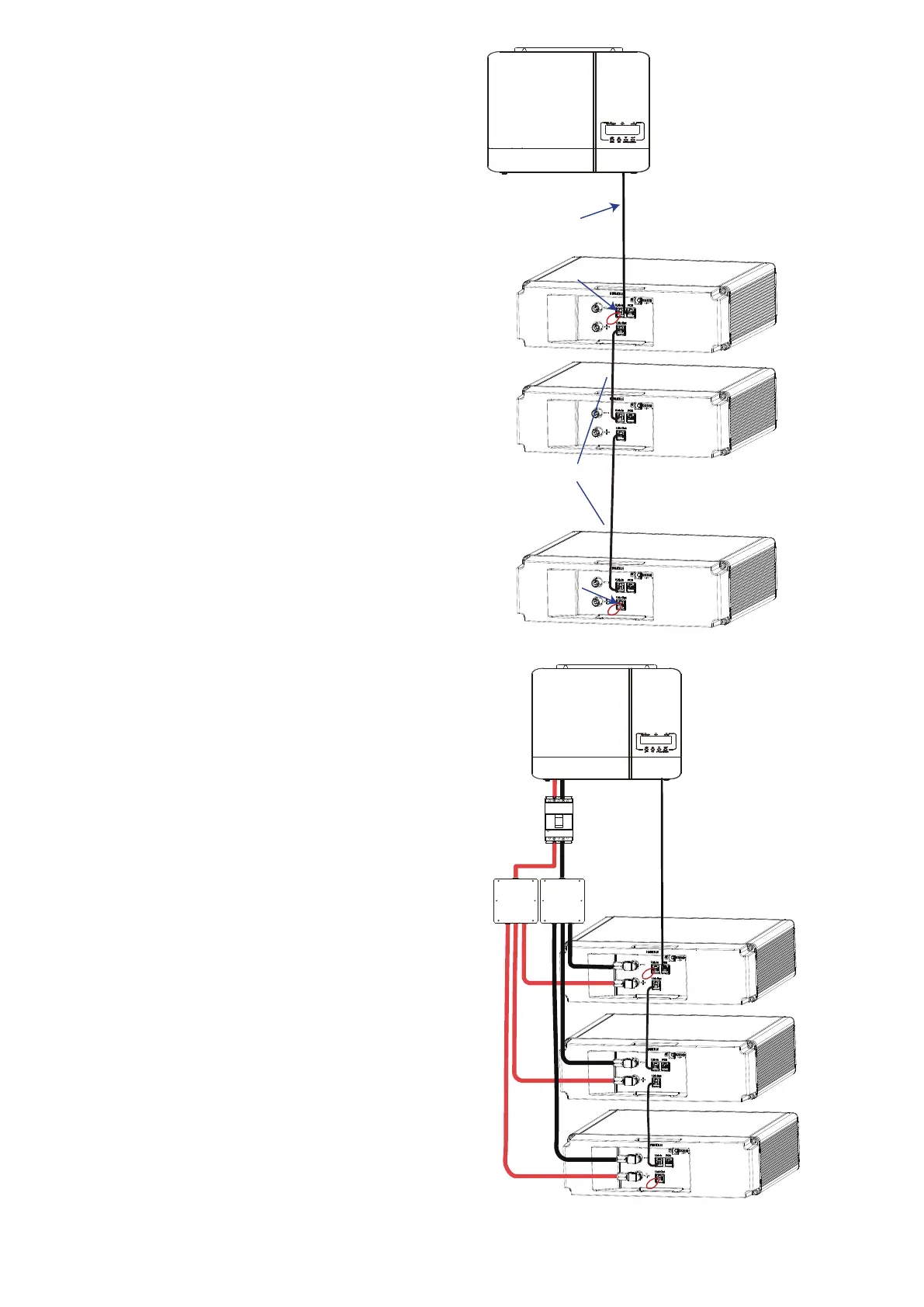
1. Plug one end of Network Cable A into the PCS port
of battery 1 and the other end into PCS.
Battery 1
Battery 2
Battery n
(n≤6)
...
1
2
3
4
2. Insert a terminator (a crystal plug with pin 4 and pin
5 short circuited) into the Link-In port of battery 1.
3. Plug one end of Network Cable B into the Link-Out
port of the first battery, and the other end into Link-
In port of the second battery. The process goes on
until the last battery is connected.
4. Insert a terminator (a crystal plug with pin 4 and pin
5 short circuited) into the Link-Out port of battery n
(n≤6
)
.
Step 3.Connect power cables.
1. Use a positive power cable to connect the + port of
battery and junction box.
2. Use a negative power cable to connect the - port of
battery and junction box.
Battery 1
Battery 2
Battery n
Junction box


 To Next Page