23
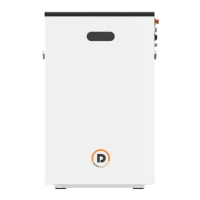
2. In the Open device dialog box, choose
CANalyst-II from the Device Type dropdown list and Extend from
the Frame Type dropdown list, and set Baud Rate to 500K. Keep other default parameters. Click OK.
3. Choose target upgrade file and click Start Upgrade.
Upgrade succeeds when progress bar reaches 100%.


 To Next Page