W
W
e
e
b
b
U
U
s
s
e
e
r
r
I
I
n
n
t
t
e
e
r
r
f
f
a
a
c
c
e
e
I
I
I
I
-
-
5
5
-
-
1
1
D
D
y
y
n
n
a
a
m
m
i
i
c
c
D
D
N
N
S
S
E
E
n
n
a
a
b
b
l
l
e
e
t
t
h
h
e
e
F
F
u
u
n
n
c
c
t
t
i
i
o
o
n
n
a
a
n
n
d
d
A
A
d
d
d
d
a
a
D
D
y
y
n
n
a
a
m
m
i
i
c
c
D
D
N
N
S
S
A
A
c
c
c
c
o
o
u
u
n
n
t
t
1. Assume you have a registered domain name from the DDNS provider, say
hostname.dyndns.org, and an account with username: test and password: test.
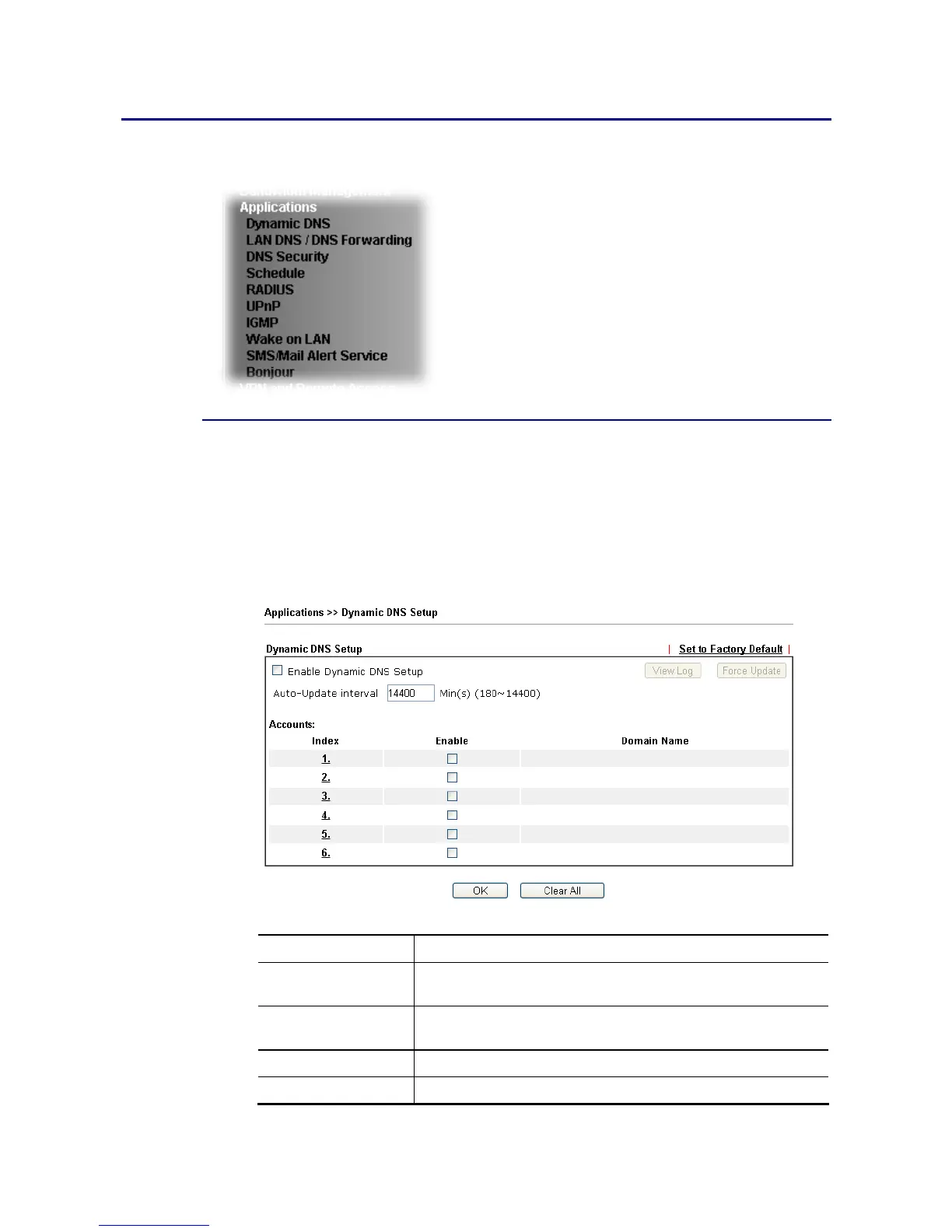
2. Open Applications>>Dynamic DNS.
3. In the DDNS setup menu, check Enable Dynamic DNS Setup.
Available settings are explained as follows:
Item Description
Enable Dynamic DNS
Setup
Check this box to enable DDNS function.
Set to Factory
Default
Clear all profiles and recover to factory settings.
View Log Display DDNS log status.
Force Update Force the router updates its information to DDNS server.















 To Next Page