Status: Connected
>
T
T
e
e
l
l
n
n
e
e
t
t
C
C
o
o
m
m
m
m
a
a
n
n
d
d
:
:
i
i
p
p
6
6
r
r
a
a
d
d
v
v
d
d
This command allows you to enable or disable RADVD server.
S
S
y
y
n
n
t
t
a
a
x
x
Ip6 radvd <LAN1|LAN2|...|LAN4> [-<command> <parameter>| ... ]
ip6 radvd –V
S
S
y
y
n
n
t
t
a
a
x
x
D
D
e
e
s
s
c
c
r
r
i
i
p
p
t
t
i
i
o
o
n
n
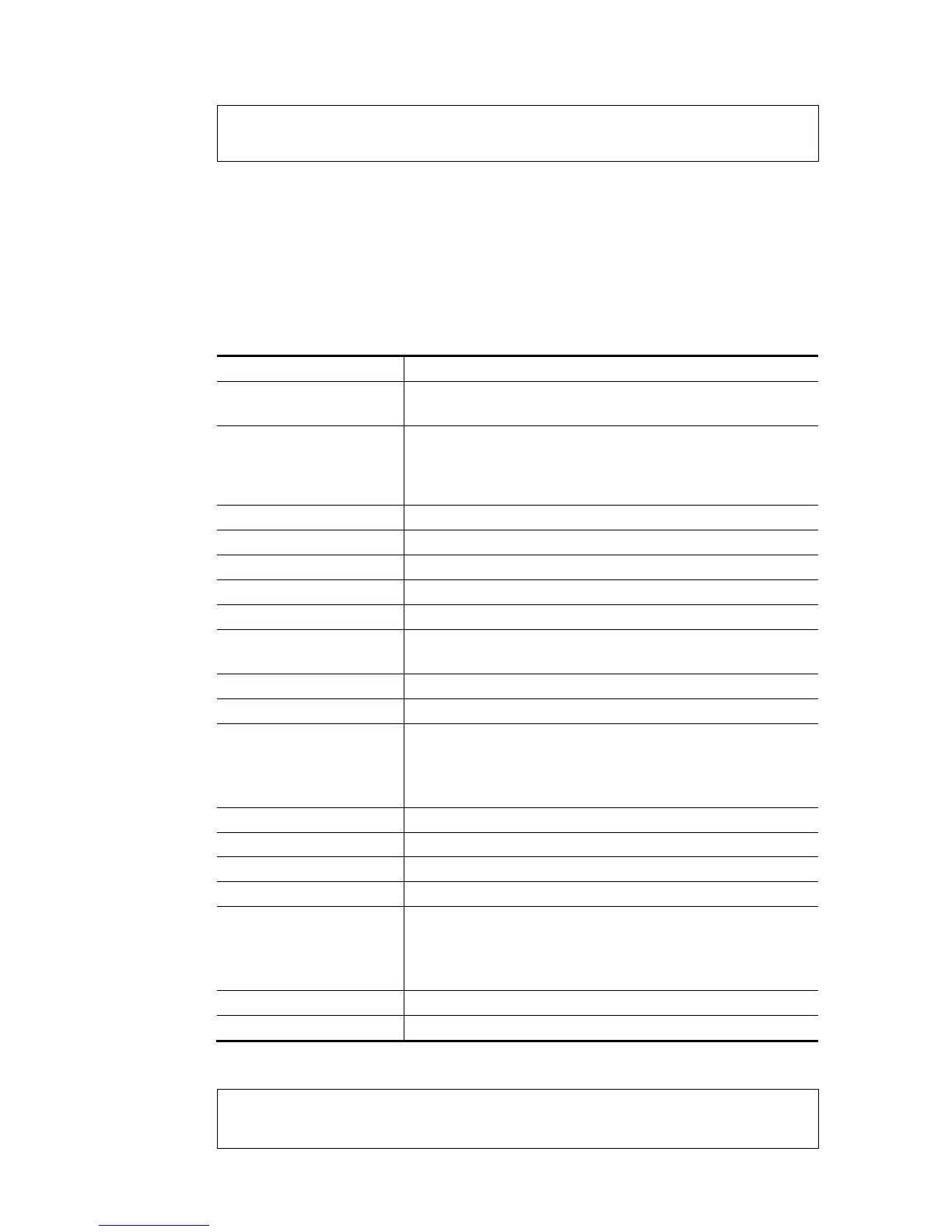
Parameter Description
[<command>
<parameter>|…]
The available commands with parameters are listed below.
[…] means that you can type in several commands in one line.
-s It means to enable or disable the default lifetime of the RADVD
server.
1: Enable the RADVD server.
0: Disable the RADVD server.
-D <0/1/2> It means to set RDNSS Disable/Enable/Deploy when WAN is up.
-d <lifetme> It means to set RA default lifetime.
-i <lifetme> It means to set RA min interval time(sec).
-I <lifetme> It means to set RA MAX interval time(sec).
-h <hoplimit> It means to set RA hop limit.
-m <mtu/auto> It means to set RA MTU, 1280-1500.
mtu: auto - auto select MTU from WAN,
-e <time> It means to set reachable time.
-a <time/infinity> It means to set retransmit timer /infinity.
-p <0/1/2> It means to set radvd default preference Low/Medium/High.
0-low
1-medium
2-high
-v It means to view radvd configuration.
-V It means to view setting in RA.
-L <time/infinity> It means to set prefix valid lifetime.
-P <time/infinity> set prefix preferred lifetime.
-r [num] It means to to set RA test for item.
0-default,
121:logo 121,
124:logo 124..
-R It means to reload Config and send RA for subnets.
-u It means to view MTU on all interfaces.
E
E
x
x
a
a
m
m
p
p
l
l
e
e
> ip6 radvd LAN1 -V
% [LAN1] setting !
% Default Lifetime : 0 seconds


 To Next Page
 Loading...











