Vigor2830 Series User’s Guide
209
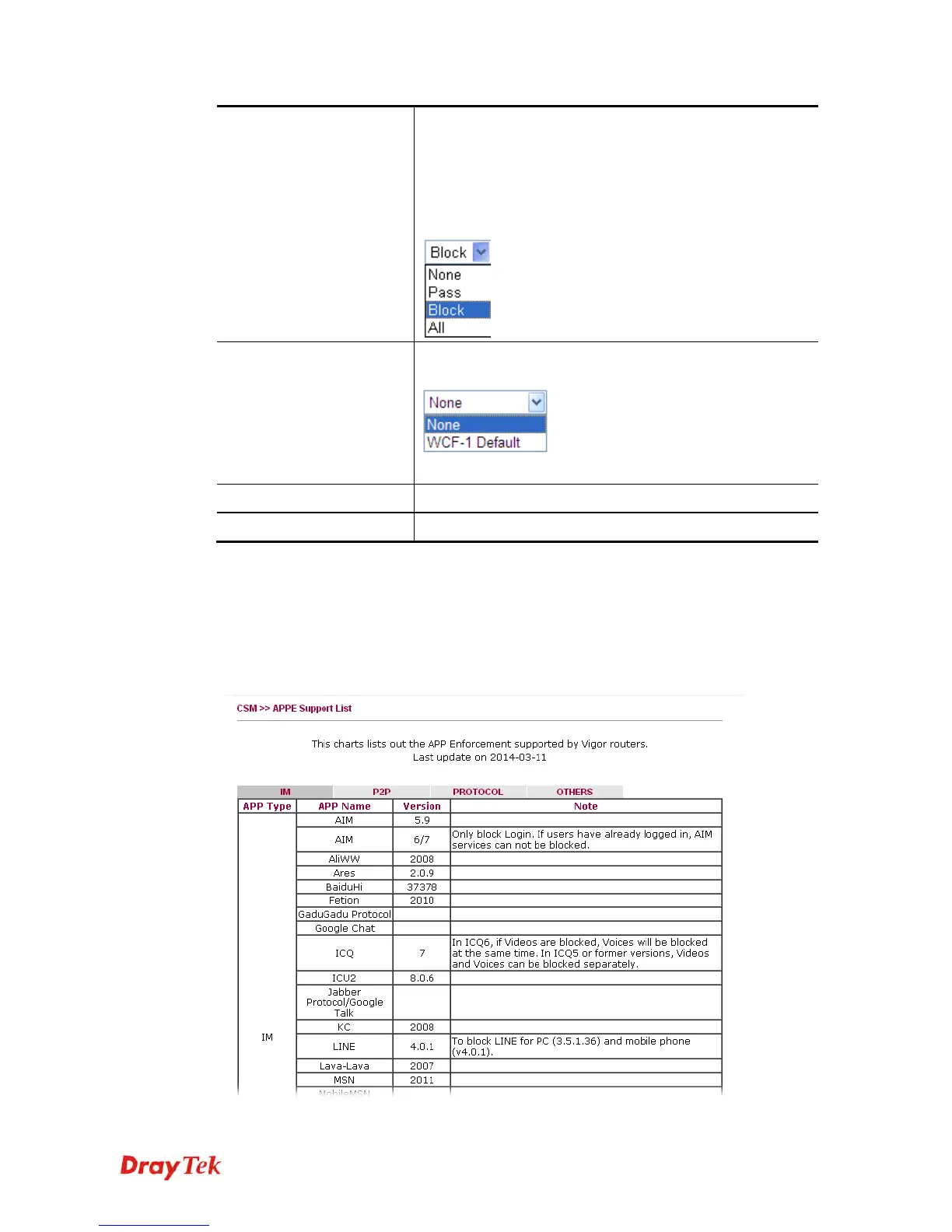
None – There is no log file will be recorded for this profile.
Pass – Only the log about Pass will be recorded in Syslog.
Block – Only the log about Block will be recorded in
Syslog.
All – All the actions (Pass and Block) will be recorded in
Syslog.
Service
Set the filtering conditions. Specify one of the WCF
profiles as Service.
Choose the WCF profiles to apply DNS filter.
Cache Time (hour)
Set the time for DNS query.
Enable Block Page
Check the box to enable such function.
After finishing all the settings, please click OK to save the configuration.
3
3
.
.
8
8
.
.
5
5
A
A
P
P
P
P
E
E
S
S
u
u
p
p
p
p
o
o
r
r
t
t
L
L
i
i
s
s
t
t
This page offers the software versions for each applications managed by APP Enforcement
Profiles by Vigor router. Click the IM/P2P/PROTOCOL/OTHERS tab to open the information
page for different APP type.














 To Next Page