Vigor2830 Series User’s Guide
390
W
W
i
i
r
r
e
e
l
l
e
e
s
s
s
s
G
G
e
e
n
n
e
e
r
r
a
a
l
l
S
S
e
e
t
t
u
u
p
p
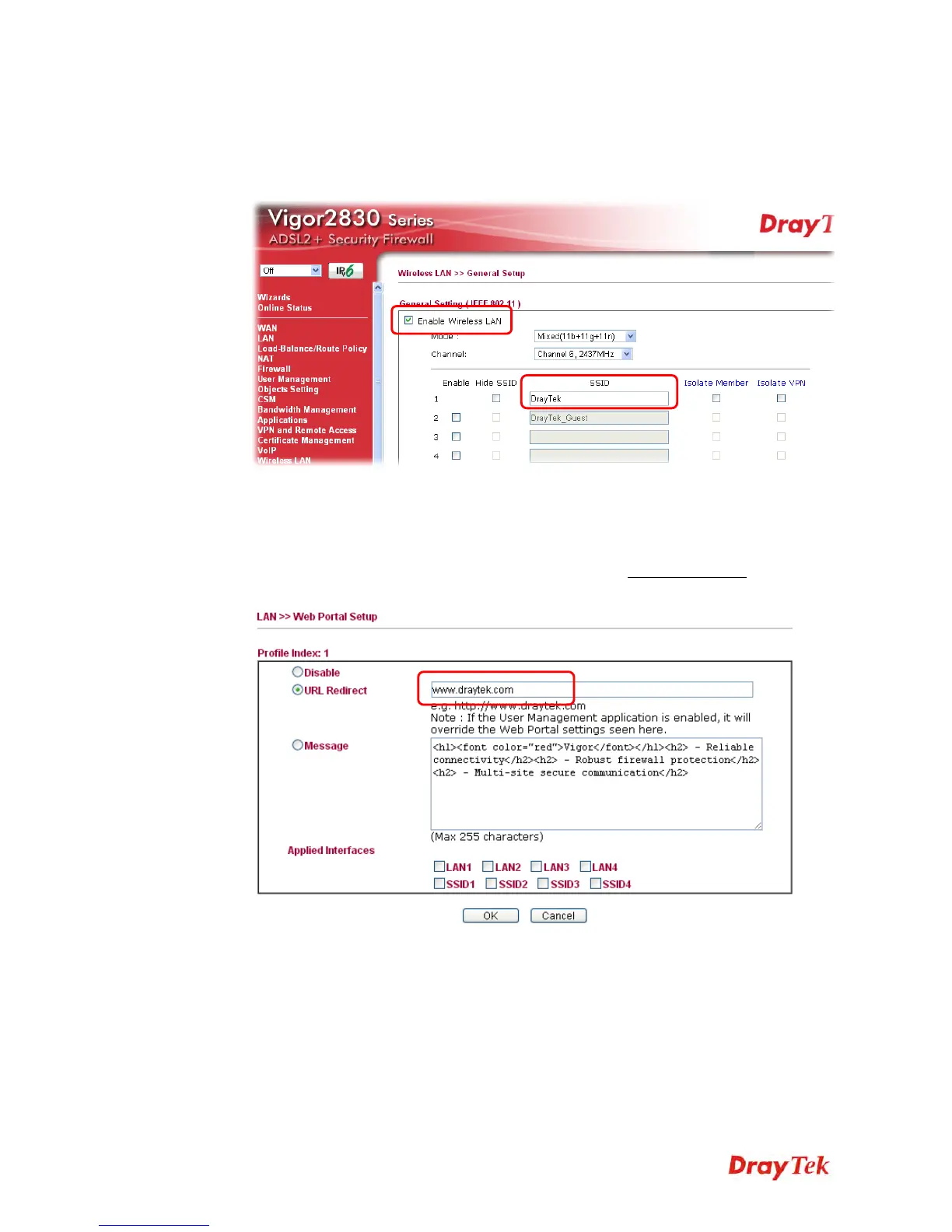
1. From Vigor router web configuration page, select Wireless LAN>>General Setup.
2. Check Enable Wireless LAN and set the SSID. Then click OK to save the settings.
W
W
i
i
r
r
e
e
l
l
e
e
s
s
s
s
P
P
o
o
r
r
t
t
a
a
l
l
L
L
o
o
g
g
-
-
i
i
n
n
S
S
e
e
t
t
t
t
i
i
n
n
g
g
1. Open LAN>>Web Portal Setup.
2. Click Redirect to URL and type the URL in the field below. User’s first HTTP request
will be redirected to the URL defined here. (Here we take www.draytek.com
for an
example.)


 To Next Page
 Loading...











