16
11 Sync Connector
You can insert USB cable or AC adapter or headset provided with the device to
this connector.
12 Talk Button
Press this button to make a call to the name or number shown on the screen or
to answer a call.
13 Start Menu Button
Press this button to active your Start menu.
14 Volume Button
Press volume Buttons to adjust the volume
15 GPS Button
Press to launch the GPS navigation.
16 RESET Button
With the stylus, press the RESET button to soft-reset your device.
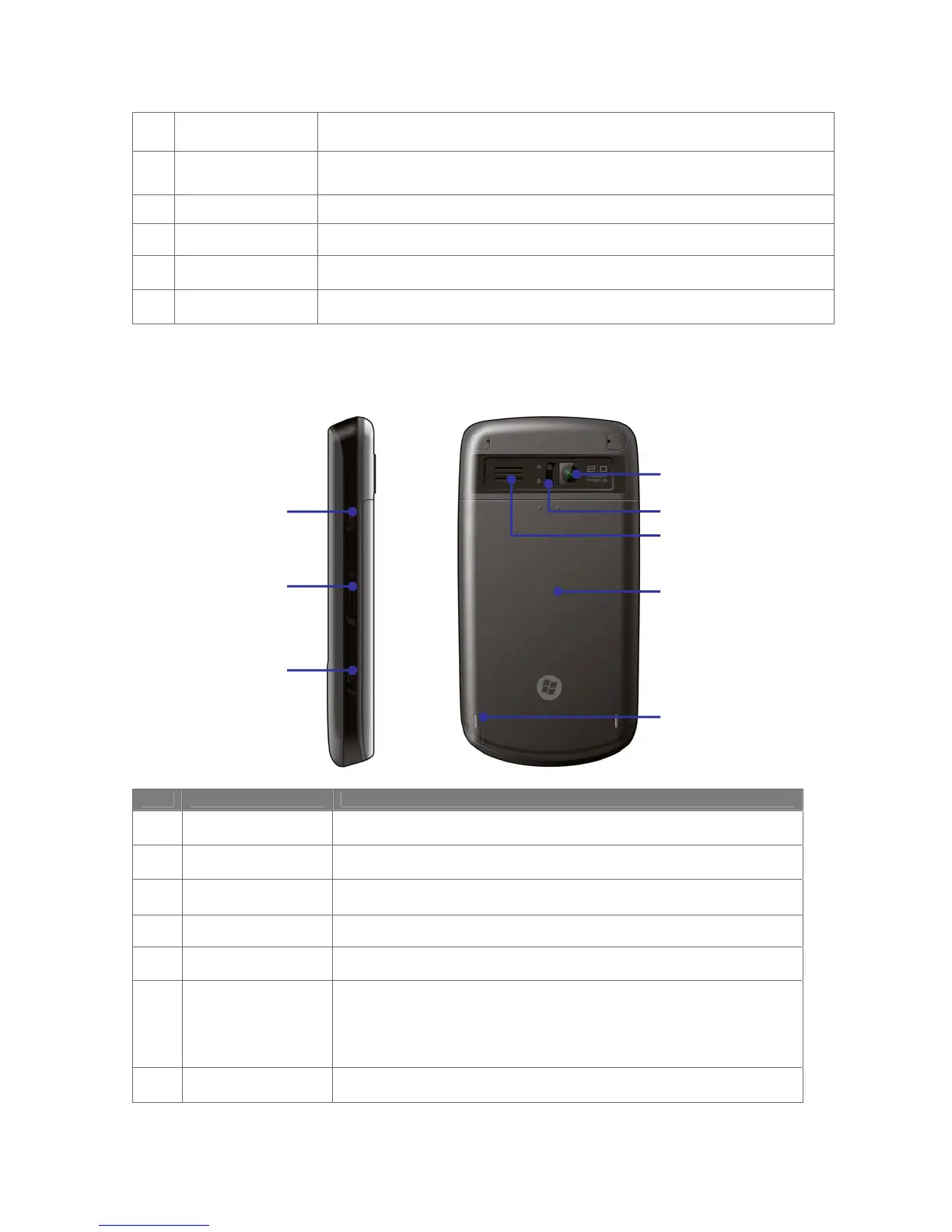
Back and right-side view
No. Item Function
17 Camera Lens
Use this built-in camera to take photos or video clips.
18 Zoom button
Use this button to adjust the zoom of Micro mode.
19 External Speaker
Allows you to listen audio media or hands-free calls
20 Cover Latch
Slide this latch to release the battery cover.
21 Stylus
Use the stylus to write, draw, or select items on the touch screen.
22 Power Button
Press this button to turn off your device temporarily and switch the
device to sleep mode. Press and hold this button to turn off your device
completely. When your device is in sleep mode, you can still receive
calls; however, the phone function is off when you turn the device off
completely.
23 MicroSD Card Slot
Insert a storage card (MicroSD) for storing data.
22
23
24
17
18
19
20
21



 To Next Page