15
1.1 Getting to Know your Device and its Accessories
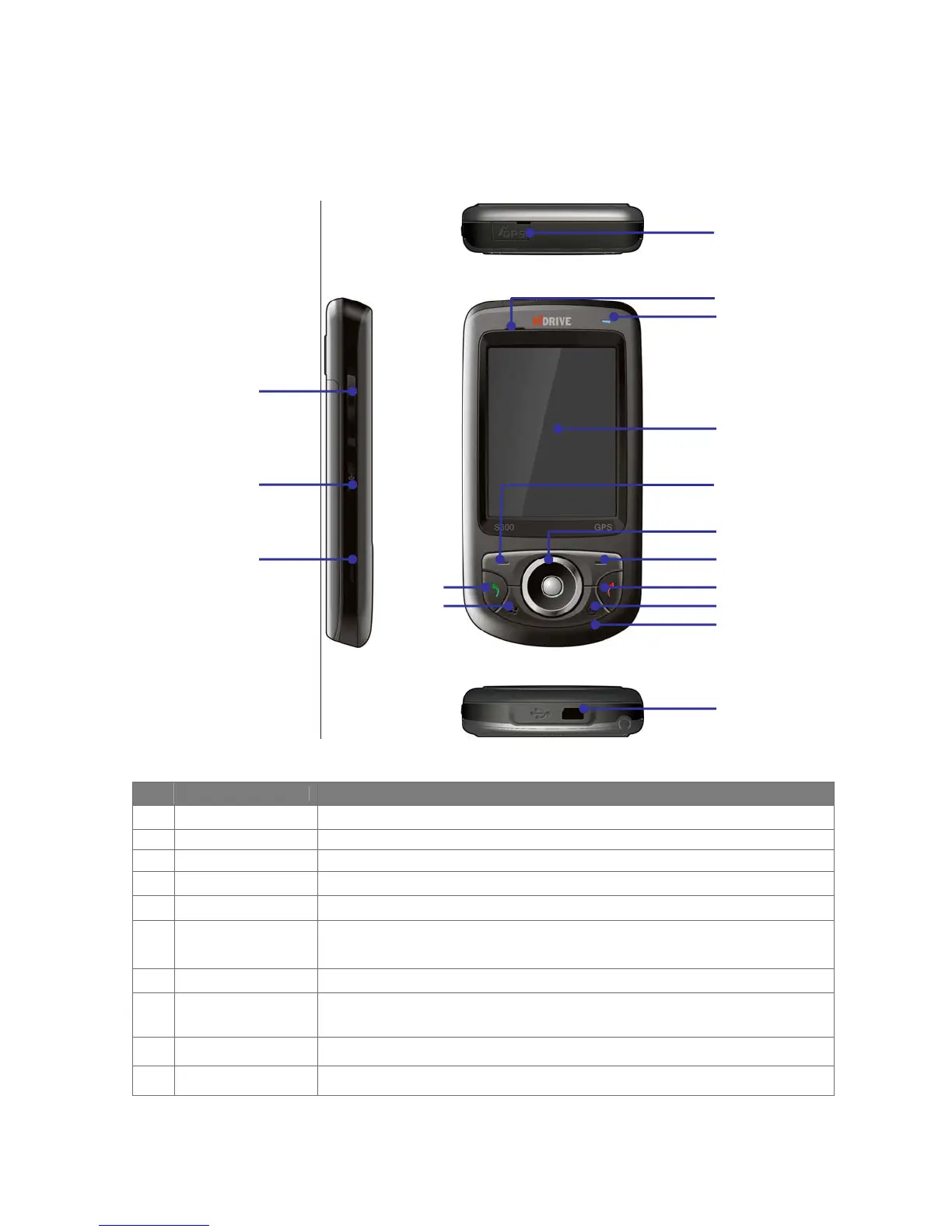
Front, top, bottom and left-side view
No. Item Function
1 GPS Antenna
Connect GPS external antenna to obtain better signal.
2 Speaker
Listen to audio media or phone call.
3 Power LED
LED Power indicator, battery charging status.
4 Touch Screen
Use to write, draw, or make selections with the stylus.
5 Left Soft Key
Performs the command shown in the label above the button.
6 Navigation Pad
Press the navigation pad to scroll left, right, up or down on the display; Slip the
jog ball to move the mouse on the screen and press it to enter a selection.
7 Right Soft Key
Performs the command shown in the label above the button.
8 End Button
Press this button to end a call or silence the ring from an incoming call. Also,
press this button to return to the Start screen from any location.
9 OK Button
Press this button to perform the command highlighted.
10 Microphone
Do not cover the microphone with your hand during phone call
1
2
3
4
5
6
7
8
9
10
11
14
15
16
12
13



 To Next Page