21
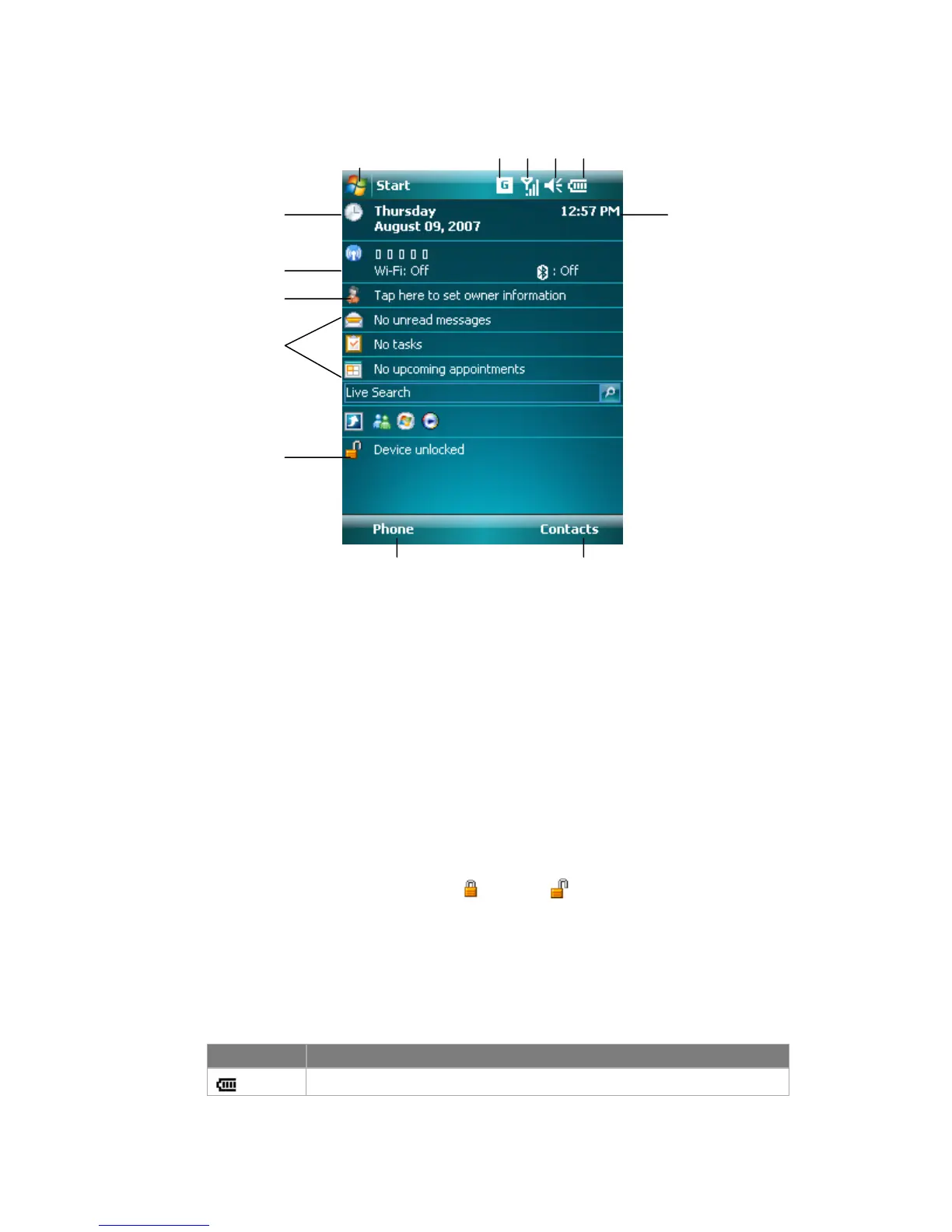
1 Tap to open the Start menu.
2 Tap to view connectivity status.
3 Indicates the radio signal strength. Tap to configuration the phone settings.
4 Tap to control device/ringer volume level.
5 Indicates the battery status. Tap to enter the Power Settings screen.
6 Displays the current time.
7 Displays the current date. Tap to setup date, time, alarm, and more.
8 Tap to start the Wireless Manager
9 Tap to set owner information
10 Your day at a glance with reminders. Tap to open the related program:
Messaging, Tasks, and Appointments.
11 Tap to lock or unlock the device.
: locked; : unlocked.
12 Tap to open the Phone screen.
13 Tap to open the Contacts screen.
Indicators
Following are some of the status icons that you may see on your device.
Icon Description
Indicates the battery is fully charged.
7
8
9
10
11
1
6
12 13
2 3 4 5



 To Next Page