12
D
V
D
P
A
R
T
You can watch and listen to DVD playback through the
connections shown below.
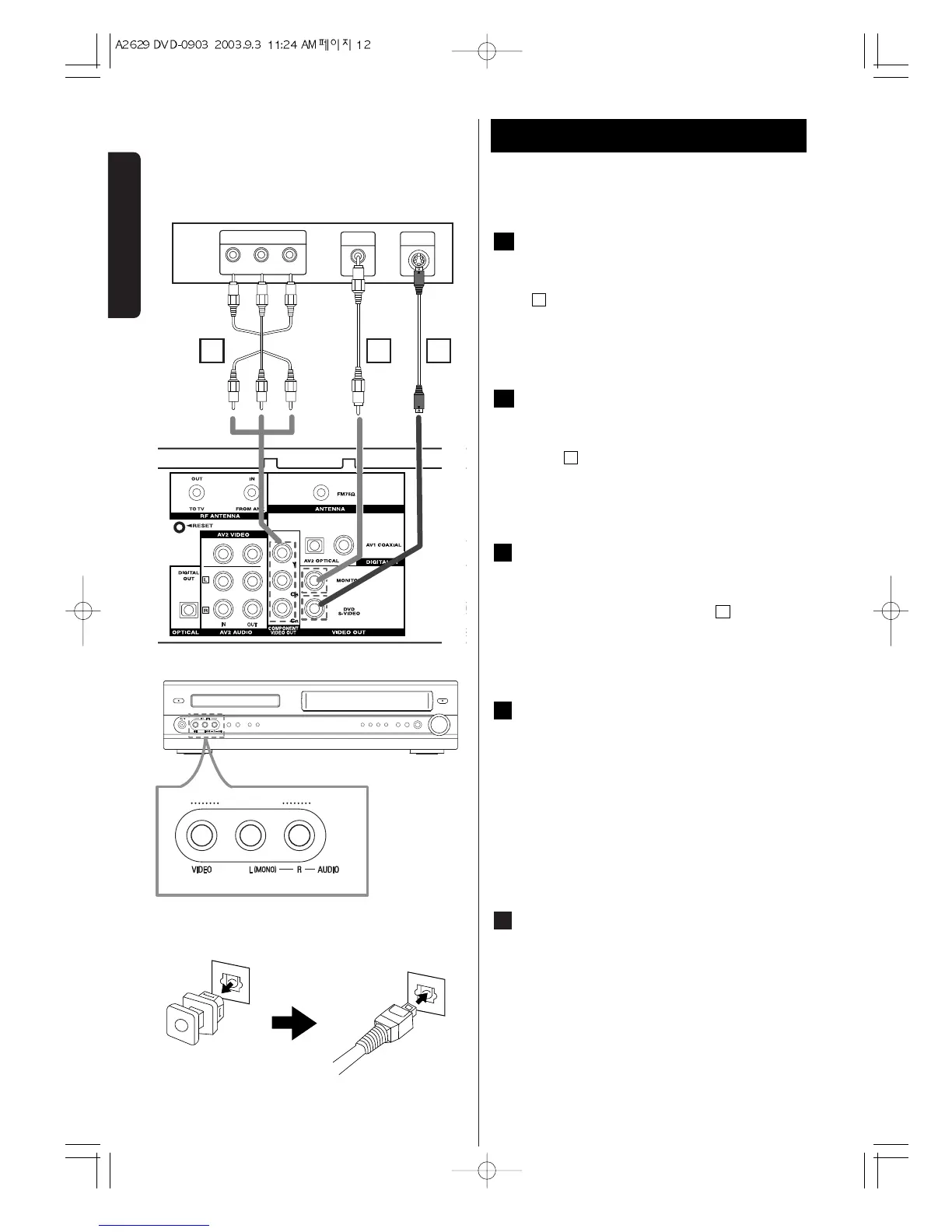
Video connection
Connect the VIDEO OUT. MONITOR jack on the
DVD/VCR to the video in jack on the TV using the video
cable .
DVD S-Video connection
Connect the VIDEO OUT. DVD S-VIDEO jack on the
DVD/VCR to the S-VIDEO INPUT on the TV using the S-
Video cable .
Component Video connection
Connect COMPONENT VIDEO.OUT Y, Cb, Cr jacks on
the DVD/VCR to the COMPONENT VIDEO IN jacks on
the TV using an optional Y, Cb, Cr Cable .
Accessory Audio/Video (A/V)
Connections to DVD/VCR
Connect the AV1 or AV2 jacks on the DVD/VCR to the
audio/video out jacks on your accessory component,
using optional audio/video cables.
( Accessory Component: : VCR, Camcorder, Video
Camera, Satellite Receiver, Laser Disc Player )
OPTICAL DIGITAL AUDIO OUT jack
Remove the dust protection cap from the connector
and connect the optical digital cable (not supplied)
firmly so that the configurations of both the cable and
the connector match. Keep the dust protection cap and
always reattach the cap when not using the connector
to protect against dust.
E
D
E
C
D
B
B
A
Connection 2


 To Next Page