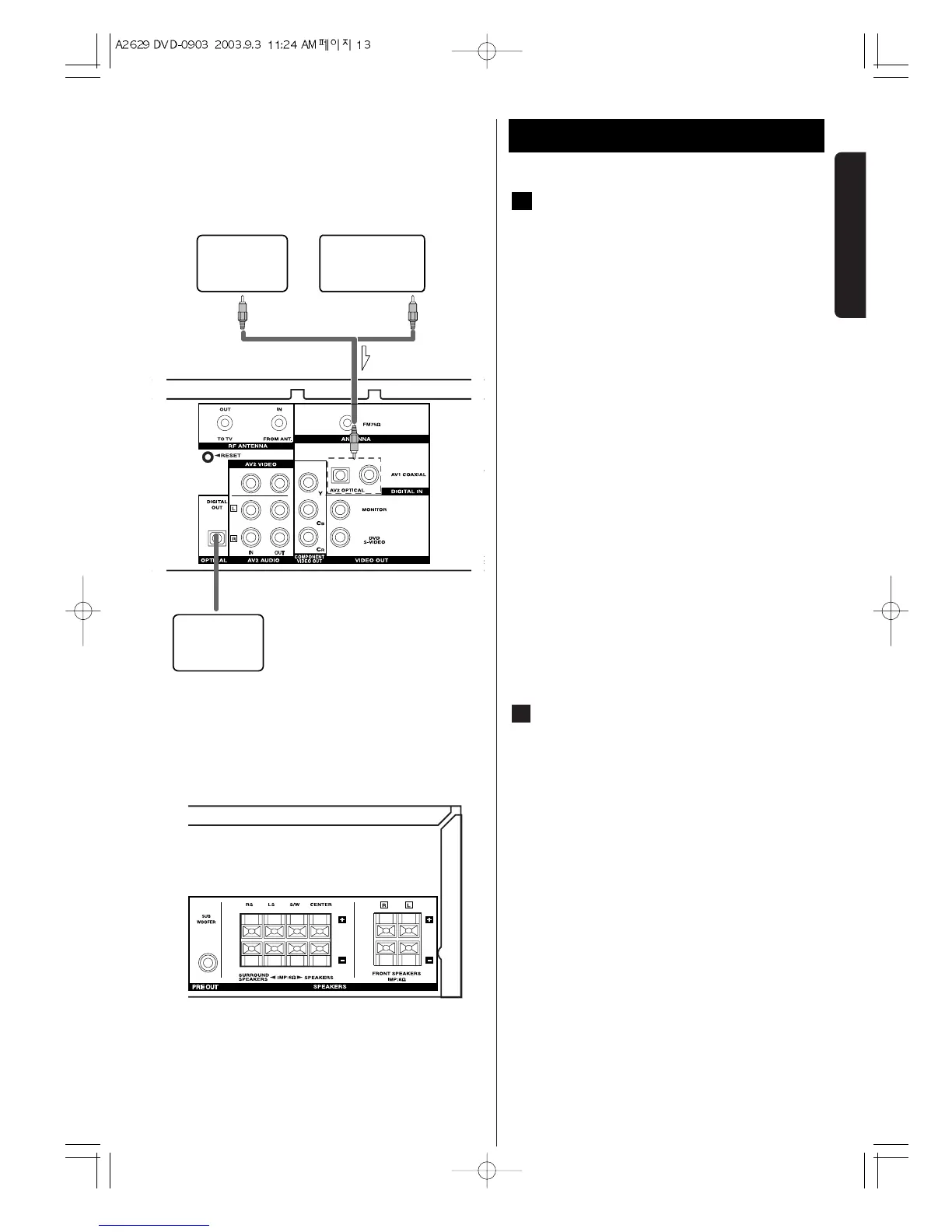
DIGITAL IN jacks
< If the Accessory Component is provided with a
DIGITAL OUTPUT jack, connect it to the DIGITAL IN
jack on the DVD/VCR. (Use the optional coaxial cord
or optical fibre cable.)
< Connect any one of the DIGITAL IN terminals.
< When an optical fibre cable is used for connection,
remove the caps protecting both ends of the optical
cable and the connectors.
DIGITAL IN/OUT terminals
Connect the component with optional coaxial cables
or optical cables.
DIGITAL IN w DIGITAL OUT(CD, etc.)
DIGITAL OUT
w DIGITAL IN(CD-R, MD, etc.)
< Connect any one of the DIGITAL IN terminals.
(OPTICAL or COAXIAL)
< When using DIGITAL OPTICAL IN terminals, remove
the caps from the terminals. When you do not use
them, leave the caps in place.
< To record digitally, connect the source(CD player,
etc.) to DIGITAL IN and the recorder(CD-R, MD, etc.)
to DIGITAL OUT.
CAUTION:
Connet either OPTICAL or COAXIAL with suitable jack.
PRE OUT jack
Use Subwoofer jack to connect addtional powered
subwoofer.
You can connect a larger powered subwoofer to
the system.
Connect the subwoofer to the PRE OUT.
SUBWOOFER jack using a shielded audio cable.
B
A


 To Next Page