DS5-AX User Manual Ver.0 2016. 03.17
52
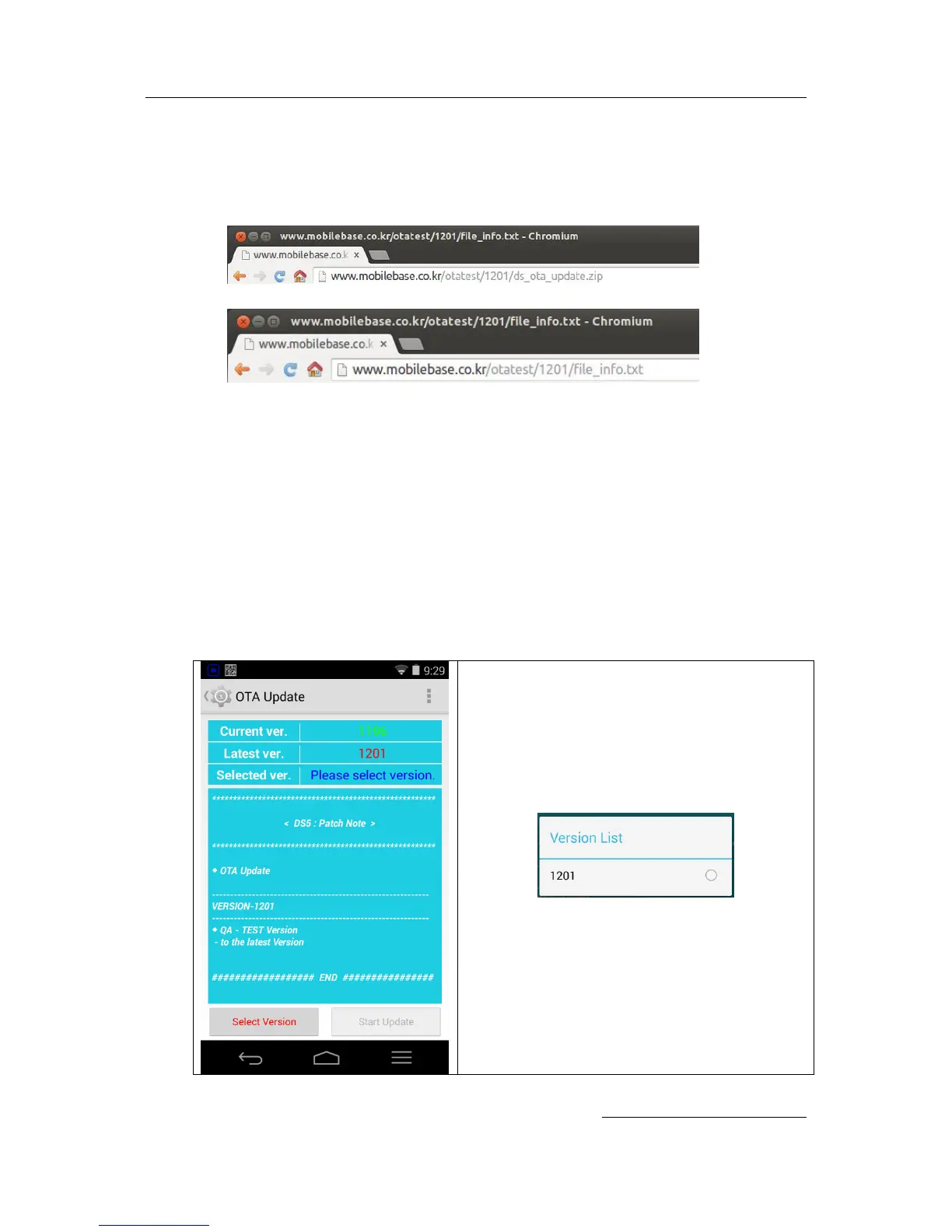
∙ Create new OS version folder under otatest folder, below example version is 1201. And
copy file_info.txt & ds_ota_update.zip. Below picture shows create OS version folder with
1201 and copy above 2 files into the folder.
- otatest/1201/ds_ota_update.zip
- otatest/1201/file_info.txt
Note:
In case uploading multiple OS version at your HTTP server, repeat this process. And
over-write and maintain as the latest released version the patch_note.txt file.
2. Edit OTA URL
When all the process of setting URL of your OTA server has been completed, please
follow below procedures.
∙ Entering OTA Update menu
Go settings > About tablet, or About Phone > OTA Update Start > OTA Start
OS information shall be displayed at your device UI.
Current version and latest version which is
updatable shall be displayed..
Press Select Version button at the left bottom of
your device screen. Upgradable Version List will
be pop up.
Select 1201 which is upgradable.


 To Next Page