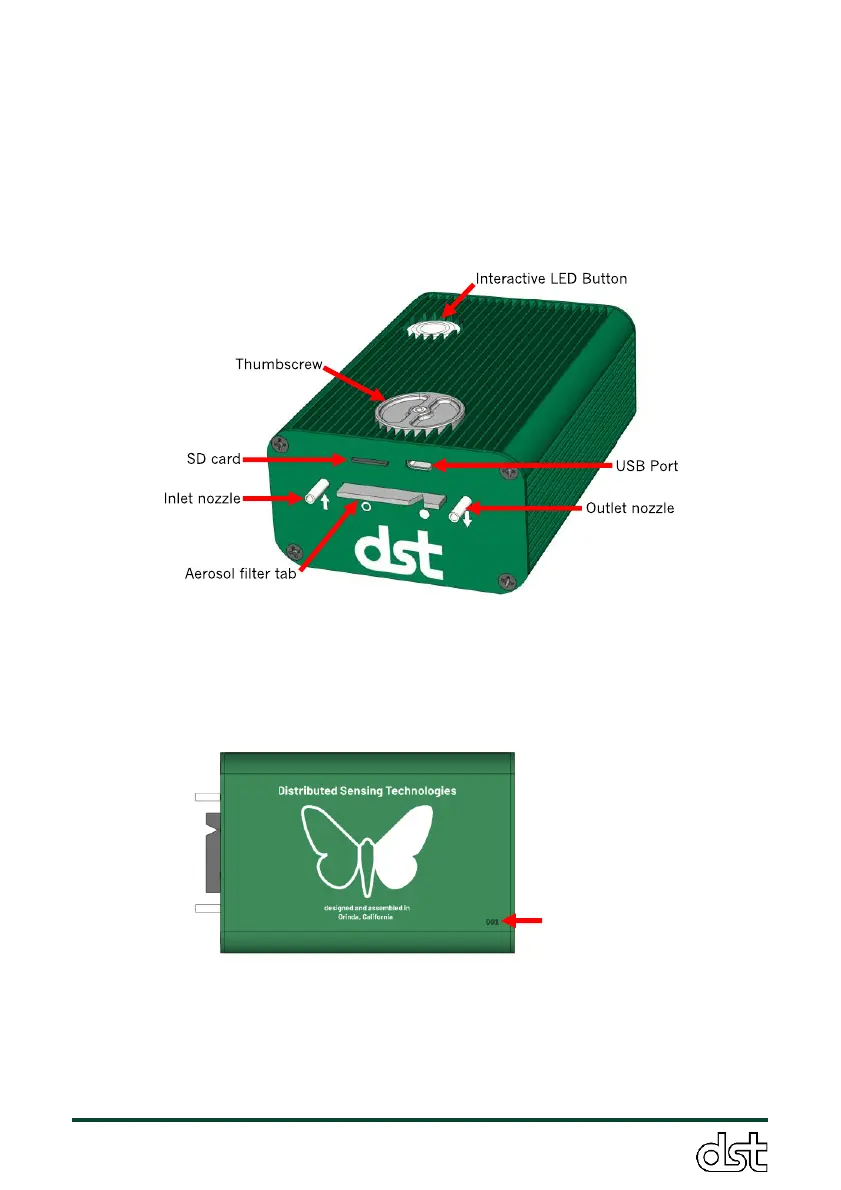
The ObservAir is shown in Figure 5 below. The sample air inlet and outlet
nozzles are located on the front panel, and are denoted by arrows facing
towards and away from each nozzle, respectively. The SD card slot and
USB port are also located next to one another on the sensor’s front panel.
In Figure 5, the aerosol filter tab protrudes from its dedicated slot through
the front panel, as it does during normal operation. On top of the sensor,
there is a thumbscrew for securing the aerosol filter tab, and the
interactive LED button for sensor control and feedback.
Figure 5. Overview of the ObservAir. Isometric view.
The serial number is displayed on the sensor’s bottom surface. Please
include this serial number when contacting DSTech technical support.
Figure 6. Bottom view of the ObservAir
3.2. Interactive LED button: Sensor display and control
The ObservAir’s interactive LED button is used to control basic operational
settings and display errors, pollutant concentrations, and other messages.



 To Next Page