ObservAir Operating Manual
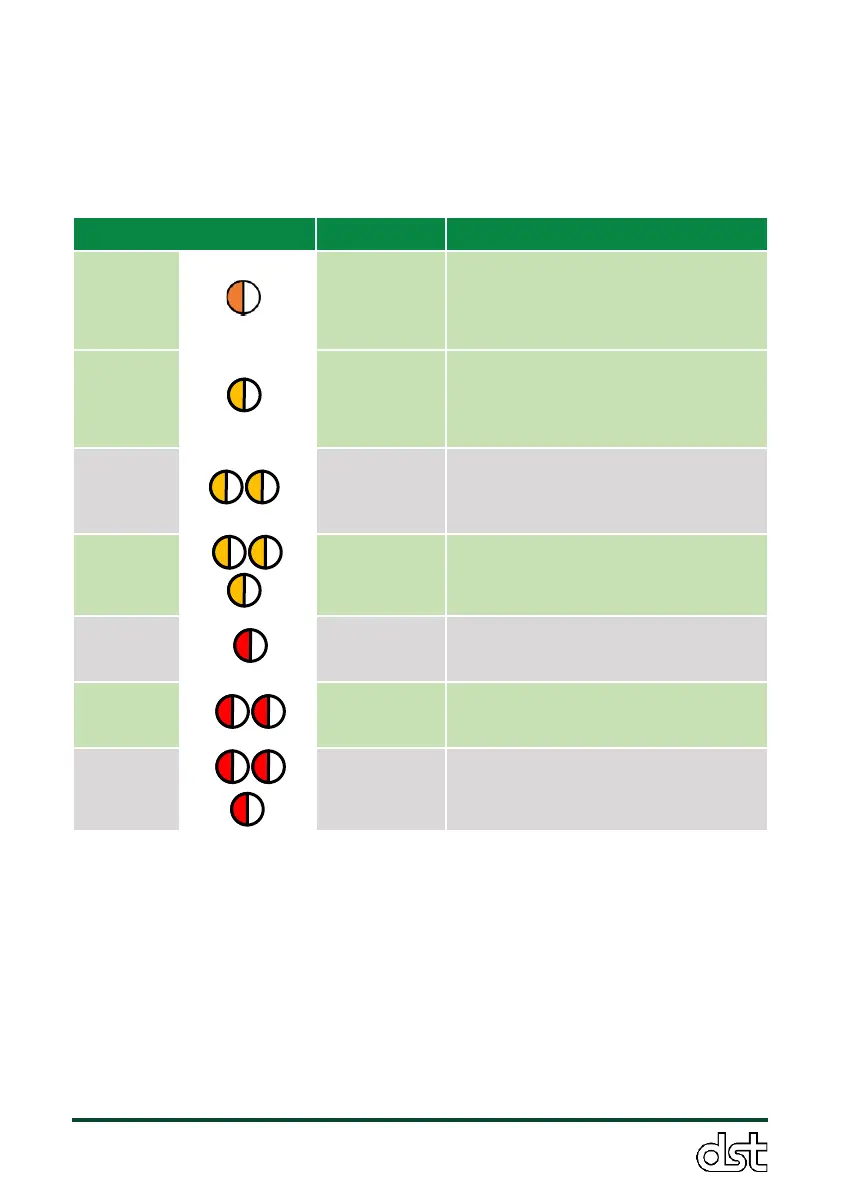
button flashes rapidly until the error is resolved. The color and speed of
the flashing LED indicates the error type, as shown in Table 9 below. Brief
instructions on how to resolve each error type are also provided. The exact
error can be found in the cloud dashboard, or through the serial command
line as described in section 3.7.3 using command “$errorInfo$”.
Change environment (remove
from direct sun, place in cooler
location), pause unit until
conditions have changed.
High
attenuation
or Low
battery
Replace filter. Check that
instrument is charging
Check that SD card is properly
inserted. Take SD card out fully
and re-insert into the slot.
Reset time according to the
instructions in Section 3.8.3.
Check that filter is properly
seated. Replace with new filter.
Check that nozzles and sample
lines are unobstructed.
Contact DSTech Technical
Support.
Table 9. LED error code lookup table.
6.2. Unresponsive sensor
If the ObservAir becomes unresponsive, the software may have crashed
and a hard reset is required. A hard reset can be triggered by swiping a
magnetic over the top of the sensor in line with the interactive LED button
(Figure 17). A magnetic detector is located inside the sensor just below



 To Next Page