16
RL-61, 61L EN.033 24.01Seibu Giken DST
EN
7 FUNCTIONS
7.1 DEHUMIDIFICATION FUNCTION
The unit is equipped with multiple modes to control the dehumidication. It allows automatic control with connected humidistat or regulator signal*, or manual override. A
selectable option to set the ventilation modes during automatic mode is also possible.
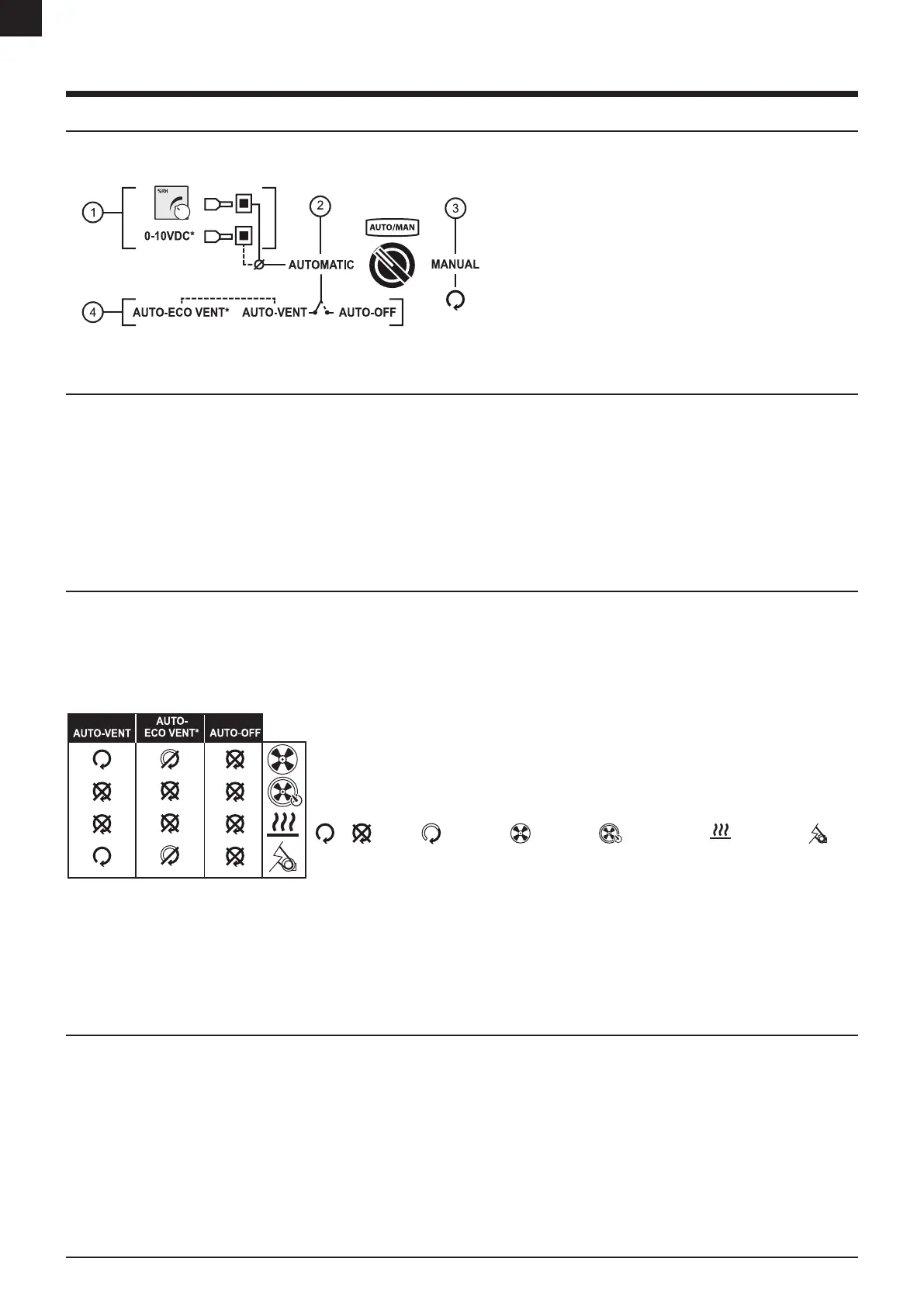
FIGURE 12: Illustration of automatic and manual functions
1. Connections for a humidistat or regulator signal when controlling the
dehumidication.*
2. Automatic control - Dehumidication is automatically controlled using
a humidistat or regulator signal
3. Manual control - Dehumidication is manually controlled using pre-set
settings.
4. Selectable ventilation mode when dehumidication stops.
* Option
7.1.1 AUTOMATIC OR MANUAL
Main operation control is operated by selecting automatic or manual mode on the [AUTO/MAN]-switch.
AUTOMATIC [AUTO] - Dehumidication capacity is controlled automatically by a humidistat/regulator signal. A user selectable ventilation mode to save energy or to ventilate
when the dehumidication need is achieved.
MANUAL [MAN] - The unit will run on selected settings until manually turned o. This mode will also prevent a humidistat or a regulator signal from shutting down the unit.
Note: Electrical heater output is selectable. Available for certain models only. See “6 Operating”.
Note: AUTO-mode is only operable when a humidistat/regulator signal is connected.
Note: If the unit is tted with Energy saving, the regeneration heater will operate on full eect in MAN-mode.
7.1.2 VENTILATION MODES
In automatic mode, the unit can operate in two dierent ventilation modes when the dehumidication automatically stops. The unit will automatically start dehumidify again
when the humidity rises above the setpoint on the humidistat or regulator signal.
• AUTO-VENT is a ventilation mode that provides a constant airow by keeping the process fan running.
• AUTO-ECO VENT* is a semi-ventilation mode that provides an airow in intervals by turning the process fan ON and OFF.
• AUTO-OFF is not a ventilation mode, unit stops all fans and is powered down to a sleep mode.
Note: When the dehumidication stops, a timed cooling down period on the regeneration fan will be initiated to remove
potential residual heat from the heaters. See cooling down timer in “11 Technical data”.
Note: Factory default setting on ventilation mode varies among models. For units with PLC, mode is adjusted in the
PLC. For units without PLC, change the mode by changing the terminal link wire inside the electrical cabinet. See
electrical diagram for default ventilation mode on the unit.
ON OFF Timed-controlled Process fan Regeneration fan Regeneration heater Rotor motor
FIGURE 13: Ventilation modes for automatic control
The default time setting for the process fan is: ON (5 min) and OFF (55 min). Adjusting the time setting is only possible with a PLC installed, without a PLC the default time
setting applies.
Note: AUTO ECO VENT is an option but it is included for DC/DR-50 and RL-60/61/71 when Energy saving 2 or 3 is selected.
* Option - Contact a DST representative for more on information on which unit can be tted with AUTO-ECO VENT.
7.1.3 HUMIDISTAT CONNECTION
Standard units have the option to use the built-in Humidistat inputs to control the dehumidication using a 1-step or 2-step humidistat.
The built-in humidistat controls the dehumidication by reducing the regeneration heater in steps. Use a 2-step humidistat to control the heater output in three steps (maximum
power, reduced power and zero power) or a 1-step humidistat for heating output in two steps (maximum power and zero power).


 To Next Page