6
Press BASS to activate and deactivate bass boost curve.
Activating this feature will enhance the bass frequencies
when listening to music at all volumes.
Adjust volume by turning VOL knob clockwise or
counter-clockwise.
Adjust balance by turning BAL knob clockwise or
counter-clockwise.
Bass Boost
Volume
Balance
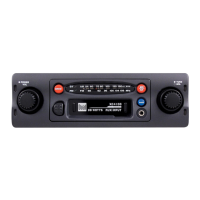
Cassette Player Operation
Insert a standard audio cassette into the cassette slot. The
cassette will automatically begin playback.
Press the EJECT button all the way in to stop and eject the
cassette. The unit will change to tuner mode.
Press the EJECT button half way in to fast forward. Press
EJECT again to resume playback.
Insert Cassette
Eject
Fast Forward
Tuner Operation
Turn TUNE knob to select desired station.
Press MO/ST during FM tuner operation to select mono or
stereo reception of the broadcast signal. The FM stereo LED
indicator illuminates during FM stereo reception.
Press BAND to select between FM and AM bands. The FM
LED indicator illuminates when FM is selected.
Tuning
FM Mono/Stereo
Band
XC4100 OPERATION
General Operation


 To Next Page