10
XML8150 OPERATION
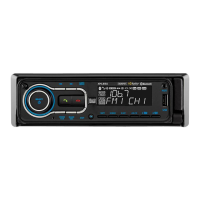
Display
Seek Tuning
Manual Tuning
Scan Tuning
Band
Storing and Recalling
Station Presets
WhenusingtheXML8150withouttheoptionalHDM90,press
DISPtotogglethedisplaybetweenthefollowingoptions:
Press TUNE
nn
or TUNE
ll
formorethanonesecond
toseekthenextstrongstation.
Press TUNE
nn
or TUNE
ll
momentarilytomoveradio
frequencyupordownonestepatatime.Pressandholdto
advancequickly.
Press SCANontheremotecontrolmomentarilytopreview
strongstationsonthecurrentband,pausingforfive
secondsateach.PressSCANontheremotecontrolagain
tocancel.
Press BANDtoselectbetweenFM1,FM2,FM3,AM1and
AM2bands.Uptosixpresetscanbeprogrammedforeach
band.
Upto18FMstationsand12AMstationscanbestoredin
memory.Tostoreastation,selectthedesiredbandand
station.Pressandholdthedesiredpresetbutton(1-6)for
morethantwoseconds.Whenstored,thepresetnumber
willappearinthedisplay.Thestationcanberecalledby
pressingthecorrespondingpresetbutton.
AM/FM Tuner Operation
FREQUENCYFREQUENCY
CLOCKBAND/PRESET
(LINE 2)


 To Next Page