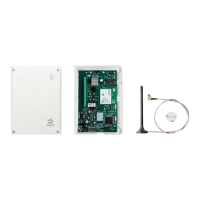
The DALMx000 is a versatile communication device primarily functioning as an external dialer and/or IP converter for fire and burglar alarm systems. It ensures secure alarm transmission, primarily via fixed Internet and secondarily through GPRS/3G. The device is designed to operate reliably even in low reception conditions, with GPRS/3G links maintaining functionality down to a signal strength of 6 (out of a maximum of 31). For optimal performance during installation, it is recommended that all LEDs are lit, indicating a signal strength of 12 or more.
Function Description
The DALMx000 offers multiple alarm notification methods, including SMS, E-mail, and IP alarms. It can be programmed with up to 10 or 12 (for DALM5000) different SMS, E-mail, or IP alarm receivers.
The device features eight hardwired inputs for direct connection to alarm sensors or relay outputs from fire alarm systems. These inputs are activated via potential-free closure to or opening from system ground, configurable during programming. Each input can be independently connected to specific receivers and assigned event codes.
In addition to hardwired inputs, the DALMx000 includes five "virtual inputs" that automatically activate in response to system events such as power supply issues (below 10.5 VDC), Internet connection errors, GPRS/3G connection errors, bypass activation, and cover protection. These integrated inputs are connected to receivers similarly to hardwired inputs and can have separate activation delays.
A key feature is its "dialer capture" functionality. The DALMx000 can simulate an analogue telephone line and alarm receiver, receiving alarms from existing alarm systems in SIA or Contact ID format. It then converts these into encrypted alarm messages and sends them via TCP/IP to alarm receiving centers. For Contact ID alarms, an acknowledgment tone is sent to the dialer only after the IP alarm is acknowledged by the alarm receiver. If the dialer hangs up before acknowledgment, message parameters are stored in an internal queue and processed upon subsequent dialer attempts. For SIA alarms, acknowledgment is sent as soon as the alarm is correctly received by DALMx000, with output REL1 activating for two seconds if transmission to the alarm center fails.
The DALMx000 can also emulate an analogue modem, allowing connection to the built-in modems of alarm systems like GE NX Series, DSCs Power Series, and Bosch 72xx/74xx Series. This enables remote connection for uploading and downloading via fixed Internet or GPRS/3G using the respective company's standard software.
Alarm notifications via TCP/IP are received by alarm receiving centers equipped with a standard SIA DC09 receiver or Dualtech's IPEagleCMS software. The device is typically powered from the existing alarm system and housed in a plastic enclosure or mounted within an existing system enclosure.
Alarm Transmission Procedures:
Alarm transmission is triggered by:
- Activation of any hardwired input.
- Activation of internal error checks (e.g., GPRS/3G error).
- Reception of dialed alarm notifications in Contact ID or SIA format from a connected analogue alarm dialer.
- Activation of alarm from equipment connected to the DALM serial port(s).
IP Alarm Procedure:
The device attempts transmission through multiple paths, testing each four times:
- Primary receiver via fixed Internet.
- Secondary receiver via fixed Internet (if primary fails).
- Primary receiver via GPRS/3G (if fixed Internet fails).
- Secondary receiver via GPRS/3G (if primary GPRS/3G fails).
- Second attempt to primary receiver via fixed Internet.
- Second attempt to secondary receiver via fixed Internet.
- Second attempt to primary receiver via GPRS/3G.
SMS Type Alarms:
DALMx000 can send SMS alarms via the GPRS/3G module to any mobile number. The message includes Object ID, Input label, and Input text. For analogue alarms, event code, area, and event text are also added. This feature is not available with Dualtech SECURE SIM, where messaging is handled via the EasyWebManager web portal.
E-mail Alarms:
E-mail alarms can be sent via both fixed Internet and GPRS/3G. The e-mail includes Sender ID, Object ID, Input label, and Input text. Similar to SMS, analogue alarm details are added if applicable. This feature is also not available with Dualtech SECURE SIM.
Important Technical Specifications
Power Supply: 11-30 VDC, secured with an external 1A fuse.
Current Consumption:
- GPRS/3G only: approx. 130 mA (idle mode)
- Wired IP and GPRS/3G: approx. 230 mA (idle mode)
Connections:
- 12/24V: Power supply (11-30 VDC).
- LINE OUT: Simulated telephone line for analogue dialer connection.
- GPRS/3G ERROR: Potential-free relay output for GPRS/3G errors (max 100mA).
- ETH ERROR: Potential-free relay output for Ethernet errors (max 100mA).
- REL1: Indicates failed transmission to ARC with a two-second pulse.
- REL2: Indicates successful transmission to ARC with a two-second pulse.
- IN1-IN8: Alarm inputs (1-8), activated by potential-free closure to or opening from system ground.
- O1-O4: Remote controllable open collector outputs (max 250 mA per output).
- BP: Bypass input. Closes against C to bypass inputs not programmed as 24h active.
- C: System ground (Common).
- ETH1: Ethernet connection socket for local area network.
- ETH2: Socket for connection to other IP equipment. ETH1 and ETH2 are connected via an onboard IP switch.
- J2-A: Pin strip for serial communication cable from external system.
- D+ D-: RS-485 connection for serial communication from external system.
DIP Switches (8x):
- DIP 1 & 2: Reserved.
- DIP 3 (ON at power up): Factory reset (deletes all configuration). Must be set to OFF after device starts.
- DIP 4 (ON): GSM mobile network signal strength indicated by LEDs (at least one green LED must be lit for optimal reception).
- DIP 5 (ON): Replies SMS for remote control of bypass/outputs off (not applicable for Dualtech SECURE SIM).
- DIP 6 & 7: Reserved.
- DIP 8 (ON): Remote access blocked (no access via SMS or EasyWebManager).
LED Indication (5 LEDs):
- LED 1 (Status):
- Off: GSM module switched off.
- Flashes once per second: Searching for GSM network.
- Two short flashes every three seconds: Connected to GSM network.
- LEDs 2-5 (Initial Start-up & First Programming):
- Flashes once per second: Indicates various stages like product start, GSM module check, SIM/PIN check, GSM network registration, programming request, EWM server connection, encrypted connection establishment, programming retrieval, and programming completion.
- Flashes 5 times per second: Indicates a different stage in the programming process.
- LEDs 2-5 (Normal Operation):
- LED 2:
- Off: DALMx000 connected (IP transmission via fixed Internet during alarm transmission).
- Lit: DALMx000 connected (IP transmission via GPRS/3G during alarm transmission).
- Flashes once/second: DALMx000 connected.
- Flashes 5 times/second with LED 3: Sending SMS or E-mail.
- LED 3:
- Flashes once/second: Countdown for alarm in progress.
- Flashes 5 times/second: Alarm transmission in progress.
- LED 2+3 (flashing three times together): Transmission OK after alarm transmission.
Approvals:
- DALM1000: Security Grade 2 (EN50131-1 / EN50136-1-1), No (CPR EN 54-21).
- DALM2000: Security Grade 3 (EN50131-1 / EN50136-1-1), No (CPR EN 54-21).
- DALM3000: Security Grade 4 (EN50131-1 / EN50136-1-1), Yes (CPR EN 54-21).
- DALM5000: Security Grade 4 (EN50131-1 / EN50136-1-1), Yes (CPR EN 54-21).
- CPR EN 54-21:* *0845-CPR-232.1747, "Alarm transmission and fault warning routing equipment for fire alarm systems installed in buildings".
Reporting Time & Availability:
- GPRS/3G: T4 (Reporting Time), A4 (Availability), ATS5 (Overall).
- Fixed Internet: T6 (Reporting Time), A4 (Availability), ATS6 (Overall).
Usage Features
Programming and Commissioning:
The DALMx000 is programmed and commissioned via the EasyWebManager web portal (https://ewm.dualtech.se) or the Dualtech EWM 2.0 smartphone app (available on Appstore, Google Play, Windows Store).
- Create and save programming configurations in the web portal.
- Install an active SIM card (PIN code must be switched off if not a Dualtech SECURE SIM).
- Power up the device and wait for "Ready for programming" mode.
- Log into EasyWebManager, select the desired configuration, enter the device's phone number (including country code), and press "Program."
- Select "Commission" to register the device with the alarm receiving center(s). During commissioning, the device uses the Transmitter code and Password (a one-time password) specified during configuration, which is then automatically changed.
System and Alarm Centre Checklist (Pre-installation):
- Inform IT department about IP alarm transmitter connection.
- Order static IP addresses (default gateway, subnet mask) if DHCP is not used.
- Ensure relevant receiver ports in firewalls are open for outgoing TCP/IP traffic.
- Obtain primary/secondary IP addresses, IP ports, transmitter code, password, and heartbeat frequency from the alarm receiving center.
- Establish the correct APN for the selected mobile operator.
Status Request:
After programming, a status request can be performed from the PC or app to retrieve current device status, including:
- GPRS/3G signal strength.
- Fixed network connection status.
- Communication path status to ARC.
- Latest heartbeat date, time, and result.
- Current status of inputs (alarm or standby).
- Current status of outputs (active or not active).
- Current status of device error sources.
- SW version.
Output Remote Control:
The DALMx000 has two outputs (REL1, REL2) that can be controlled via SMS messages sent to the SIM card's phone number. The SMS format is [password],Out[1,2]:[on,off]. The password for output remote control is set in the EWM portal.
Maintenance Features
SIM Card Replacement:
- For a new SIM card from the same mobile operator:
- Power off the device.
- Install the new SIM card.
- Power on the device.
- Reprogram the configuration file with the new phone number.
- For a new SIM card from a different mobile operator:
- Update the configuration in EWM with the new APN.
- Reset hardware to factory settings (set DIP3 to ON, connect power, check LEDs 2,3,4,5 flash, then reset DIP3 to OFF).
- Select the relevant configuration via the app.
- Select "Tools" -> "New hardware" -> "Continue" -> "Hardware replaced".
- Reprogram via the app with the new phone number.
Hardware Replacement (Resetting):
When replacing hardware or a circuit board, a new activation is required at the alarm center(s).
- Transfer the SIM card to the new device.
- Ensure the replacement product is the same model and all connections/DIP settings are identical. Connect power.
- Log into the EWM app, select the relevant configuration.
- Under "Tools," select "New hardware" and perform the actions.
- Select "Program" in the EWM app.
- Under "Commission," select "New password" for the alarm center(s), enter the new password received from the alarm center(s), and commission the device.
Resetting Existing Hardware to Default Delivery Settings:
- Disconnect power.
- Perform hardware reset (set DIP3 to ON, connect power, check LEDs 2,3,4,5 flash, then reset DIP3 to OFF).
- Log into EasyWebManager, select the relevant configuration.
- Under "Commission," select "New hardware" and perform the actions.
- Select "Program" in the PC or EWM 2.0 app.
- Under "Commission," select "New password" for the alarm center(s), enter the new password received from the alarm center(s), and reactivate the device.
The DALMx000 is developed and produced according to the ISO9001 quality system, with components selected for high quality and functionality, designed to operate within class 3k5 ambient climate conditions (EN60721-3-3: 1995).

 Need help?
 General

 To Next Page