36 37
METHOD OS
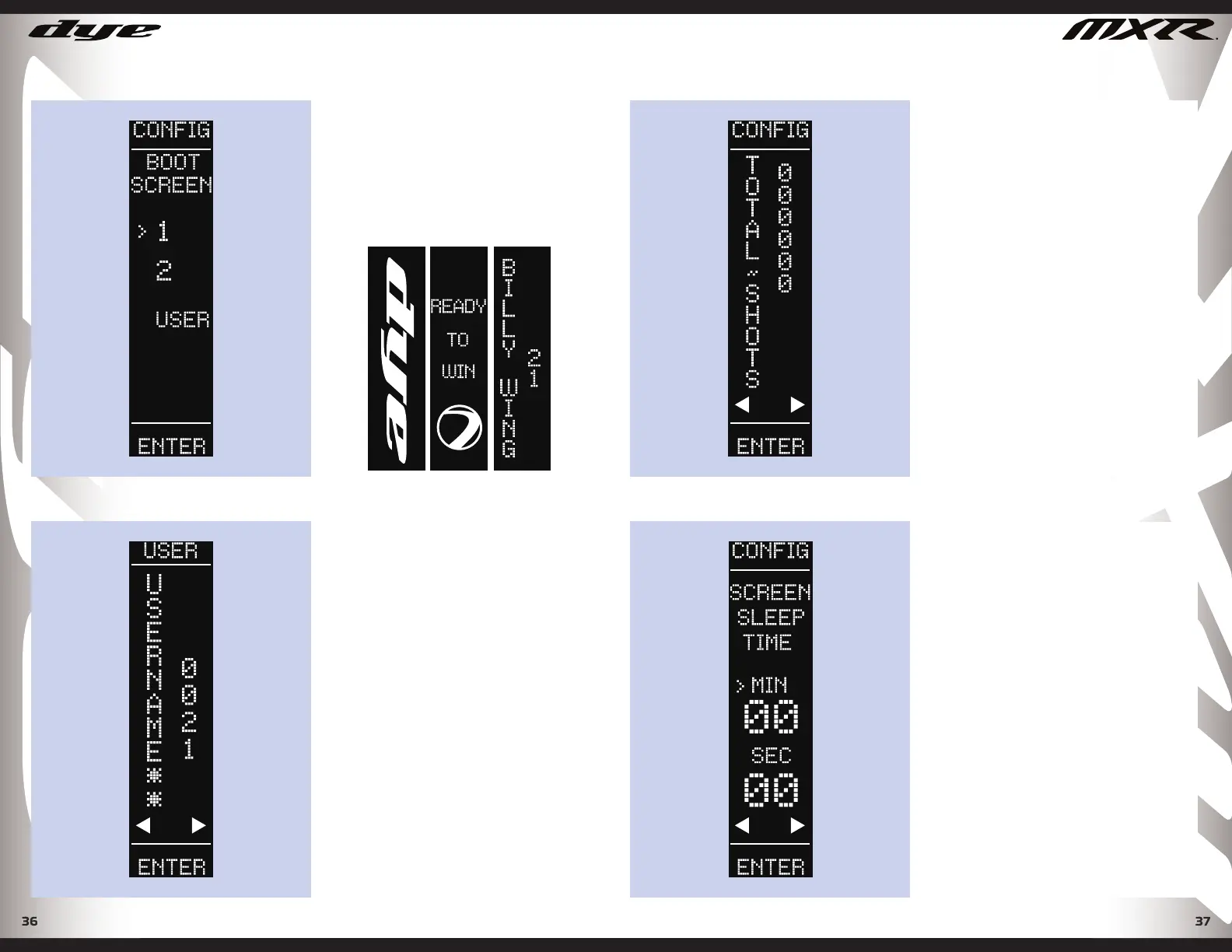
BOOT SCREEN
Select you favorite Boot screen from
the 2 pre-set options. The user is able
to choose between 2 pre-set boot up
screen options, or select to have the
user’s name displayed on boot up.
GENERAL SETTINGS
USER NAME
Personalize your MXR by entering a
custom username.
Move the joystick up and down to
scroll through letters, numbers, and
special typescript. Move the joystick
left and right to change the next
character.
The option is available to display
the username during boot up. This
can be done from the Boot Screen
confi guration screen in the General
Setting menu.
DYEPAINTBALL.COM
TOTAL SHOTS
The total Shot Counter cannot be
reset, it is used to monitor systems
and service schedules. The total Shot
Counter also indicates that the gun
was tested at the factory prior to
shipping. It is also a strong indicator
of how much use the MXR has seen
in its life.
GENERAL SETTINGS
SCREEN SLEEP TIME
Values 15 sec - 10 min
(Factory Default 1 min)
The screen will go to sleep after
a predetermined amount of time.
This is to conserve battery life when
playing. To activate the screen, tap
the joystick in any direction.
METHOD OS
DYEPAINTBALL.COM


 To Next Page