EN
ENTER 40
15
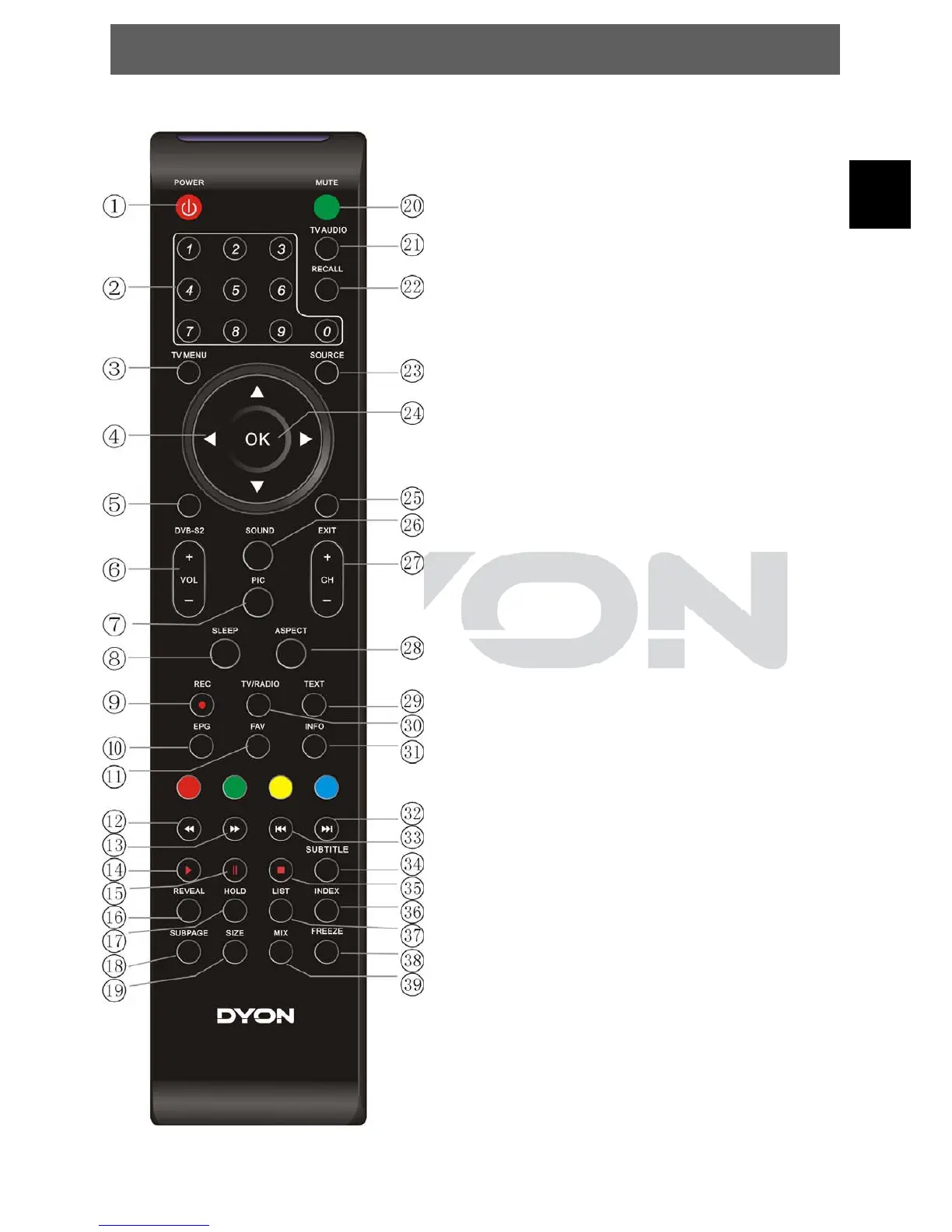
3.5 Remote Key Function
1. POWER: to switch the set device to on or standby.
2. NUMBER KEYS: used to select channel numbers or
input numbers in menus.
3. TV MENU: open the menu of the current title.
4. ARROW KEYS: Move within the menus.
5. DVB-S2: Switch to DVB-S Mode
6. VOL+/-: Adjust the volume level.
7. PIC: To switch picture mode.
8. SLEEP: Set timer to turn off the TV.
9. REC: Start Record in DTV / DVB-S mode.
10. EPG: To display information about the program being
viewed and what’s on next in DTV and DVB-S mode.
11. FAV: Used to access your favorite channels.
12. : Fast rewind for USB file playback
13. forward for USB file playback
14. PLAY: Play the media player in USB mode.
15. PAUSE: Pause the media player in USB mode.
16.-19. REVEAL HOLD SUBPAG:SIZE
20. MUTE: To disable or enable the sound output.
21. TV/AUDIO: to switch the soundtrack
22. RECALL: to show the last view channel
23. SOURCE: select input source.
24. OK: Used to confirm a selection within a menu.
25. EXIT: Used to return to the previous screen or menu.
26. SOUND: To switch sound mode.
27. CH+/-: Used to changing the channels in normal play.
28. ASPECT: to switch the apsect ration
29. TEXT: to open teletext OSD display if teletext available in
the broadcasted stream.
30. TV/RADIO: It is used to switch between digital TV
channels and radio stations.
31. INFO: Used to display information about the channel
being viewed or further information about the program
when in DTV / DVB-S mode.
32. : go to the next file in USB mode
33. : got to the last file in USB mode
34. SUBTITLE: Used to switch among different subtitles that
are broadcasted in DTV and DVB-S mode.
35. STOP: Stop the media player in USB mode.
37./38. Open the programm list / freeze the picture.
36./39.
INDEX MIX, and open PVR list of DTV / DVB-S mode.
Colour keys (RED/GREEN/YELLOW/BLUE): Teletext functions


 To Next Page