3
Domestic Hot Water Increase Temperature Button
The temperature of the domestic water can be increased up to 65 °C thanks to the domestic water
temperature increase button.
4
Central Heating Water Increase Temperature Button
The temperature of the heating water can be increased up to 80 °C thanks to the heating water
temperature increase button.
5
Domestic Hot Water Decrease Temperature Button
The temperature of the domestic water can be decreased down to 30 °C thanks to the domestic water
temperature decrease button.
6
Central Heating Water Decrease Temperature Button
The temperature of the heating water can be decreased down to 30 °C thanks to the heating water
temperature decrease button.
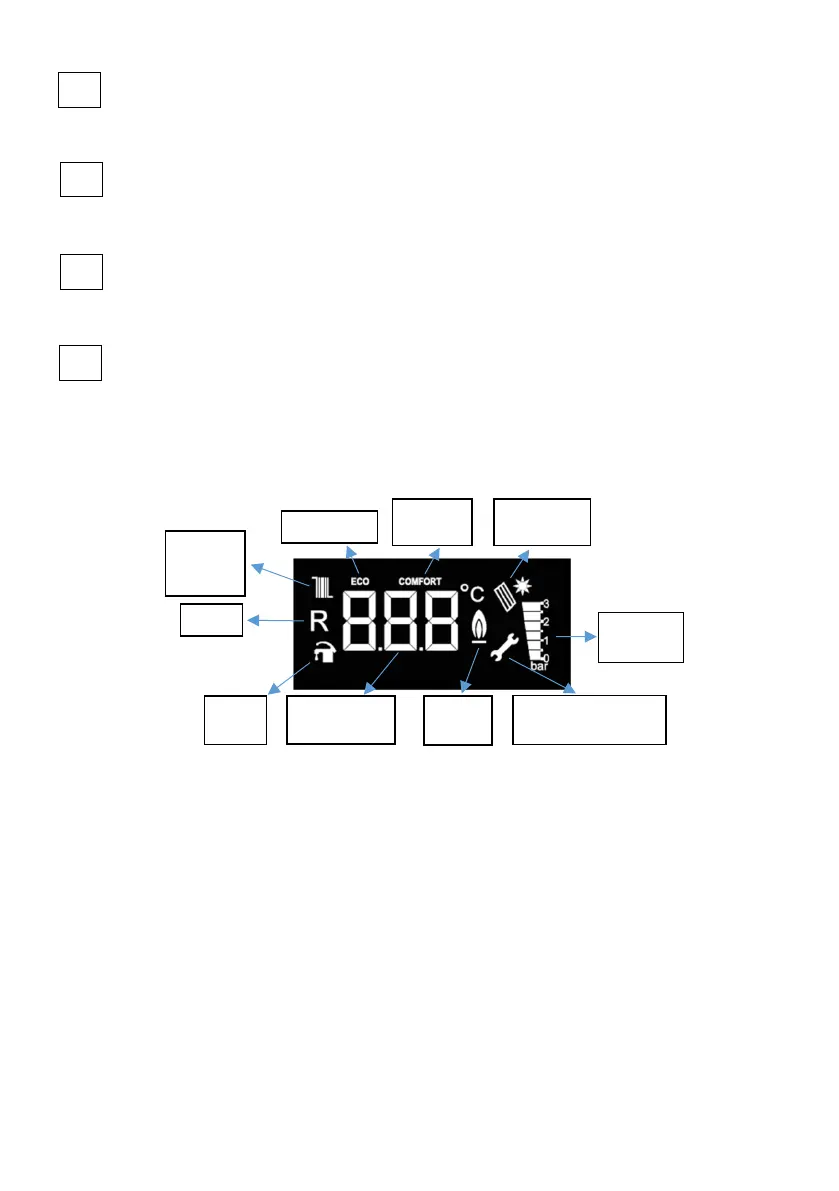
11.2. LCD Screen
LCD screen display icons described here below.
Figure 19
11.2.1. Flame Icon
When operating between 0% and 50% capacity range, the icon is displayed on the LCD
screen as single bar, whereas it is displayed as two bars when operating between 50% -100% capacity
range.
11.2.2. Pressure Indicator
The LCD display shows 0-0,5-1-1,5-2-2,5-3 bar water pressure values. The values other than these
ones are not displayed. Only when filling after C37 (Low water pressure error) fault, the pressure value
is displayed in the temperature value section.
11.3. Operation Functions
11.3.1. Standby (OFF Mode)
The mode where device can be set to standby mode. In this mode, no requests for heating water and
domestic water can be made. To activate the OFF mode, it is necessary to keep button no. 1 (position
selector) pressed for 3 seconds continuously. When -OFF- is displayed on screen, mode is activated.
Central
Heating
is On
Reset
DHW
is On
Temperature
On
Flame
ON
Parameter
Adjustment Indicator
Pressure
Indicator
ECO Mode
Comfort
Mode
Solar Panel
Mode



 To Next Page