93
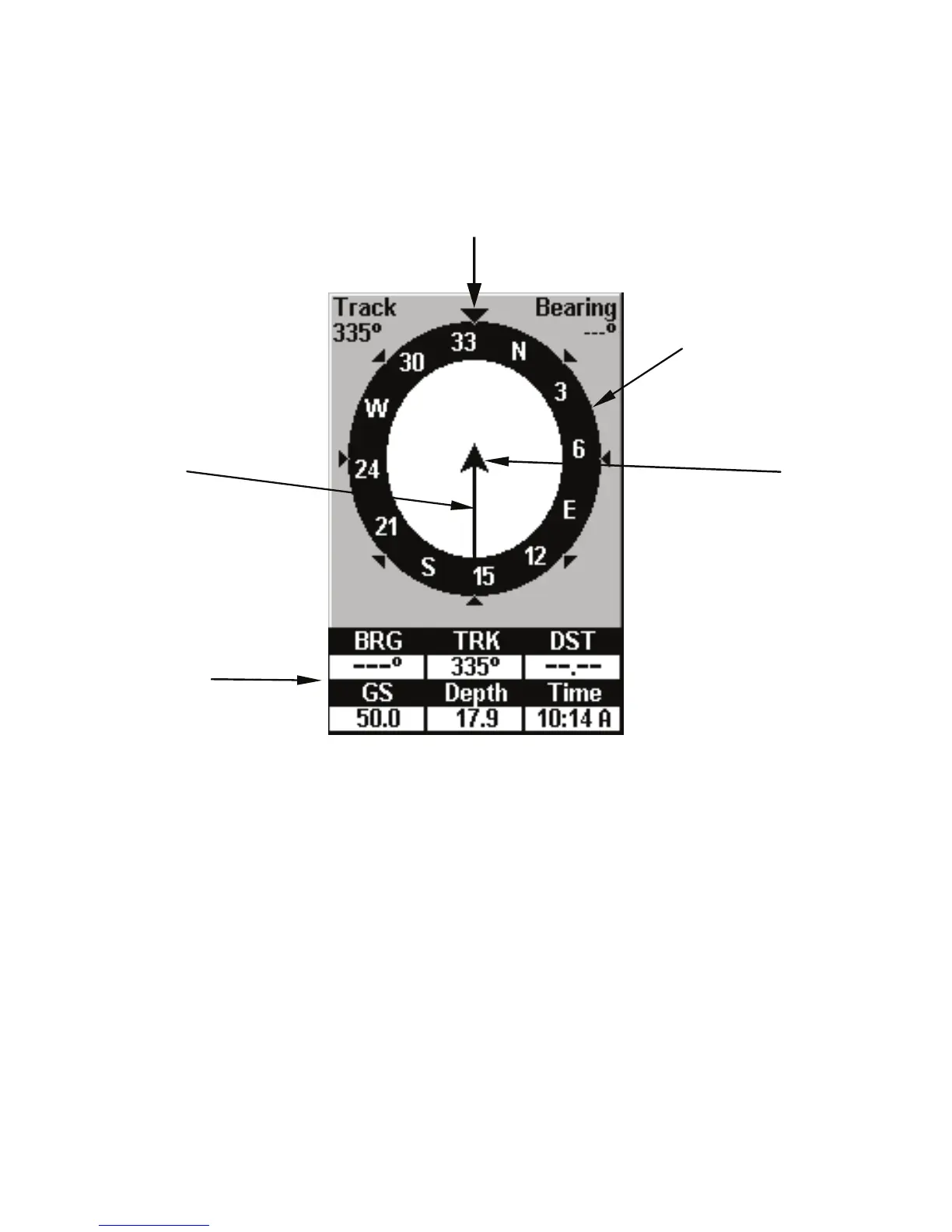
you've just taken — is depicted by the line extending from the arrow.
The arrow pointing down at the top of the compass rose shows your cur-
rent track (direction of travel).
Navigation Page, recording a trail, traveling north. The page looks like
this when the unit is not navigating to a waypoint, following
a route, or backtracking a trail.
When navigating to a waypoint, the Navigation screen looks like the
following figure. Your ground speed, track, distance and bearing to
waypoint and course are all shown digitally on this screen.
NOTE:
Remember: when Speed, Track and Position information displays
are flashing, satellite lock has not been acquired and no position fi
has been determined. A question mark will also flash on the pre-
sent position arrow in the center of the compass rose.
Compass
rose
Navigation
information
displays
Present
position
arrow
Trail line
Track or compass heading indicator, showing direction of travel



 To Next Page