59
ting. For example, if you set the shallow alarm to 10 feet, the alarm
will sound a tone if the bottom signal is less than 10 feet. It will con-
tinue to sound until the bottom goes deeper than 10 feet. The deep
alarm works just the opposite. It sounds a warning tone if the bottom
depth goes deeper than the alarm's setting. Both depth alarms work onl
signals. No other targets will trip these
alarms. These alarms can be used at the same time or individually.
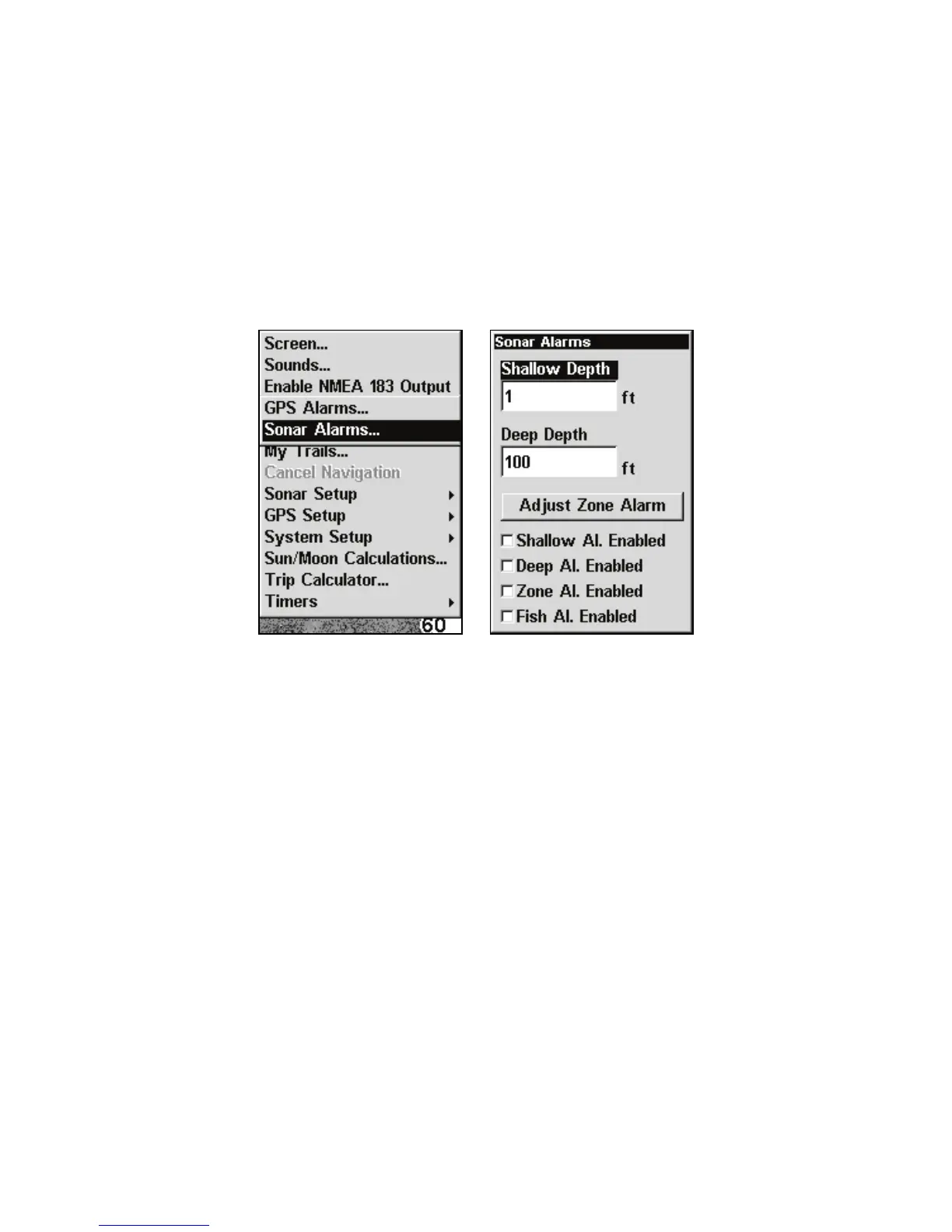
Sonar Alarms selected from main menu (left).
The Sonar Alarms menu (right).
To adjust and turn on the shallow alarm:
1. Press MENU|MENU|↓ to ALARMS|ENT.
2. Press ↓ to
SONAR ALARMS|ENT.
3. Press ↑ or ↓ to
SHALLOW ALARM ENABLED and press ENT.
4. Press ↑ to
SHALLOW DEPTH|ENT.
5. Use ↑ ↓ to change the first digit, then press → to the next digit. Re-
peat these steps until you have entered the desired depth and press
ENT.
To switch to a different depth setting, open the Sonar Alarms



 To Next Page