Eagle Access Control Systems, Inc. www.EagleOperators.com
18
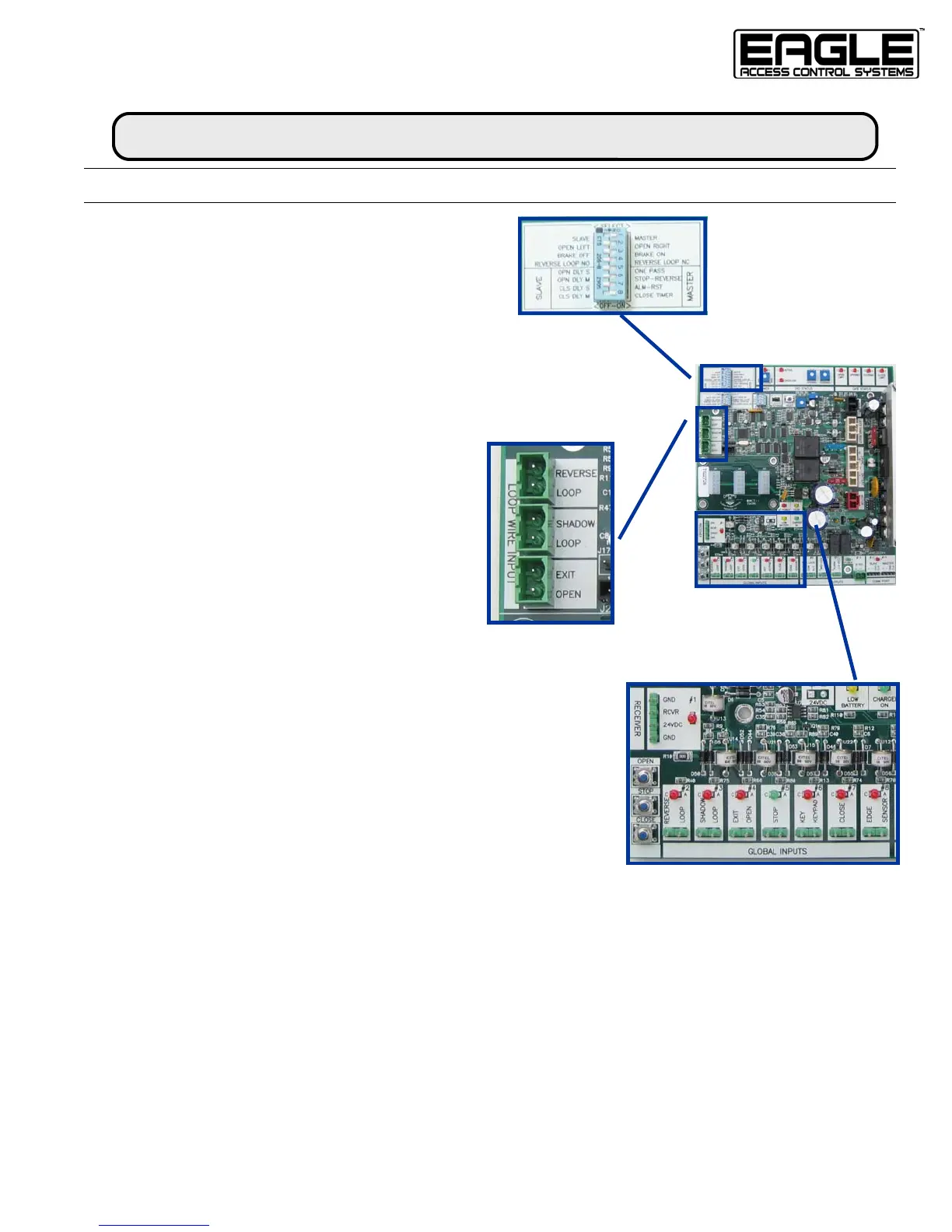
FEATURE SELECTOR
SET-UP & OPERATION
Feature Selector Switches
1. Master / Slave (Not Applicable/Do Not Use)
2. Opening Direction
3. Motor Brake (Not Applicable/Do Not Use)
4. Reverse Loop Input can be set to NO or NC
MASTER
5. One Pass is an anti-tailgating feature
6. Stop Reverse is a convenience feature that allows your radio
controls to work like a 3-button station; click to open, click to stop,
click to close
7. Alarm Reset allows the operator to reset itself 5 minutes after going
into overload
8. Close Timer
Loop Wire Inputs
Reverse Loop for Use with Plug-in Loop Detector
Shadow Loop for Use with Plug-in Loop Detector
Exit Open for Use with Plug-in Loop Detector
Inputs
#1—Pre-wired Receiver Terminal Strip (3 and 4 wire receiver)
#2—Reverse Loop for External Safety Loop Detector & Photo-eye
#3—Phantom Loop for Phantom or External Shadow Loop Detector
#4—Exit Loop for Exit Probe or External Loop Detector
#5—Stop for NC Stop Button or 3-Button Station
#6—Keypad for NO Keypad, Keylock & Fire Boxes
#7—Close for 3-Button Station
#8—Edge Sensor for Edge Senor Input
Outputs
#9—Dry Contact Relay for NC or NO control of auxiliary device
#10—Mag-Lock Relay for power and control of Magnetic Gate Lock
#11—Alarm output for overload siren
#12—24 VAC Power Output for accessories
#13 & #14 Connection for 2-wire Master Slave Communication
Safety & Convenience
• Plug-in Loop Detectors & Loop Wire Connectors
• Open, Stop, Close controls on board
• ERD Adjustable in the Opening and Close Direction of travel
Feature Selector



 To Next Page