SH-TSX Product Manual - © EasyIO / www.easyio.eu
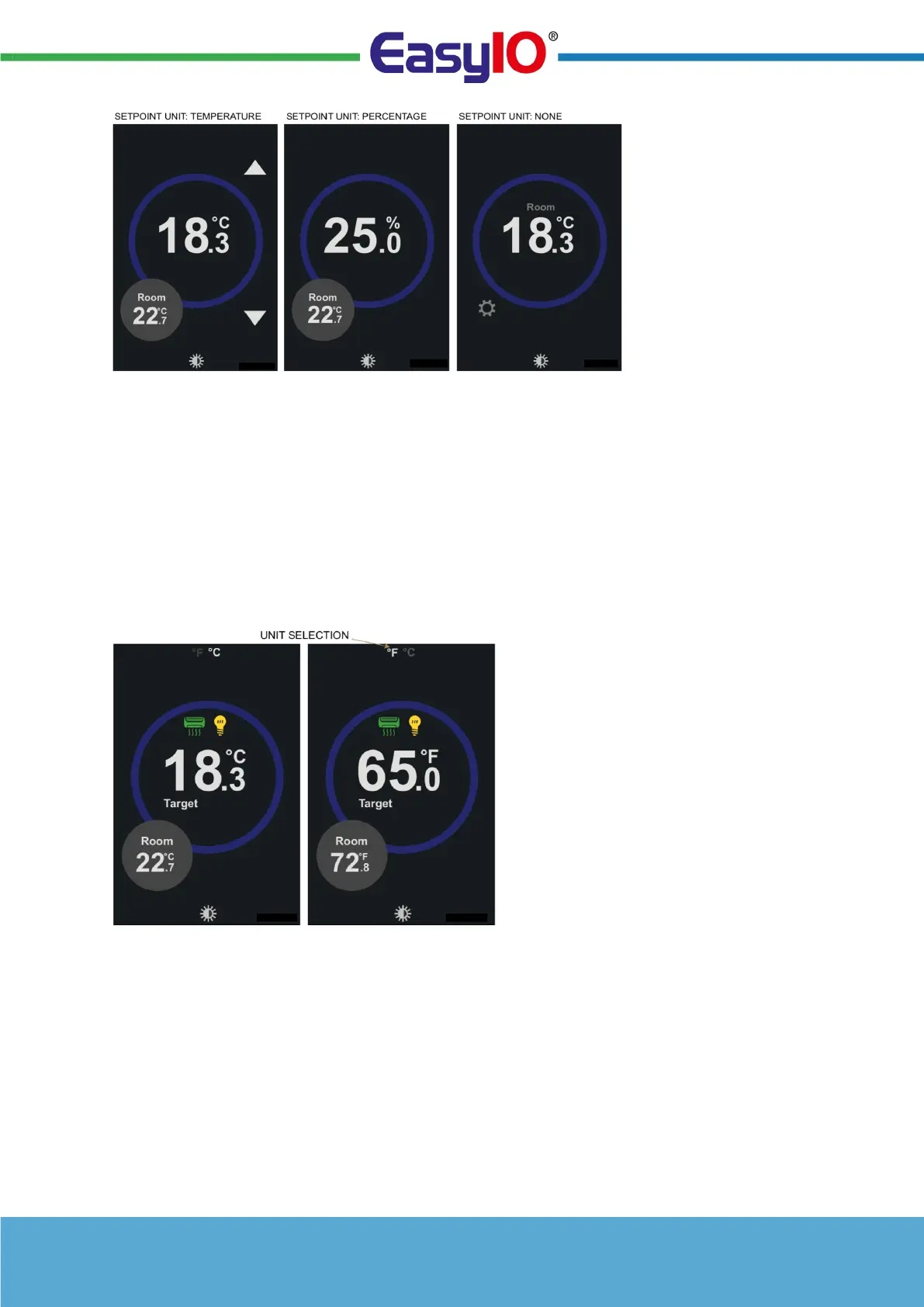
Target Setpoint
Using the arrows up & down the target setpoint can be adjusted. The minimum and maximum user
setpoints are configured in the Maintenance mode. With BAC/MOD models the current setpoint is
available over the communication network.
Centigrade to Fahrenheit Display
If Centigrade to Fahrenheit icon has been enabled it is possible on the front screen to change the units
by touching this icon on top of the screen.
This option is particularly useful in hospitality applications where the client base is expected to be
international.
Further Settings and Information
The FURTHER SETTINGS shows additional user settings options on the thermostats:-
• OFF icon to switch thermostat to OFF (OFF icon is displayed here only if OFF icon has been
enabled and the PARTY (BOOST) button has also been enabled)
• LOCK icon is used to lock the thermostat. Number of different lock modes options exist.
• CLEANING icon is used to enable timed cleaning mode
• LIGHT and AC icons are used to switch lighting or AC on in system applications
• COG WHEEL icon allows entry to the maintenance mode.


 To Next Page