SH-TSX Product Manual - © EasyIO / www.easyio.eu
Touchscreen Backlight
The touchscreen backlight level can be adjusted through the maintenance mode. During the normal
operation after 30 seconds of inactivity, the touchscreen dims to the “stand-by level set. If the backlight
level is set to 0, the screen backlight switches off.
By pressing the DIM icon when the screen is active the screen is immediately dimmed to the "stand-
by" level. Pressing the DIM icon when the device is in the "stand-by level", switches the backlight OFF.
The screen backlight is automatically activated when it is touched.
Measurement Displays
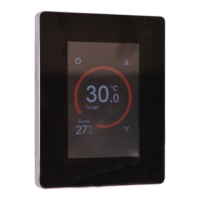
The SH-TSX thermostat can show up to 3 temperatures (sensor 1, sensor 2, sensor 3) in the ACTION
CIRCLE. With the RH humidity sensor option, the relative humidity sensor is also displayed in the
ACTION CIRCLE.
Sensor 1 can display the external sensor RI1 temperature, or temperature can be set
over the network (if Sensor1 Source has been set to network). The description for the
temperature can be changed via Sensor1 Text parameter in the configuration pages. By
setting the description to Disabled, the sensor reading is not displayed on the screen.
Sensor 2 can display the external sensor RI2 temperature, or temperature can be set
over the network (if Sensor2 Source has been set to network). The description for the
temperature can be changed via Sensor2 Text parameter in the configuration pages. By
setting the description to Disabled, the sensor reading is not displayed on the screen.
Sensor 3 can display the built-in sensor temperature, or temperature can be set over the
network (if Sensor3 Source has been set to network). The description for the
temperature can be changed via Sensor3 Text parameter in the configuration pages. By
setting the description to Disabled, the sensor reading is not displayed on the screen.
Note: If all sensor displays are Disabled, the ACTION CIRCLE displays the last drawn image.
Setpoint Mode
Inside the large circle on the HOME SCREEN the SH-TSX shows the target value. As default the units
are in temperature (Celcius / Fahrenheit). It is possible to change the units to ’percentage’ to display
the target values for percentage based control, or to show temperature only.
Setpoint Mode Options:
• TEMPERATURE: Setpoint is displayed in temperature (Celsius/Fahrenheit)
• PERCENTAGE: Setpoint is displayed in percentage
• NONE: No setpoint is displayed. Instead of setpoint the Sensor 3 is displayed inside the circle.
If no other measurement is not displayed the ACTION CIRCLE change to the COG WHEEL
icon to indicate access to FURTHER SETTINGS screen.


 To Next Page