SH-TSX Product Manual - © EasyIO / www.easyio.eu
The FURTHER SETTINGS screen is protected by the Staff Code. As default the Staff Code is
disabled (0000). If activated, the user will need to enter the Staff Code to enter the screen.
Fan Speed Display and Manual Override
The SH-TSX has fan icon and line bar to indicate the fan speed. It is also possible to use the line bar
only to indicate other signals by disabling the fan icon.
The fan and line bar display is configured by a parameter. The options are:-
• DISABLED (Default)
• FAN AND LINE BAR
• LINE BAR ONLY
• FAN ONLY
• FAN AND COLOUR
LINE BAR
• COLOUR LINE BAR
ONLY
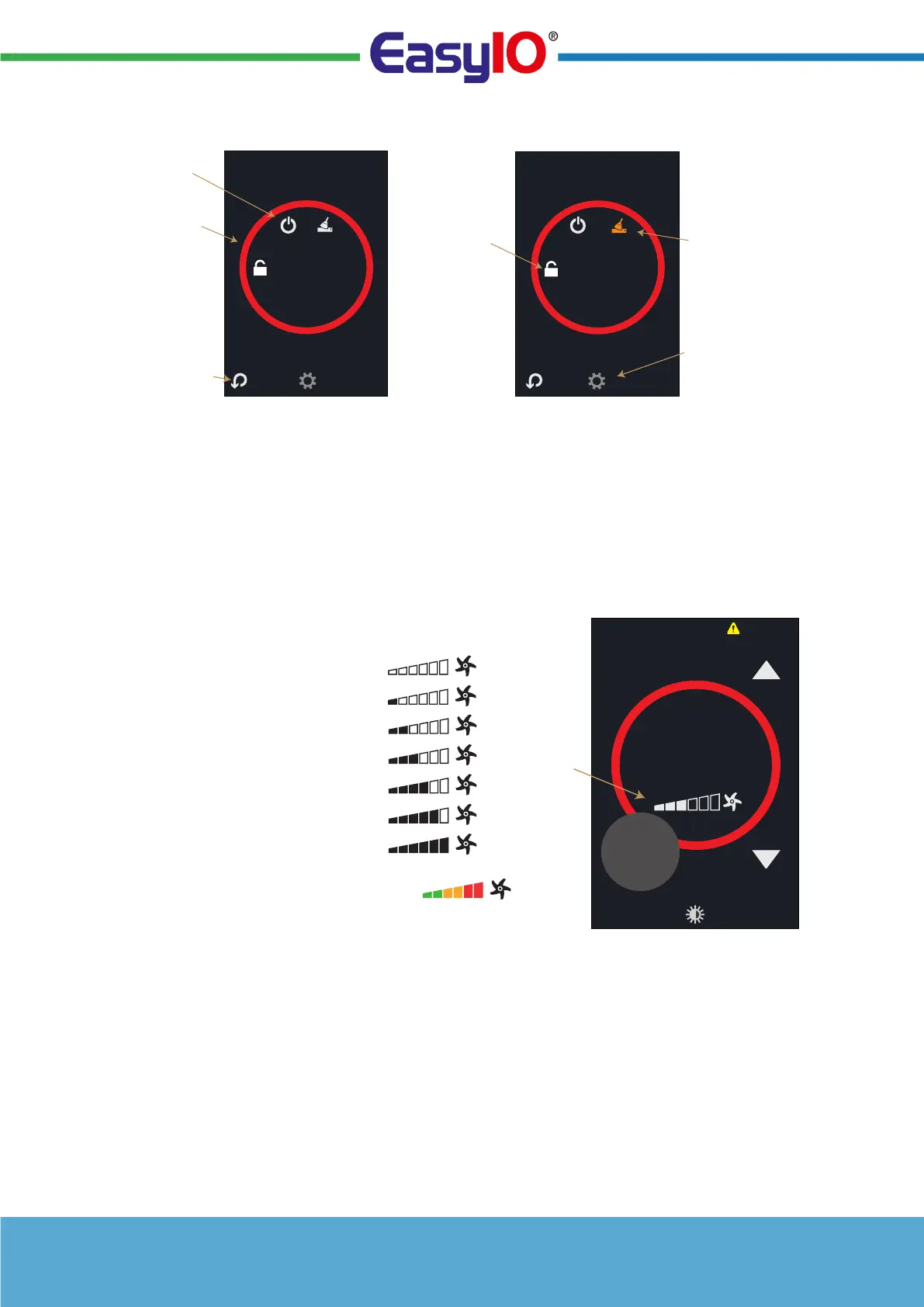
When the fan level set to
more than OFF (Speed 0) via
network or manually (if
enabled), the fan icon
rotates. The current fan/level
is displayed by the shading
of the line bar (in 6
steps/bars).
The shading of the bar can
beset to follow greyscale, or
green/yellow/red colour
scheme.
The system uses thelast command principle.If the fan speed hasbeen set/changed fromthe
network then thedisplay goes toautomatic mode(showing ’A’ next to theline bar if Auto option
selected). When thedevice is manuallyoverridden then the ’A’symbol changes to ’M’indicating
manualoperation (only if Autooption has beenselected for ManualControl). Otherwise thescreen
shows only the selected Fan Speed.
FURTHER SETTINGS AND INFORMATION
CTIVATE FUNCTIONS
BY SELECTING THE
ICONS
LARGE CIRCLE
CONTINUES TO
DISPLAY THE SET
COLOUR
USE ESC BUTTON TO
SET OR WAIT FOR A
TIME-OUT
ENTRY SCREEN
TO ENABLE CLEANING MODE
TOUCH THE ICON
SELECT COG WHEEL TO
ENTER MAINTENANCE
MODE (REQUIRES
PASSWORD)
SELECT LOCK ICON TO
LOCK THE THERMOSTAT
FROM TAMPERING
SELECT CLEANING ICON
TO ENABLE CLEANING
MODE. THE DISPLAY
WILL COUNT DOWN
FROM 30 SECONDS
DURING WHICH ALL
BUTTONS ARE DISABLED
ALLOWING SCREEN
CLEANING.
PRESS OFF BUTTON
TO SWITCH THE
INTERFACE OFF
30
Clean Screen
OPTIONAL FAN
SPEED AND
MODE INDICA-
TION
A =AUTO
M = MANUAL
21.5
°C
Room
20
.1
°C
A
PRESSING THE
FAN DISPLAY
THE FAN
SPEED CAN BE
MANUALLY
OVERRIDDEN
‘A’ IS DISPLAYED WHEN UNDER AUTO-
MATIC CONTROL (NETWORK), IF FAN
MANUAL MODE PARAMETER HAS AUTO
OPTION SELECTED.
WHEN FAN SPEED IS 1 TO 6 FAN ICON
ROTATES.
A
FAN AUTOMATIC
CONTROL
Speed 1
A
Speed 2
A
Speed 0
A
COLOUR LINE
BAR (OPTION)
A
Speed 3
A
Speed 4
A
Speed 5
A
Speed 6


 To Next Page