EasyManua.ls Logo

Eaton FT1380e - User Manual

Eaton FT1380e
34 pages
Print Icon
To Next Page IconTo Next Page
Loading...
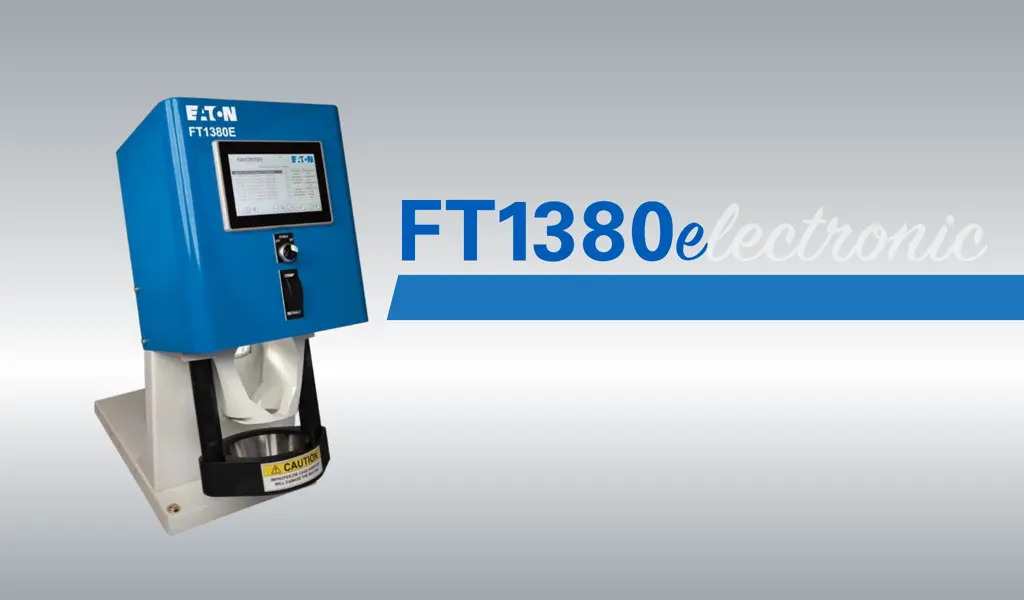
Eaton Electronic FT1380e Crimp Machine Operator’s Manual
CRIMP MACHINE OPERATOR’S MANUAL
FT1380E Crimp Machine Operators Manual: E-HOAS-TT005-E

Other manuals for Eaton FT1380e

Questions and Answers

Summary

Safety Instructions

General Safety Guidelines

Comprehensive safety instructions covering operation, handling, and maintenance to prevent injury and damage.

Specifications

Machine Specifications

Details on electrical requirements, dimensions, weight, and production capacity.

Part Numbers and Setup

Lists part numbers for machine configurations and outlines the setup and installation procedure.

Accessories

Die Cages and Related Parts

Information on die cages, repair kits, and fitting locators for various hose sizes.

Auxiliary Items

Details about USB drives, styluses, and wiping cloths for machine operation.

Operating Instructions

Control Panel and Icon Reference

Explains the FT1380e control panel features and provides a quick reference guide for screen icons.

Product Library and Favorites

Product Library Navigation

How to access and view the complete list of FT1380e crimp specifications.

Favorites Menu Management

How to save and manage frequently used crimp specifications in the Favorites menu.

Production Screen

Production Screen Overview

Details on the Production Screen, its displayed information, and assembly photos for verification.

Maintenance Screen

Maintenance Screen Overview

Displays calibration information, revision levels, and crimp counter; accessible only when logged in as Admin.

Searching for Crimp Specs

Product Library Search Function

Step-by-step guide on how to use the search function in the Product Library to find specific crimp specs.

Loading Crimp Specs

Loading Specs from Product Library

Instructions on selecting and loading a crimp spec from the Product Library for crimping or saving as a favorite.

Saving Favorites

Saving to Favorites Menu

Process for saving a selected crimp specification to the Favorites menu for quick access.

Favorite Record Management

Moving Favorite Records

How to move selected favorite crimp specifications up or down in the list.

Crimping Procedures

Crimping from Product Library

Steps to perform crimping using specifications selected from the Product Library menu.

Crimping from Favorites Menu

Loading and Crimping Favorites

Instructions on loading a favorite spec and initiating the crimping process via the production screen.

Renaming Favorites

Renaming Favorite Specs

Procedure for renaming a saved favorite crimp specification using the on-screen keyboard.

Removing Favorites

Removing Favorite Specs

Steps to remove a favorite crimp specification from the Favorites menu after confirmation.

Crimp Offset Adjustment

Using Calculator for Offsets

Guide on measuring crimp diameters and using the calculator to adjust crimp offsets.

Crimp Offset Manual Adjustment

Manual Offset Entry

Procedure for manually entering and verifying desired crimp offset values directly on the production screen.

Setting Retract Position

Variable Retract Position Setup

Instructions for setting the variable retract position for the crimper using the position field.

Admin Login

Logging In as Administrator

Steps to log into the system as an administrator using the admin login icon and password.

Admin Session Management

Admin Privileges and Auto-Logout

Information on admin session status, maintenance icon visibility, and auto-logout settings via privileges.

Custom Crimp Spec Loading

Loading and Editing Custom Specs

Process for loading custom crimp specifications and editing their attributes while logged in as admin.

Machine Calibration

Calibration Procedure

Steps to check or recalibrate the machine using the CALIBRATION spec and the calculator function.

Privileges Management

Setting User Privileges

How administrators can set user privileges for common users regarding favorites, offsets, and retract settings.

Software Updates

Updating Machine Software

Instructions for downloading and installing new software versions via a USB drive.

Software and Restore Procedures

Restoring Software and Favorites

Procedures for restoring software, saved programs, or favorites lists after updates or issues.

PLC Update Procedures

Steps for updating the PLC using a micro-SD memory card.

Crimping Procedures

Loading and Unloading Die Cages

Detailed steps for loading and unloading die cages into the crimp machine.

Maintenance Procedures

Maintenance Intervals and Lubrication

Guidelines for die cage and crimp ring lubrication and maintenance intervals based on crimp counts.

Die Cage and Machine Maintenance

Procedures for die cage maintenance, component inspection, and general machine upkeep.

Troubleshooting Tips

Common Symptoms and Corrective Actions

A guide to diagnosing and resolving common operational issues with the crimp machine.

Crimp Machine Components

Component Part Numbers

A list of part numbers and descriptions for various components of the crimp machine.

Die Cage Components

Die Cage Part Breakdown

Detailed breakdown of components within a die cage, including part numbers and quantities.

Hydraulic Schematic

Hydraulic System Sequence

Diagram and sequence of operations for the hydraulic system of the crimp machine.

Summary

Safety Instructions

General Safety Guidelines

Comprehensive safety instructions covering operation, handling, and maintenance to prevent injury and damage.

Specifications

Machine Specifications

Details on electrical requirements, dimensions, weight, and production capacity.

Part Numbers and Setup

Lists part numbers for machine configurations and outlines the setup and installation procedure.

Accessories

Die Cages and Related Parts

Information on die cages, repair kits, and fitting locators for various hose sizes.

Auxiliary Items

Details about USB drives, styluses, and wiping cloths for machine operation.

Operating Instructions

Control Panel and Icon Reference

Explains the FT1380e control panel features and provides a quick reference guide for screen icons.

Product Library and Favorites

Product Library Navigation

How to access and view the complete list of FT1380e crimp specifications.

Favorites Menu Management

How to save and manage frequently used crimp specifications in the Favorites menu.

Production Screen

Production Screen Overview

Details on the Production Screen, its displayed information, and assembly photos for verification.

Maintenance Screen

Maintenance Screen Overview

Displays calibration information, revision levels, and crimp counter; accessible only when logged in as Admin.

Searching for Crimp Specs

Product Library Search Function

Step-by-step guide on how to use the search function in the Product Library to find specific crimp specs.

Loading Crimp Specs

Loading Specs from Product Library

Instructions on selecting and loading a crimp spec from the Product Library for crimping or saving as a favorite.

Saving Favorites

Saving to Favorites Menu

Process for saving a selected crimp specification to the Favorites menu for quick access.

Favorite Record Management

Moving Favorite Records

How to move selected favorite crimp specifications up or down in the list.

Crimping Procedures

Crimping from Product Library

Steps to perform crimping using specifications selected from the Product Library menu.

Crimping from Favorites Menu

Loading and Crimping Favorites

Instructions on loading a favorite spec and initiating the crimping process via the production screen.

Renaming Favorites

Renaming Favorite Specs

Procedure for renaming a saved favorite crimp specification using the on-screen keyboard.

Removing Favorites

Removing Favorite Specs

Steps to remove a favorite crimp specification from the Favorites menu after confirmation.

Crimp Offset Adjustment

Using Calculator for Offsets

Guide on measuring crimp diameters and using the calculator to adjust crimp offsets.

Crimp Offset Manual Adjustment

Manual Offset Entry

Procedure for manually entering and verifying desired crimp offset values directly on the production screen.

Setting Retract Position

Variable Retract Position Setup

Instructions for setting the variable retract position for the crimper using the position field.

Admin Login

Logging In as Administrator

Steps to log into the system as an administrator using the admin login icon and password.

Admin Session Management

Admin Privileges and Auto-Logout

Information on admin session status, maintenance icon visibility, and auto-logout settings via privileges.

Custom Crimp Spec Loading

Loading and Editing Custom Specs

Process for loading custom crimp specifications and editing their attributes while logged in as admin.

Machine Calibration

Calibration Procedure

Steps to check or recalibrate the machine using the CALIBRATION spec and the calculator function.

Privileges Management

Setting User Privileges

How administrators can set user privileges for common users regarding favorites, offsets, and retract settings.

Software Updates

Updating Machine Software

Instructions for downloading and installing new software versions via a USB drive.

Software and Restore Procedures

Restoring Software and Favorites

Procedures for restoring software, saved programs, or favorites lists after updates or issues.

PLC Update Procedures

Steps for updating the PLC using a micro-SD memory card.

Crimping Procedures

Loading and Unloading Die Cages

Detailed steps for loading and unloading die cages into the crimp machine.

Maintenance Procedures

Maintenance Intervals and Lubrication

Guidelines for die cage and crimp ring lubrication and maintenance intervals based on crimp counts.

Die Cage and Machine Maintenance

Procedures for die cage maintenance, component inspection, and general machine upkeep.

Troubleshooting Tips

Common Symptoms and Corrective Actions

A guide to diagnosing and resolving common operational issues with the crimp machine.

Crimp Machine Components

Component Part Numbers

A list of part numbers and descriptions for various components of the crimp machine.

Die Cage Components

Die Cage Part Breakdown

Detailed breakdown of components within a die cage, including part numbers and quantities.

Hydraulic Schematic

Hydraulic System Sequence

Diagram and sequence of operations for the hydraulic system of the crimp machine.

Eaton FT1380e Specifications

General IconGeneral
BrandEaton
ModelFT1380e
CategoryCrimp tool
LanguageEnglish