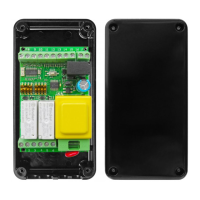
START-S1XL
Operating Guide
1 2 3 4 5 6 7 8 9 10 11 12
L1 L2 L3
DIP
6,5cm
3,8cm
Thisisafreeprogramforaspecicadressinthecontrolunit.Itispossible
to install no.63 START S1Xl in the same BUS-DATA line It is not possible to
install in the same installation control units with the same ID.
7 ConnectionoftheBUS DATA SYSTEM
The control unit has a bi-directional BUS DATA with EB Protocol
ThereisaMASTERofthesamecategoryavailableorfromakeyboard.Itissufcienttogiveanactivation
ordeactivationcommandforlighttoinsertthecontrolunitinaBUSDATASySTEM,thethecontrolunitwill
bemanagedfromaMASTERoraCONTROLdevice.WesuggesttoreadthemanualoftheMASTERor
fromthecontroldevice.
ON
DIP A
DIP B
+ Alimentaz. 12 Vdc/Vac
- Alimentaz. 12 Vdc/Vac
- BUS-DATA
+ BUS-DATA
BUS L2
Connectaresistanceof 10K
between the terminal board
no. 11 and 12 fromofthe
modul BUS L2
11 12
Thisisanexampleofaninstallationof3rollingshutters,connectedwithaBusSystem,controlledfrombut-
tonsintheinput5oftheBUSL2.Thiscanconsequentelytheopeningandtheclosingofallrollingshutter
through a single button. The module is supplied to be installed in a 503E box.
7.1 Example of the installation of BUS L2
11
15
11
15
11
15
14
11
12
14
11
12
START-S1XL
START-S1XL
START-S1XL
DIP A
DIP B
DIP A
DIP B
DIP A
DIP B
14
11
12
-14-

 To Next Page
 Loading...