EasyManua.ls Logo

Ebitcam EB01 series - Device Settings Overview; About Device Information

Ebitcam EB01 series
25 pages
Print Icon
To Next Page IconTo Next Page
To Previous Page IconTo Previous Page
Loading...
11
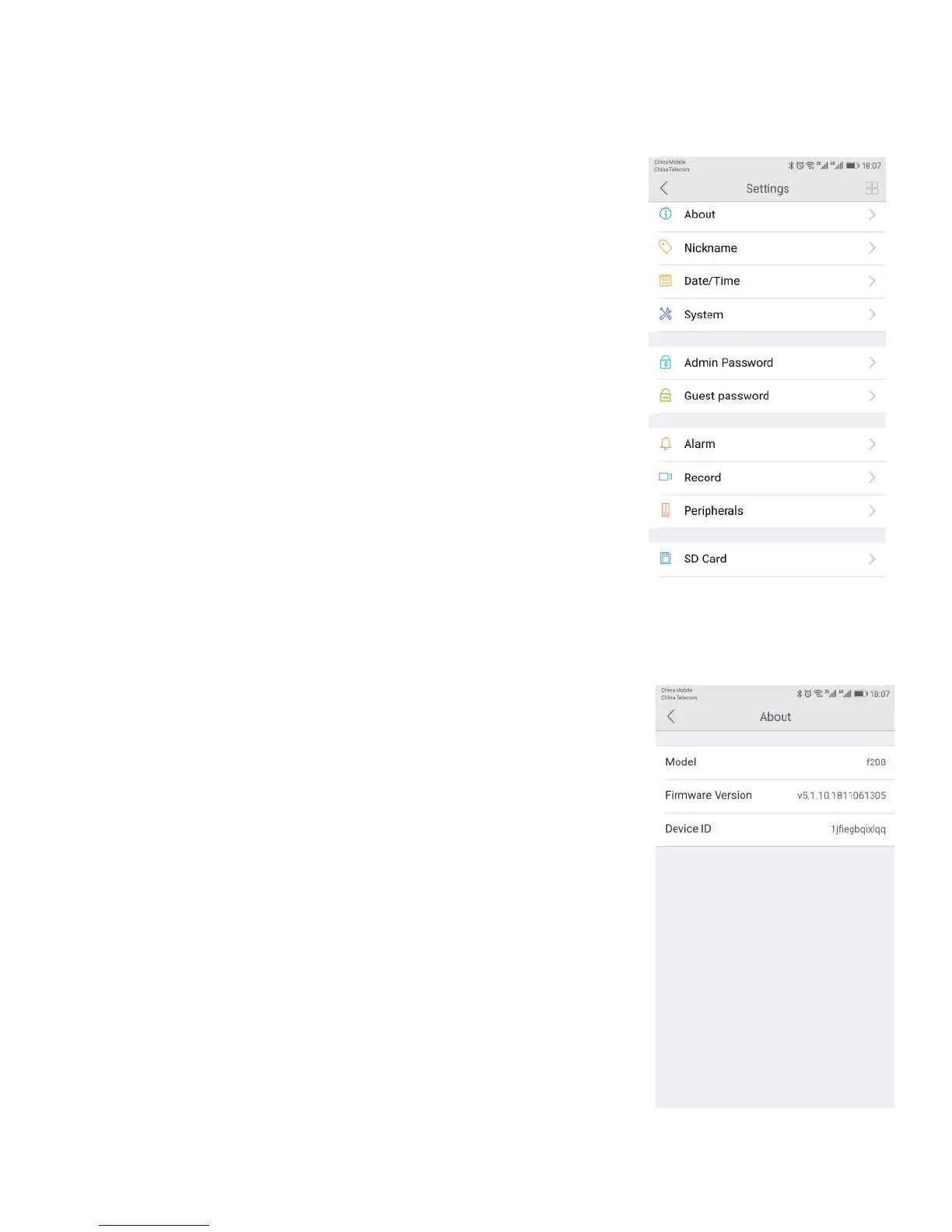
3.6 Device Settings
The Device Settings Page features a number of different tabs that are
just to the right of your cameras. You are able to switch between the
different cameras to access the settings information for each of them.
Let
s look at the long list of items under this section.
About
Nickname
Date/Time
System
Admin Password
Guest Password
Alarm
Record
Accessory
SD Card
Storage Device
Cloud storage
Network
OSD (On Screen Display)
Others
3.6.1. About
In this section, you will find information about the particular camera
that you are using.
It features several sections:
Model - Shows the model of the camera you are using.
Firmware Version - This shows the current firmware version you are
using.
Device ID - This is the identifying number for your device.