EasyManua.ls Logo

EBS 6900 - Page 12

EBS 6900
31 pages
Print Icon
To Next Page IconTo Next Page
To Previous Page IconTo Previous Page
Loading...
The BOLTMARK
®
IIseries PrinTers
Basic OPeraTing insTrucTiOns
122018/02/27#2.0EN
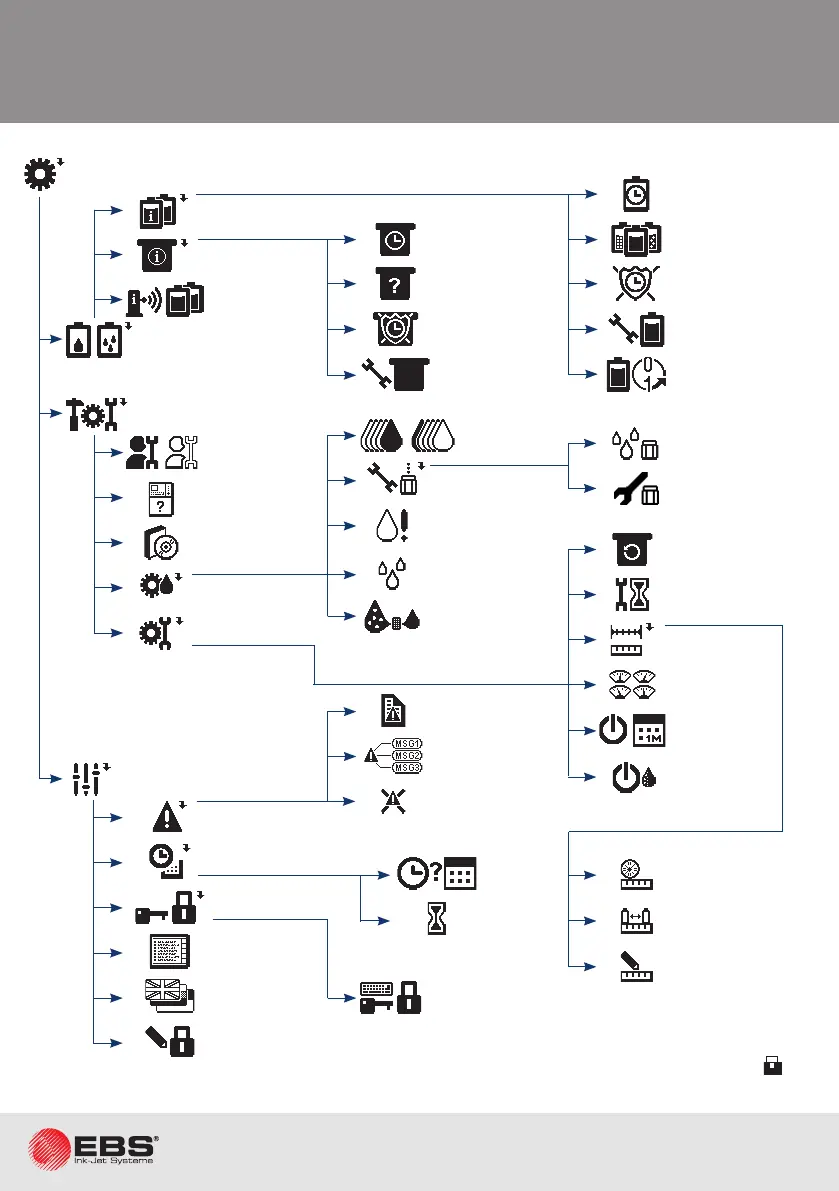
menu Structure
Nozzle service
Ink system OFF
Ink circulaon
(ltering)
Fast ink ON/ Fast
ink OFF
Solvent ON
Printer sengs
IMS version
Consumables
iModule
informaon
Bole
informaon
Number of
texts/1l
Boles
diagnoscs
Remove protec-
on me
Printer, ink,
solvent type
Operang me
iModule
diagnoscs
Remove protec-
on me
iModule type
iModule
Operang me
Service
Printer
opons
Print head service
Service funcons
Service mode ON/
Service mode OFF
Program opons
Date of next
service visit
Nozzle unclog
Printer parame-
ters control
Prepare for
monthly storage
& switch o
Thicken the ink
& switch o
SMP service tool
Two objects on
conveyer
According to
sha. data
iModule
replacement
Nozzle cleaning
Conveyor
measurement
Date and me sengs
Switch to text
user interface
Interface language
Edit/set password
Auxiliary sengs
Alarm service
Unlock printer
Display errors
Check Time &
date
Read error report
Clear error
Unlock printer using
keyboard
Acvity me
* available to OPERATOR

Related product manuals