The BOLTMARK
®
II‑series PrinTers
Basic OPeraTing insTrucTiOns
162018/02/27#2.0EN
• keyboaRd
• touch panel
Types of menu icons:
• funcons, e.g. ,
• funcon folders - the funcons are marked with , e.g. .
Addional navigaon icons:
to return to the previous menu level in working window
to go to the main screen
on funcon idencaon icon
bar
to return to the recently used menu level (from the
main screen)
on funcon idencaon icon
bar
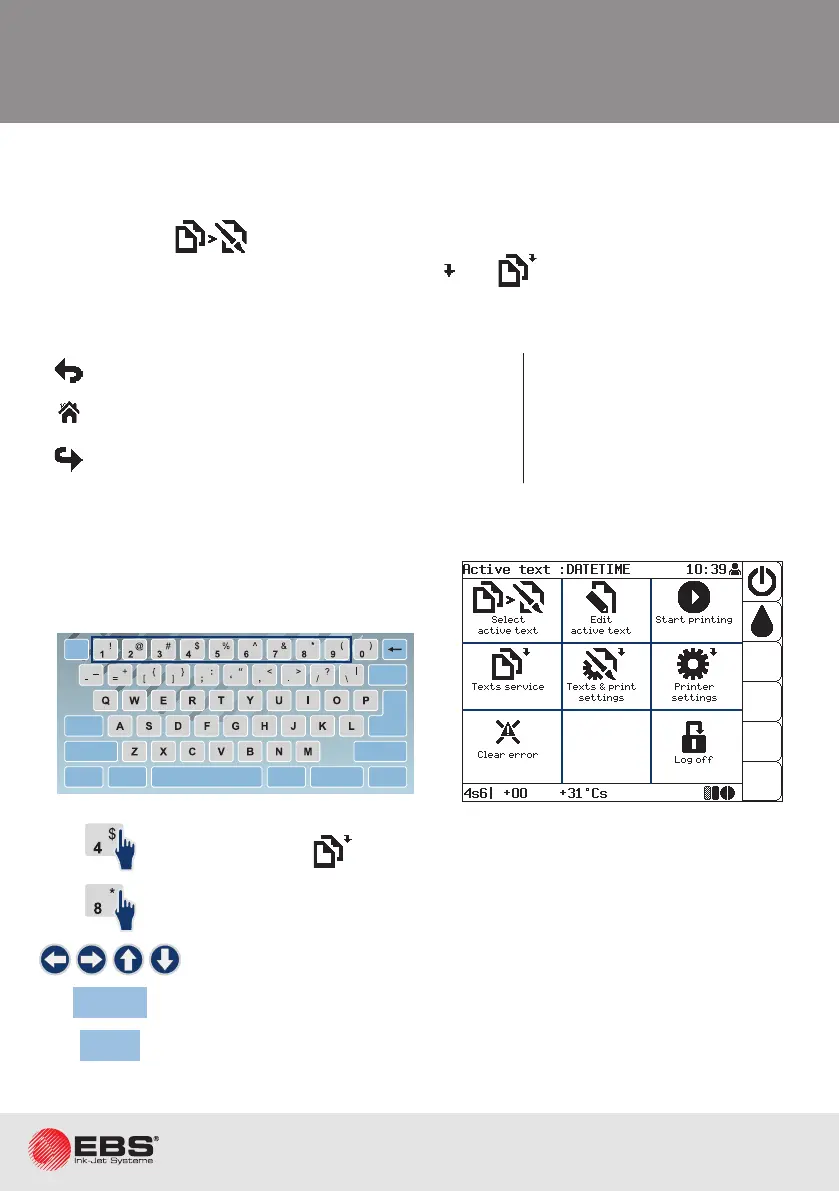
The working window is divided into 9 secons.
Every secon is associated with a keyboard digit;
the digit works as a hot key.
to open folder ,
no response - no funcon or folder in secon 8,
to move among secons, to highlight a selected secon,
Enter
to perform an operaon in the highlighted secon,
Esc
to return to the previous level.
navigation menu
COLOUR
EBS-6600
OFF
ON
INK
ON / OFF
READY
CLEAR
ALARM
ERROR
PRINT
ON / OFF
Enter
Delete Par
Shift
Space
Alt Alt
Shift
Caps
Esc
Insert
Ctrl
Enter
F5
F4
F3
F2
F6
F1
BOLTMARK
®
II
1 2
64
8
3
7
5
9



 To Next Page